Forum Activity for @isleander

Isleander
@isleander
11/22/14 07:53:24AM
560 posts

Unable to update some Discussions


Ning To Jamroom

brian:
Jamroom already tries to increase max allowed upload time (I will double check but I believe it is already done).

Unfortunately with the limits in place on your server you're not going to be able to host media of anything but very small size - JR will not be able to run FFMpeg to convert the media, and you won't be able to upload anything very large.

I have just opened an account with Arvixe (just to try it out). It has the option of automatically setting up scripts when you first sign up for an account, one such being Jamroom (as I am sure you know). I noticed straight away that the limit on the Arvixe server is 128MB. Three times as much as my other host.

I asked my current host 'why the discrepancy?'. They say I can increase the max memory if I need to. But this conflicts with their previous statement. So really I'm no clearer!

I'm currently awaiting clarification from them.
updated by @isleander: 12/29/14 09:23:54AM
Isleander
@isleander
11/22/14 05:12:11AM
560 posts

Unable to update some Discussions


Ning To Jamroom

Thanks Michael.

Host support suggest increasing max execution time, which I have now done.

Quote:
"...if you are uploading via a PHP form, then you will need to increase the max execution time to a larger number, as the script uploading the file will crash partway through due to it exceeding the max_execution_time figure."

However, 128M is their max memory allowance (allowing a 32MB file). If I increase the max memory to more than 128M, it reverts to the default allocated allowance of 24MB.
updated by @isleander: 12/29/14 09:23:54AM
Isleander
@isleander
11/21/14 03:22:06PM
560 posts

Unable to update some Discussions


Ning To Jamroom

Brian,

My host specified that 128m is the max allowed for memory. Which only gives me a 32MB file size. Apparently increasing the memory max to above 128m will cause the server to drop back to the 24MB default,

They've run a check on the server, and said there were errors. They suggest looking at the .htaccess file.

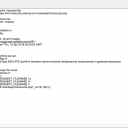
They did copy this error.
regal-network.com [Fri Nov 21 15:37:30 2014] [error] [client 81.129.244.254:56370] AH01215: sh: line 1: 22069 CPU time limit exceeded nice -n 12 /home/sites/regal-network.com/public_html/ncnorg/modules/jrCore/tools/ffmpeg -y -i "/home/sites/regal-network.com/public_html/ncnorg/data/media/1/1/jrVideo_10_video_file.avi.original.avi" -threads 1 -s 320x240 -b 200k -bt 240k -vcodec libx264 -acodec libfaac -ac 2 -ar 48000 -ab 128k "/home/sites/regal-network.com/public_html/ncnorg/data/media/1/1/jrVideo_10_video_file.avi.original.avi.m4v" > /dev/null 2> /home/sites/regal-network.com/public_html/ncnorg/data/cache/jrVideo/conversionfO21gx

Whilst I can understand some of this, it's above my station in life at present.

They also mentioned having too many internal redirects on the server, which could cause a problem. Apparently I am only permitted to have ten.

Anyway, That's about all I know at present.

I do appreciate all the help and advice you fellas have been giving, and all the time you spend trying to sort out amateurs like me (they say a little knowledge is dangerous!)


Thanks again,
Alex

=edited=

The .htaccess file looks fine to me (image attached)
Screen Shot 2014-11-21 at 23.44.28.png Screen Shot 2014-11-21 at 23.44.28.png - 84KB

updated by @isleander: 12/29/14 09:23:54AM
Isleander
@isleander
11/21/14 10:27:51AM
560 posts

Unable to update some Discussions


Ning To Jamroom

brian:
Sure - if you want to accept larger videos than 32mb, you'll need to set your php.ini settings to something much larger than 128M - say 1024M, which will get you a 256M upload limit.

https://www.jamroom.net/the-jamroom-network/documentation/problems/748/how-do-i-increase-phps-upload-limit

Let me know if that helps.

Thanks!

Yes I did that... but still having problems playing videos.
I created a new video and saved it at low rate, but it only played 1.10 minutes of 10 minutes ???

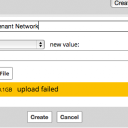
Large file never upload successfully, but always fail. Please see image.
Screen Shot 2014-11-21 at 18.42.26.png Screen Shot 2014-11-21 at 18.42.26.png - 33KB

updated by @isleander: 12/29/14 09:23:54AM
Isleander
@isleander
11/21/14 09:04:28AM
560 posts

Unable to update some Discussions


Ning To Jamroom

brian:

I'm not following here - how does the max allowed upload size make the player redundant?

Thanks!

Brian,

If the PHP Memory Limit = 128M, the max quota will be 32MB. Very few quailty video files would be smaller than 32MB. I don't think I have any that size. I suppose I could lower the quality of the files when recording/saving them to make them smaller, but that would't be a preference.

Does that make sense?

=Edit=

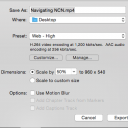
e.g. A small basic 10 minute file recorded with ScreenFlow is above 340 MB in size (the default format is mp4). For default export settings, please see image. The same low quality file is nearly 43 MB.

Screen Shot 2014-11-21 at 17.28.21.png Screen Shot 2014-11-21 at 17.28.21.png - 61KB

updated by @isleander: 12/29/14 09:23:54AM
Isleander
@isleander
11/21/14 08:10:02AM
560 posts

Unable to update some Discussions


Ning To Jamroom

This is info i received from my Host Support team.
--------
Looking at the video player I can see the flash player is streaming the video am I correct in saying that the video format is .flv and .m4v ? If this is the case I would recommend uploading your videos in .mp4 format because I have found that this format has better support across the browsers.

Would it be possible to attempt streaming a video using HTML5? I am not sure how attached you are to the flash player but you may find this easier to work with.

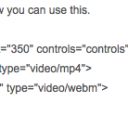
Here is an example of how you can use this. See image.

Basically what you can do here is list as many source types as you like and the one that is supported by X browser will be used for example the webm one above works in FireFox while mp4 works in IE, Chrome and Safari.

--------
=edited=
It would appear that the max memory permitted is 128M. Which gives me only 32MB Maximum. So will be unable to upload larger video files. Effectively, for me, this makes the JR video player redundant.
Screen Shot 2014-11-21 at 16.10.31.png Screen Shot 2014-11-21 at 16.10.31.png - 22KB

updated by @isleander: 12/29/14 09:23:54AM
Isleander
@isleander
11/20/14 03:02:00PM
560 posts

Unable to update some Discussions


Ning To Jamroom

brian:

Your hosting provider is the only one that can tell you that though.

Hope this helps!

OK. I will contact them, and go from there with this.
updated by @isleander: 12/29/14 09:23:54AM
Isleander
@isleander
11/20/14 02:48:25PM
560 posts

Unable to update some Discussions


Ning To Jamroom

I've deleted the PHP.ini file I created to see if that will make any difference.

I had previously upped the memory, load and time values to enable larger files - to see if that would help; but it made no difference to the problem of not playing the videos.
updated by @isleander: 12/29/14 09:23:54AM
Isleander
@isleander
11/20/14 02:12:18PM
560 posts

Unable to update some Discussions


Ning To Jamroom

I use iMovie and ScreenFlow to make recordings, but have used Quicktime and Voila "capture" to record some footage from the Internet - so could be a problem there with meta data.
updated by @isleander: 12/29/14 09:23:54AM
Isleander
@isleander
11/20/14 01:58:10PM
560 posts

Unable to update some Discussions


Ning To Jamroom

brian:

Do you host your own server or are you on someone else's hosting?


I use a hosting company. Heart Internet in the UK, and have unlimited data storage.
http://heartinternet.co.uk

Should I contact them about this problem?

What is the recommended PHP.ini settings?
updated by @isleander: 12/29/14 09:23:54AM
  46