jrAction_form in modal window like site search (jrElastic)
Design and Skin Customization
Ok, so this is what I have so far and I am using a cloned Elastic skin.
This is in the header_menu_desktop.tpl
            {if jrCore_module_is_active('jrAction')}
                {jrCore_lang skin=$_conf.jrCore_active_skin id=51 default="activity feed" assign="at"}
                <li><a onclick="atAction_modal_form()" title="{$at}">{jrCore_image image="A-T-Pencil.png" width=20 height=20 alt=$at style="margin-top:-3px"}</a></li>
            {/if}
Which triggers this js that I added to my skin js file:
function atAction_modal_form(){
$('#new_action').modal({
onOpen: function (dialog) {
dialog.overlay.fadeIn('fast', function () {
dialog.container.slideDown('fast', function () {
dialog.data.fadeIn('fast');
});
});
},
onClose: function (dialog) {
dialog.data.fadeOut('fast', function () {
dialog.container.hide('fast', function () {
dialog.overlay.fadeOut('fast', function () {
$.modal.close();
});
});
});
},
overlayClose:true
});
}
This opens the hidden form in the header.tpl
{* This is the new action form - shows as a modal window when the new action icon is clicked on *}
<div id="new_action" class="search_box" style="display:none;">
    {jrAction_form class="form_text" value=$at style="width:70%"}
    <div style="float:right;clear:both;margin-top:3px;">
        <a class="simplemodal-close">{jrCore_icon icon="close" size=20}</a>
    </div>
    <div class="clear"></div>
</div>
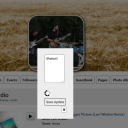
This does open the form as you can see from the screen shot, but I can not enter any text, nor does the Update button work.
Can you see where I went wrong?
updated by @the-patria-company: 02/01/16 02:20:02PM