Forum Activity for @michael

michael
@michael
12/15/16 11:50:59PM
7,832 posts

Listing featured events that occur today and in future


Using Jamroom

you are a programmer ;) ( I'm going to claim that I left that code mistake in there on purpose :) )

Glad you figured it out.
michael
@michael
12/15/16 11:49:19PM
7,832 posts

How to search member accounts?


Using Jamroom

If you add that field to the ADDITIONAL SEARCH FIELDS setting found at:
your-site.com/search/admin/global

If you say, added
profile_bio
Then updated one of your profiles biography with
something avacardo and something 
Then ran the "Rebuild Index" tool found at:
your-site.com/search/admin/tools

That new field would be searched in the search results.

From there if you're using the Data Browser tab found at:
your-site.com/profile/dashboard/browser

and searched for:
%avacardo%
You would see the profile you added the string to as the only result.

You could use this technique to add other search fields to the search results as well.
michael
@michael
12/15/16 11:32:04PM
7,832 posts

Quick Share Modal Window - item_share_modal.tpl


Design and Skin Customization

Steps I take to get the info you're wanting:

* open up PhpStorm with the jamroom codebase project open and run a search for 'item_share_modal.tpl'

That returns 3 locations where that template is used, one is a comment, the other is the birthday module, so im 95% sure the one Im after is the one in the jrAction module.

I open that search result and see this function:
function view_jrAction_share_msg($_post, $_user, $_conf)
{ jrUser_session_require_login(); jrUser_check_quota_access('jrAction'); if (!isset($_post['_1']) || !jrCore_module_is_active($_post['_1'])) { return 'error: invalid module'; } if (!isset($_post['_2']) || !jrCore_checktype($_post['_2'], 'number_nz')) { return 'error: invalid item_id'; } $_temp = $_post; $_temp['module'] = $_post['_1']; $_temp['item_id'] = (int) $_post['_2']; // Does this module have a custom template? $_temp['template'] = false; if (is_file(APP_DIR . "/modules/{$_post['_1']}/templates/item_share.tpl")) { $_temp['template'] = 'item_share.tpl'; } return jrCore_parse_template('item_share_modal.tpl', $_temp, 'jrAction'); }

At the bottom of that function is the location where $template could possibly be set, its this piece of code:
    if (is_file(APP_DIR . "/modules/{$_post['_1']}/templates/item_share.tpl")) {
        $_temp['template'] = 'item_share.tpl';
    }

That piece of code reads: "If the current module which is active from the url contains an item_share.tpl file then use that file"

So the answer to your question is: If the module being shared has provided its own template, then that is used.

--
Modules that provide their own item_share.tpl files can be found again with phpstorm. It tells us that currently only 2 modules do provide that template, they are the jrGallery module and the jrComment module.
michael
@michael
12/15/16 11:22:35PM
7,832 posts

Auto Join main chat room


Using Jamroom

Strumelia:
I just noticed something-
If I'm using my Wacom tablet pen at my desktop to delete a chat post as admin, it doesn't work on Chrome but it does on FF. But if I use my regular mouse in Chrome, it deletes the post. Go figure.

That suggest that the wacom tablet is not sending the same key-code to chrome as a mouse click when the pen is touched to the delete icon button.

3 ways to handle that:
* ask wacom to send the same key-code as a mouse click in chrome
* ask chrome to interpret wacom's different key-code in the same way as the mouse click
* figure out what key code is coming in and compensate for that issue in the jamroom module.
michael
@michael
12/15/16 11:13:13PM
7,832 posts

Mailchimp Integration


Installation and Configuration

Currently in this thread, you are asking questions and we are replying as if you are debugging the jrMailChimp module. If that is what you want to do we can keep replying as is. If you want US to debug the module, its better to offer steps to show how we can setup to see the error happening.

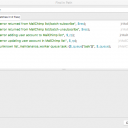
So in answer to your question: "What does the debug log capture?" its easy to find that out by running a search on the module for jrCore_logger. or just '_logger'. that will return all the locations in the code base that log something to the activity log.

In this case there are 5 locations. (screenshot)
screenshot_logged_errors.png screenshot_logged_errors.png - 62KB
michael
@michael
12/15/16 10:56:37PM
7,832 posts

Stream Pay


Using Jamroom

That info is listed in the credit log in the ACP for the admin to see. The data is not currently displayed anywhere else.
michael
@michael
12/15/16 10:50:46PM
7,832 posts

Listing featured events that occur today and in future


Using Jamroom

search2="event_date >= `$smarty.now`" 
is going to evaluate into a timestamp, so become
search2="event_date >= 1481870742"
so you need to add the number of seconds between 'now' and 'midnight'. Thats a little harder than just adding a day to now. A day is 86400 seconds.

If that is acceptable, then
{$end = $smarty.now+86400}
{jrCore_list ......... search2="event_date >= $end" ........}

updated by @michael: 12/15/16 10:51:51PM
michael
@michael
12/15/16 11:22:41AM
7,832 posts

Podcast Hosting


Using Jamroom

Not sure changing 'genre' to 'date and time' is a wise move unless you're just talking about the label and not the Form Field type. If it works and you're happy with it though, cool.

The Form Designer changes Forms. The Template Editor changes Templates. Templates are where info from the database is displayed. Forms are where data gets put INTO the database.

So ... "how can I display the Show (formerly Album) names in the menu on the profile page? " will be an alteration to a template probably, but im not sure of the exact location you're referring to. Screenshot with a circle around the location please, or a URL.
michael
@michael
12/15/16 10:57:23AM
7,832 posts

PHPstorm xdebug setup on JR Hosting


Suggestions

xdebug is not something you setup on your production server. Its something you setup on your local network or local pc.

There is an older tutorial here:

Docs: "Setting up a debugging environment"
https://www.jamroom.net/the-jamroom-network/documentation/jamroom-developers-guide/129/setting-up-a-debugging-environment

but I usually use this as the guide to setting up the server:

Guide: "High Performance Jamroom on Digital Ocean"
https://www.jamroom.net/brian/documentation/guides/1188/high-performance-jamroom-on-digitalocean

So if you have an old pc that you can connect to your local network, turn that into a server. Thats the best way I reckon. If you dont have that install a server in the same pc you're running PhpStorm on, that works too.
  306