Forum Activity for @michael

michael
@michael
10/16/15 11:57:53PM
7,832 posts

more repeating weirdness added to urls


Design and Skin Customization

ok, found something irregular:
* When I click on the UPDATE TOPIC for the post with the three dots in it "..." what I see is this:

See the 2 screenshots. What I expected to see when I opened the edit view for that post was that the [ quote ] parts would be there, what is there instead seams to be directly input HTML. Not sure how that got there, but that being there is the root cause of the wrong URL.

On my site, the Media URL Scanner does not convert the urls that are inside the quote.
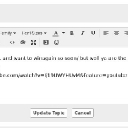
screenshot_expected.jpg screenshot_expected.jpg - 46KB
michael
@michael
10/16/15 11:30:56PM
7,832 posts

more repeating weirdness added to urls


Design and Skin Customization

The problem looks to be those three dots there (screenshot).

Just need to figure out what is getting them there.
screenshot_dots.png screenshot_dots.png - 354KB
michael
@michael
10/16/15 11:16:30PM
7,832 posts

more repeating weirdness added to urls


Design and Skin Customization

They've found the source in that code:
<a href="a_player" target="_blank">
But not indicated the URL where that is coming out at. It doesn't look like a default skin thing, is it something you've added?

---
guess:
It looks like this url is what @sam-newton posted:
http://www.youtube.com/watch?v=Ij19UWYHUvM&feature=youtube_gdata_player
That looks like its being cut off, perhaps by URL Scanner to
http://www.youtube.com/watch?v=Ij19UWYHUvM&feature=youtube_gdat
and leaving the remainder of that
a_player
being set into its own new URL. I'll check that out. Thanks.
michael
@michael
10/16/15 11:07:16PM
7,832 posts

Question regarding text editor and quoting


Using Jamroom

Strumelia:...it's in your active skin's jrCore_form_editor template....
It is for strumelia, because she's over-riding it with her skin.

#1
Look for it in these places in this order:
ACP -> CORE -> SYSTEM CORE -> TEMPLATES -> form_editor.tpl

That's the most default place for it to be and where you would over-ride it if you like over-riding things via the ACP.

#2
If your more into skins, then its possible that you have a file in your skin that over-rides it (like stumelia does), in which case you can alter it via that file if you like working in the filesystem instead at:
/skins/(YOUR-SKIN)/jrCore_form_editor.tpl

#3
And the last place to look for it would be if its been over-ridden by the skin, BUT then you have over-riden that over-ride in the ACP you might look for it at:
ACP -> SKINS -> YOUR SKIN -> TEMPLATES -> jrCore_form_editor.tpl
michael
@michael
10/16/15 10:59:43PM
7,832 posts

"Attach file" to posts not working


Using Jamroom

First guess: The default template got updated, but your using a custom template, so something needs to be added in to make it show.

But that's just a hunch, I'll go test to see if its working on a default system.
michael
@michael
10/16/15 10:57:45PM
7,832 posts

Where Do I find how to:


Using Jamroom

This part:
{jrCore_image image="468x60_banner.png" alt="486x60 Ad" title="Get Jamroom5!" class="img_scale" style="max-width:468px;max-height:60px;"}
is the bit that is showing that advert by the looks of things (its not one of our skins, its n8flex's just judging by the name)

If you remove that part, the advert should disappear.
michael
@michael
10/16/15 10:52:03PM
7,832 posts

Are there still lofi and hifi audio options in JR5?


Installation and Configuration

One of the challenges addressed with JR5 was all the new forms of devices, so now by default each song is run through a system similar to the old "conversion server" to create several formats of the audio and video files so there will be one form that is playable on any of the new devices.

So there is no lofi/hifi anymore (which was for people with slower connections) but there should always be a format of the song that can play on all devices.

If its for sale, then the original format of the song is the one that gets delivered.
michael
@michael
10/14/15 09:49:06PM
7,832 posts

files in groups - transfer issues


Ning To Jamroom

The question is really broad, best to check with Paul who did the import for you and focus on a specific thing, that way you and he can check what's missing and see if there is a way to get it.
  477