Forum Activity for @michael

michael
@michael
02/03/14 07:43:39PM
7,832 posts

Subscription Browser Help


Installation and Configuration

If im understanding correctly, you want a page that shows all the subscriptions that are paid for subscriptions but not the subscriptions that are free.

You want to have the free subscriptions but just not show that they are there. correct?

If so, the /subscription_browser isn't going to work.

You could use the site.com/foxycart/subscriptions location as that is template driven.

Then over-ride the current template found at:
/modules/jrFoxyCart/templates/subscriptions.tpl

using the normal over-ride system:

"Altering a Modules Template"
https://www.jamroom.net/the-jamroom-network/documentation/development/1051/altering-a-modules-template

Then put in a check to make sure the subscription has a price set before allowing it to be displayed.
michael
@michael
02/03/14 07:31:53PM
7,832 posts

Private channel license invite


Using Jamroom

SteveX:
I've created a license for a module still in a private channel and sent nixt an invite, but the module can't be found in the marketplace. I had assumed that it would appear, but I might not be understanding how this is supposed to work.

nixt:
Actually I have received the licence but it doesn't appear in my marketplace and when I try to download it from the JR website, I get this message : "Error: Downloads of Private Channel marketplace items are blocked"

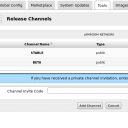
Nixt might need to go into the TOOLS tab of his marketplace. There there is a button marked "Release Channels" which takes you to:
site.com/marketplace/release_channels

in there there is a message that reads "If you have received a private channel invitation, enter the invite code below" and a box to enter it into.

There is also an existing channel next to STABLE that is labeled BETA with a button marked "Make This Channel Active".

Try those options.

--edit--
(Looks like this screenshot)
screenshot_marketplace_channels.png screenshot_marketplace_channels.png - 56KB

updated by @michael: 02/03/14 07:33:31PM
michael
@michael
02/03/14 06:33:24PM
7,832 posts

Subscription Browser Help


Installation and Configuration

Turnining off the subscription will remove them from that page.

Otherwise creating a new page with just the subscriptions you want to show is the way to go.
michael
@michael
02/03/14 05:58:55PM
7,832 posts

500 Error on Large Files


Jamroom Developers

500 is always an "Internal Server Error". Check the servers logs to see if you can narrow down what the actual error is.

It could be an out of memory error or something.
michael
@michael
02/03/14 01:19:16AM
7,832 posts

For @CurlsandCompany regarding music/book downloads website.


Design and Skin Customization

Hi @BillMortonPromo and @CurlsandCompany,

Regarding our conversation on twitter.

Twitter seamed a bit limited to provide a plan at, so Im going to use here to outline one possible plan for using Jamroom as a platform to create a website to sell music/book downloads.

If it was me wanting to do this, I would first look at how I wanted to set the site up.

There are a few ways to do it. Since Jamroom is a profile focused system we need to figure out how that will fit into the site that you want to create.

You could use the profile level as authors/bands and hold all the books
OR if there is only going to be you running the site, you could upload everything to a single profile then just use the front-end for displaying the items to the customers.

For what it will look like visually, you can use one of the existing skins, or pick a skin from a template selling site that you like and get that converted over to a Jamroom skin.

Another thing to think about is; are you going to allow others to upload stuff, or is it just for you.

So there are a few things you need to decide on how you want them to work before setting things up.
updated by @michael: 11/23/14 09:57:28PM
michael
@michael
02/02/14 11:20:48PM
7,832 posts

Reinstalled back up and get error - CRI: Unable to copy skins/jrProJam/index.tpl


Installation and Configuration

I cant answer that question because I don't have enough information. The reason in the post that you link to is that the web server was unable to write to that directory.

Is that the same issue on your server? If so the way to fix it is to change the permissions on the server to give apache write access to that folder.

Check your server settings in your ACP it should tell you if this is an issue or not.
michael
@michael
02/02/14 10:11:16PM
7,832 posts

Smiley's on comments


Using Jamroom

ouviste:
Michael, I can't find,

{$item.action_text|jrCore_convert_at_tags|jrAction_convert_hash_tags}

on /modules/jrAction/templates/item_list.tpl

Its already been changed.

It changed to:
{$item.action_text|jrCore_format_string:$item.profile_quota_id}

So as long as the quota is allowed smileys they will show up.

Check that that quota is allowed smileys in the:
ACP - SYSTEM CORE - QUOTA CONFIG - "Active Text Formatters" - "Allow Smileys" CHECKED.
michael
@michael
02/02/14 09:37:35PM
7,832 posts

Reinstalled back up and get error - CRI: Unable to copy skins/jrProJam/index.tpl


Installation and Configuration

You do have the jrProJam skin uploaded right?

Try going into phpmyadmin and in the settings table changing the skin back to the default jrElastic skin.
  735
