Forum Activity for @michael

michael
@michael
05/08/18 11:39:35PM
7,826 posts

auto-follow a discussion when you've posted to it


Using Jamroom

What is happening on your system with that user is that at some point they were in a quota that allowed a forum on their profile. During that period they set the notification 'Forum Updated' to 'off' then were changed into a quota that is not allowed a forum on their profile. The result is they are stuck with the 'Forum Updated' setting set to OFF.

In the next version of jrForum 2.2.6 this is fixed. The 'Forum Updated' setting no longer has impact on the watching button. Now only if all notifications are disabled will the notification watcher not be turned on.
michael
@michael
05/08/18 10:05:18PM
7,826 posts

auto-follow a discussion when you've posted to it


Using Jamroom

It looks connected to the 'Allow Profile Forum' quota setting. It shouldn't be but it seams to be. Looking more.
michael
@michael
05/06/18 06:43:06AM
7,826 posts

auto-follow a discussion when you've posted to it


Using Jamroom

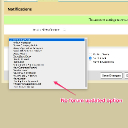
On your site strumelia for 'the member' you don't seam to have the 'Forum Updated' notification option. Its that that controls the auto follow.

Not sure why yet.
no_forum_updated.jpg no_forum_updated.jpg - 153KB
michael
@michael
05/06/18 04:03:04AM
7,826 posts

Display tag search results as panel, not as list


Suggestions

can you take a screenshot of what it is now and maybe explain more how you'd like it to look please.
michael
@michael
05/05/18 12:36:03AM
7,826 posts

auto-follow a discussion when you've posted to it


Using Jamroom

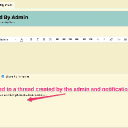
Its on and working on your site. I added a forum called TESTING and signed up as a regular user. When the regular user added a new discussion following that discussion was turned on.

When the regular user replied to a discussion created by the admin notifications were also turned on.
on.jpg on.jpg - 80KB

updated by @michael: 05/05/18 12:36:21AM
michael
@michael
05/05/18 12:10:09AM
7,826 posts

MySQL error after updating Jamroom


Jamroom Developers

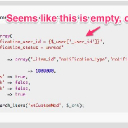
make sure that _user_id is being set, seems like it might not be there.
missing.jpg missing.jpg - 49KB
michael
@michael
05/01/18 10:37:04PM
7,826 posts

JR sites going down...


Using Jamroom

andrusito:
ok, if the server were the problem, why is there another JR site running without issues?
The key to figuring out the issue is understanding what the different is between those 2 sites.
michael
@michael
05/01/18 10:35:12PM
7,826 posts

Uploader Not Working


Installation and Configuration

Fantastic! well done :)
michael
@michael
04/30/18 11:38:36PM
7,826 posts

Uploader Not Working


Installation and Configuration

Need to figure out what that error is. Check your servers error logs for clues. anything like:
* "500 internal server error"
* "permission denied error"
* "file ownership permission error"

The uploaded file is not able to be written to the servers hard disk.
michael
@michael
04/30/18 11:35:56PM
7,826 posts

JR sites going down...


Using Jamroom

andrusito:thanks, but if the guys behind JR cannot figure it out, I hardly believe I can.
Our recommended way to setup a server is in this guide:
https://www.jamroom.net/brian/documentation/guides

it is of course not the only way to setup a server. Your server is setup differently and something in there is causing issues. We can offer suggestions but cant really debug your server for you. :( . Probably your server company doesn't want to do that for you either so it kind of is left up to you like it or not unfortunately.
  131