Forum Activity for @brian

brian
@brian
04/04/19 04:37:04PM
10,154 posts

How to un-follow discussions for a user that leaves the Group


Using Jamroom

lornawebber:My understanding is that a user can be following discussions in a Group of which they are not a member, and they will get update notifications for that discussion.

That does not seem right - a user should never be notified of new discussions within a group they are not a member of - I consider that a security issue and will check it out if that is the case.

Quote:When a member leaves a group, it's usually because they don't want any more notifications from that particular group. Is there a way of automatically undoing all the discussion Follows for a member, when that member leaves the group?

Yes - a user should not receive notifications for a group they are not a member of - I'll get a tracker open on that so we can check it out.
updated by @brian: 04/04/19 04:37:28PM
brian
@brian
04/04/19 04:35:38PM
10,154 posts

GEDCOM Will Not Import


Genosis

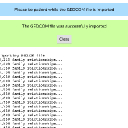
Paul E Hendee:I tried a smaller file thinking maybe that would help. Attached is a screenshot of the Import Window as I had it set, with failure message.

OK you're not even making it to the actual import process - that is just the file upload. Make sure the jamroom_dir/data/cache directory (and sub directories) are writable by the web user - that is where the file is uploaded and temp stored.

Let me know if that helps.
brian
@brian
04/04/19 01:45:03PM
10,154 posts

GEDCOM Will Not Import


Genosis

I had no problems importing your GEDCOM file - it all worked as it should. Make sure when you are importing that you UNCHECK the options:

Import Media
Save Media Space
Sync Profiles

Those options are for importing a GEDCOM file that has been exported from another Genosis site. If that still does not work, the I suspect your hosting provider has "locked down" the amount of memory a single PHP process can consume - importing GEDCOM can take up quite a bit of memory. So contact them and see if they can tell you if they have locked down the PHP memory or file access.

Let me know if that helps.

Thanks!
20190404-134151.jpg 20190404-134151.jpg - 361KB
brian
@brian
04/04/19 01:21:49PM
10,154 posts

New tech for Facebook Players?


Installation and Configuration

Thanks for the followup - I was going to post that they have "locked out" indie players unfortunately. If you're not willing to give Facebook $millions$ then they don't even want to deal with you.
updated by @brian: 04/04/19 01:21:55PM
brian
@brian
04/04/19 01:20:06PM
10,154 posts

Admin Export Images from Gallery


Using Jamroom

SoftDesigns:Since this thread is going on five days without being resolved, we will go ahead and put in a support ticket...

We've been short staffed here for the last 1.5 weeks - I've been out of town and so has Michael.

If it shows as being configured, my guess is you're using a REALLY old version of a custom gallery template - the buttons at that location are controlled by the core now - not a template, so as long as you reset caches it should show if enabled.

You also need to make sure the ACP -> Profiles -> Image Galleries - Global Config -> "Allow Original Download" is CHECKED.

Let me know if that helps.
brian
@brian
04/04/19 01:17:31PM
10,154 posts

GEDCOM Will Not Import


Genosis

Thanks for posting the GEDCOM file - I will check it out and see if I can spot what's up. I see it's only 1.4mb - I have no idea why it shows "5 Gigs" - that's not right.

Thanks!
brian
@brian
03/25/19 11:49:34AM
10,154 posts

Two Questions About Documentation Module


Using Jamroom

Ceri:Did anyone get a chance to look in to this yet?

I tested this and don't see any issue - make sure and place:

{jrProfile_disable_module_tabs}

At the top of the doc_section_header.tpl file.

Let me know if that helps.
brian
@brian
03/17/19 01:39:51PM
10,154 posts

Mobile post editor problem


Using Jamroom

lornawebber:Is it possible to default to the normal comment editor, instead of the small-screen editor, when on mobile devices? Is there an option for that?

No - the "normal" editor has never been enabled on mobile devices. Previous to Jamroom 6.1.6 (when the mobile editor was first introduced) mobile devices would see just a simple textarea - no editor. The problem with that is that if you created a post on a desktop (for example) and then came back later to edit it on a mobile device, then you would just see the raw HTML in the texraea. This of course caused issues. With Jamroom Core 6.1.6 the TinyMCE editor (which Jamroom uses) included a new beta mobile editor, and that is what has been enabled since then.

I'm not sure if it will function on the mobile device but if you want to FORCE all devices to use the standard editor (which again is NOT made for mobile devices and is not likely to look right) you can edit the "form_editor.tpl" file in the System Core module (templates tab) and remove these lines (13 - 15):

    {if jrCore_is_mobile_device() && !jrCore_is_tablet_device()}
    mobile: { theme: 'mobile' },
    {/if}

Save, click the enabled checkbox and reset caches.

I'm not 100% sure that will force the "normal" editor on mobile phones, but that is how it is controlled. I would be prepared for the regular editor to have significant size issues on mobile phones, however, so I would make sure and test that thoroughly.
brian
@brian
03/17/19 01:04:17PM
10,154 posts

BUG - Profile Avatar Looks Terrible


Using Jamroom

Re-reading my follow up here, and I didn't really post any possible "solutions" - sorry about that.

1) The easiest would be to simply upload a larger version of the profile image for that profile
2) You could customize your profile page and add a template conditional where if the image width (or height) is UNDER a certain size, then simply show it smaller (maybe center it, etc). The only issue with this approach is that your profiles may not have a uniform appearance.

I also will add that Google+ is going "out of business" and I would not be surprised at all that they are no longer offering hi-res versions of images for social signup - they probably turned those off as a way to save bandwidth and money.
brian
@brian
03/17/19 12:22:09PM
10,154 posts

site no longer sending important emails (beta issue?)


Using Jamroom

Those are not emails being sent - that's a remote site trying to connect to your SMTP server for "relaying" and being denied. I am not familiar with how your email is setup, so that's something you will need to contact your hosting provider to assist with - it's not really something we're going to assist with here in the forum.

Thanks!
  35