How exactly does "Enable Full Text Search" work?
Using Jamroom
researchcooperative:
When I searched for "search module" in the jamroom marketplace, nothing came up until I tried the Installed tab. Then I could learn that it is already installed by default as part of jamroom core.
However, in ACP, no search module appears as an obvious, distinct module. What we see when we look at the "Core" are:
1. Marketplace,
2. Support Center,
3. System Core,
4. System Tips.
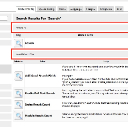
To find the search module components I did a search on "search" in the search box at top of the ACP module menu, and was rewarded with a list of four modules each dealing with a different aspect of the search system:
1. Additional Search Fields
2. Enable Full Text Search
3. Index Result Count
4. Module Result Count
When you search inside the ACP, 3 areas are searched:
1) Module names - in this case you will see "search" is listed as a module if you search for "search"
2) Global Config items - this will find the word "search" in Global Config options
3) Tools - if there was a tool that had "search" in it's name, you would see it as well.
I've outlined in my screenshot what you will see - I think it is intuitive and am not sure how to make it more clear, but feedback is welcome.
Thanks!
updated by @brian: 04/16/15 12:21:49PM