Forum Activity for @brian

brian
@brian
09/05/14 01:27:46PM
10,169 posts

Profile User name Causes Errors for Events


Using Jamroom

dkmowbray:Hi
Im using jamroom as a single artist/band,the admin user name was "anti-social"
i changed it to "antisocial" and now the events link and gallery links in the menu fail because they still try to point to the events page for "anti-social" but that name does not exist anymore,ive tried resetting caches etc to no avail,
im probably doing something wrong,could you guide me in the right direction please?
thanks

Do you have a link to the page you are seeing this on?

Thanks!
brian
@brian
09/05/14 09:14:04AM
10,169 posts

Jamroom Core 5.2.9 - update to Tiny MCE 4


Announcements

If you'd like to add that button, you can modify the "form_editor.tpl" file in the system core and add that in as outlined in the StackOverflow question Michael linked to.

Hope this helps!
brian
@brian
09/05/14 09:12:40AM
10,169 posts

Arrange Blogs


Using Jamroom

The solution to this is as I outlined above. The other suggestions on this thread are not going to work for what you want.

Thanks!
brian
@brian
09/05/14 09:11:57AM
10,169 posts

Help on PJ News


Using Jamroom

Dazed:hey Michael - Pretty much everything is in this post.

Readers Digest version:
Modified site_news and index to be "in" vs "=" on the blog call for category "News".
Changed the Global values for "Blog Profile" to include admin plus a few other users.
Then post as an admin and one of the users.
on the index page click the comments to add a comment for the admin
result - comment box not visible
add a comment as a user
result - comment box visible
expected result - all users should be able to reply to a post from admin or user in the "News" category

Do you have a link to the comment page? Comments needs to be located on the item's detail page - if you are instead linking to a special "view this news entry" page where you are trying to add the comments, it may not work properly.

Thanks!
brian
@brian
09/04/14 02:31:39PM
10,169 posts

Changing the background image


Design and Skin Customization

Yeah it's hard to specifically say what classes and stuff you need to change - that's why I recommended Firefox:

1) Load your site in Firefox
2) Click on "Tools" -> "Web Developer" -> "Toggle Tools"
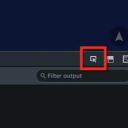
3) When that is up, click on the small arrow-screen icon on the right (see my image)
4) Whatever you click on, you will see the classes in the lower right - you can turn them on/off to see what is affecting your page.

Hope this helps!
Voila_Capture 2014-09-04_02-31-17_PM.jpg Voila_Capture 2014-09-04_02-31-17_PM.jpg - 10KB

updated by @brian: 09/04/14 02:31:51PM
brian
@brian
09/04/14 08:54:19AM
10,169 posts

Where Is the "your_callback_uri" for oneall


Design and Skin Customization

Ekwe:Trying to embed this on another html page of another time to connect with our jamroom. Thanks

You will want to consult the OneAll documentation if you are trying to set this up on your own inside a template (i.e. outside the module).

Thanks!
brian
@brian
09/03/14 02:05:45PM
10,169 posts

Changing the background image


Design and Skin Customization

You will want to add the background image to the html tag in your CSS, then make sure and set the background color to "transparent" for body and #wrapper:

body{
background-color:transparent;
background-image:none;
}
#wrapper{
background: transparent !important;
background-color:transparent !important}

For customizing your site make sure you are using Firefox for your browser - it has style tools in the developer tools that lets you click on an item and see the CSS classes and id's associated with the element - this saves you a ton of time trying to figure out what is involved with styling an element.

Hope this helps!
brian
@brian
09/03/14 02:02:01PM
10,169 posts

Modifying Buttons on Album Pages


Using Jamroom

Yeah - change it to this:

{if jrUser_is_admin()}
{jrCore_item_update_button module="jrAudio" profile_id=$_items.0._profile_id action="`$murl`/update_album/`$_items.0.audio_album_url`" alt="60"}
{/if}

Hope this helps!
brian
@brian
09/03/14 10:25:14AM
10,169 posts

How To Strip HTML from page view


Design and Skin Customization

Ekwe:Thankies! You rock

No problem - glad that worked for you ;)
brian
@brian
09/03/14 06:52:50AM
10,169 posts

How To Strip HTML from page view


Design and Skin Customization

Ekwe:Put in this code, but not working

- {$profile_bio|jrCore_format_string:$profile_quota_id:false:"html"|truncate:300:"...":false}

Yeah - that's not going to work since you're not stripping anything at all. Use this:

{$profile_bio|jrCore_format_string:$profile_quota_id|jrCore_strip_html|truncate:300:"...":false}

Hope this helps!
  664
