Forum Activity for @strumelia

Strumelia
@strumelia
12/16/15 11:33:28AM
3,605 posts

where/how to edit old Ning profile ANSWERS ?


Using Jamroom

D'OHHH... I think I knew that! ...once long ago....

If my damn cat hadn't woken me up all night long, I might have had the brain clarity to figure this out today by myself. grrr....

Thanks paul, no wonder I couldn't find it! (duh)

updated by @strumelia: 12/16/15 11:34:46AM
Strumelia
@strumelia
12/16/15 11:07:39AM
3,605 posts

where/how to edit old Ning profile ANSWERS ?


Using Jamroom

Interesting, Paul-
When I'm logged in as a regular member, I can get to those answers and edit them, under my 'Account' tab in Settings.
But as Admin Strumelia, I don't get those fields at all in my Account Tab....I only get the secret security questions/answers there. but not the ones showing on my own profile in the screenshot. Hence my confusion. Odd.

But at least I can now tell the member where they can go to edit theirs. Thanks
updated by @strumelia: 12/16/15 11:07:55AM
Strumelia
@strumelia
12/16/15 09:53:52AM
3,605 posts

where/how to edit old Ning profile ANSWERS ?


Using Jamroom

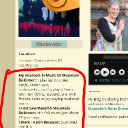
See screenshot. I don't want to eliminate the old ning signup profile questions for all my imported members. I'm wanting to know if there is a way for me to EDIT the answers of a specific member- they are asking me if they can change/edit what they had written in about themselves long ago on Ning when they joined. I know maybe THEY cannot edit this...but is there a place where *I* can edit it for them, to update it to reflect changes over time that they want updated? (NOT their location, which we know how to adjust)

See the stuff I've circled in red, that shows publicly on their profile page. Thanks


strumelia.jpg strumelia.jpg - 387KB

updated by @strumelia: 03/16/16 11:56:03PM
Strumelia
@strumelia
12/16/15 08:54:06AM
3,605 posts

Lost comments


Using Jamroom

Yes, it's normal. This merely shows that the 'ghost' "@" profile member in groups should no longer be there listed as a group member...since the user ID# gap shows that they are no longer site members. Yet they remain listed in the page of Group members.
updated by @strumelia: 12/16/15 08:54:36AM
Strumelia
@strumelia
12/16/15 07:21:49AM
3,605 posts

tweak the Like/Dislike module


Using Jamroom

This is still happening, and causing a problem.

Member Robert Schuler this morning 'Liked' my Forums discussion which is located here on my site:
http://fotmd.com/forums/forum/for-saleinstruments-music-items-cds-learning-materials-or-wanted-to-buy/18959/new-fotmd-main-page-slideshow-banner-ads
(it's a thread telling folks about buying slider ads on my site, so I really want folks to be able to click to it if someone 'likes' it)

I am subscribed to that thread, so I just received an email notification with this:
------
User 'robert schuler' has liked "NEW!- Fotmd Main Page slideshow banner ads!"

http://email.fotmd.com/c/eJxFTsEKwyAU-5p6s6jVWg8edtl_POdzFaoWdfT3Jz1sEEgISYi3IDk4Ei3nyGRgL8E2s3iUUm9hFVIqGQxTHCbJQunJz6-SyG5X4ZhWRqMA7hYFXmj0KAwgMr9CIIfdez-n5TGJ58CvO3Tr9ZPwiHD7Qw_mm1FmcMaL3lmaIGZ6whtpO6LHtpeLOsgZKwXfSLX_mXENYj1LzH3O2L-Fj0Qy
-----------
But clicking on that link in the email only takes me to here:
http://fotmd.com/strumelia/forum/18959/new-fotmd-main-page-slideshow-banner-ads
(Not Found)

Likewise, in the Main Page Activity feed, where it shows that Robert Liked that discussion, clicking on the link there again takes people to:
http://fotmd.com/strumelia/forum/18959
(again, "Not Found")

--> Paul, The problem is-
the 'Liked' links for forum discussions in both notifications and on the Activity Feed...are taking people to discussion urls within: fotmd.com/strumelia/forum/ ...instead of properly taking them to the discussion urls within: fotmd.com/forums/forum/


updated by @strumelia: 12/16/15 07:22:54AM
Strumelia
@strumelia
12/16/15 07:02:38AM
3,605 posts

tweak the Like/Dislike module


Using Jamroom

Paul- on your site, are your Forums housed within an admin profile you created for forums, like my site is?
Strumelia
@strumelia
12/15/15 03:25:16PM
3,605 posts

Lost comments


Using Jamroom

Ok, so I found a clue:
There are NO blank profile fields in my User Accounts Browser.
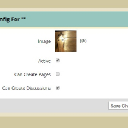
HOWEVER... when I go to a GROUP that has a "@" profile amongst its members, I can click on that little avatar and the URL I got for one was:
http://fotmd.com/group/user_config/group_id=5/user_id=1090

So...the user ID # is 1090, and I was able to see that my user numbers go from 1089 right to 1091...with no #1090 member. so....Presumably it is a member who has left my site or has been deleted.

Here is their Group 'url':

I should mention that I am only seeing these @ members in the Groups Member lists.
Group Config.jpg Group Config.jpg - 31KB

updated by @strumelia: 12/15/15 03:26:42PM
Strumelia
@strumelia
12/15/15 01:53:34PM
3,605 posts

Lost comments


Using Jamroom

dim:
@strumelia,
I think you have the same problem.
Just check out his "profile name" in yoursite/user/browser

How am I supposed to FIND their profile name in the user browser, when clicking on their "@" only takes me to my site index page? I can't find what their 'actual' identity might be. (see my previous screenshot, above)
updated by @strumelia: 12/15/15 01:54:39PM
Strumelia
@strumelia
12/15/15 11:22:38AM
3,605 posts

tweak the Like/Dislike module


Using Jamroom

Yes- Paul, when you are on my Home page and looking in the activity feed- the two entries for "The Member" having liked two different discussions, titled: "The Drifting Thread", and "We can now Like Stuff!". If you click on either of those two activity feed entries, you;ll get the page not found.

So far, no other examples of noon-admin members liking forum discussions...but that is two examples from using my test regular member.

--> when im logged in as admin, i have no truble clicking to my fellow admins' liked GROUP discussions from the activity feed- so I think it has to do with forum discussions only.

I have to go out for a couple hours right now...back later. Thanks!


updated by @strumelia: 12/15/15 11:25:49AM
  172