Forum Activity for @douglas

douglas
@douglas
03/11/14 03:02:57PM
2,808 posts

Featured member / artist not showing


Using Jamroom

The ProJam templates have been updated in the Marketplace to fix both the Today's Featured Artist and Member, you'll want to get the code from them to fix your custom templates.
douglas
@douglas
03/11/14 09:20:04AM
2,808 posts

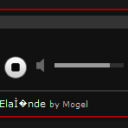
Ascii Characters showing in Media player listing


Using Jamroom

I'm seeing entities in the player on the page for this link:
http://www.punkbandpromotions.com/mogel/audio/1399/05-elandes-elande
punksite_issue.jpg punksite_issue.jpg - 32KB

updated by @douglas: 03/11/14 09:20:24AM
douglas
@douglas
03/11/14 08:46:46AM
2,808 posts

Translations for Nova Skin


Tips and Tricks

I do a separate search on Google for the language code and the Country code. I got nl for the language and NL for the Country.
douglas
@douglas
03/11/14 08:13:49AM
2,808 posts

Translations for Nova Skin


Tips and Tricks

BTW, your dutch language file should be named nl-NL.php
douglas
@douglas
03/11/14 08:11:59AM
2,808 posts

Translations for Nova Skin


Tips and Tricks

I've got the Marketplace updated with both of these languages.

Thanks!
douglas
@douglas
03/11/14 08:08:21AM
2,808 posts

Tag Cloud Not Resizing


Design and Skin Customization

According to the include.php it looks like it is set to 500
douglas
@douglas
03/11/14 08:05:36AM
2,808 posts

Tag Cloud Not Resizing


Design and Skin Customization

Create more tags to show more... there is a default limit, set at 500, but you can also add a limit parameter to the tag cloud function.

{jrTags_cloud limit="100" assign="tag_cloud"}
douglas
@douglas
03/11/14 07:27:34AM
2,808 posts

Tag Cloud Not Resizing


Design and Skin Customization

In the template, do a check for the $selected variable and have two JS sections...

{if issest($selected) && $selected == 'home'}
new JS code here...
{else}
original JS code here...
{/if}
douglas
@douglas
03/11/14 07:03:54AM
2,808 posts

Tag Cloud Not Resizing


Design and Skin Customization

Yeah, it is hard coded in the template for the module.

You can create a jrTags_tag_cloud.tpl for your skin directory and copy the code from the modules/jrTags/templates/tag_cloud.tpl file and change the height that way.


Hope this helps,
Douglas
  237