Forum Activity for @douglas

douglas
@douglas
06/12/17 05:05:43AM
2,812 posts

Videos Not Playing on Desktop - Video Pro Skin


Installation and Configuration

What is the URL to the site they are not playing on?

Alos, which browser are you using?

Thanks!
douglas
@douglas
06/10/17 06:58:19AM
2,812 posts

After switching nameservers over to Jamroom for hosting


Jamroom Hosting

Strumelia:
OK, I understand about the {literal} wrapping. :)
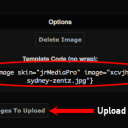
One last question, about the .jpgs in the original html page- wouldn't i have to bring the image files referenced in the html code over to my jr server? Or would that be done automatically? If I have to manually bring the images over, where and how would I put them so as to show up in the new page? thanks!

You can upload your new images via your skins "Images" tab, after uploading the image, you'll see the code you need to use to show the image. See attachment...

Hope this helps!
Screen Shot 2017-06-10 at 8.50.48 AM.png Screen Shot 2017-06-10 at 8.50.48 AM.png - 45KB
douglas
@douglas
05/31/17 05:40:15AM
2,812 posts

How to add YouTube to the VideoPro skin?


Design and Skin Customization

My guess would be that the templates used for the jrCore_list functions are not setup for YouTube but rather uploaded Videos.

You'll want to modify the templates used by the jrCore_list functions to work with the YouTube module. ie. index_item_1.tpl etc.

Hope this helps!
douglas
@douglas
05/27/17 06:46:52AM
2,812 posts

How to re-activate archived profile ?


Using Jamroom

Jamroom 4 does not have a recycle bin, and we don't support Jamroom 4 anymore either.

Have you considered upgrading to the latest Jamroom version?

If you need to get any data/info back for your Jamroom 4 install, you'll most likely have to get your hosting provider to restore your site with a backup from a point before the profile was deleted.

Hope this helps!
updated by @douglas: 05/27/17 06:47:17AM
douglas
@douglas
05/24/17 07:58:41AM
2,812 posts

How to add items to the 'user dropdown' menu that members see under username after login?


Using Jamroom

If you used the custom form module to create your form then your custom form will have an URL like form/name_of_custom_form.

That would be the URL you would want to use.

Hope this helps!
douglas
@douglas
05/23/17 06:13:35AM
2,812 posts

what is difference Pages with Blog


Using Jamroom

Hello,

Here are the docs on the Page and Blog modules...

Page Module:
https://www.jamroom.net/the-jamroom-network/documentation/modules/2866/page-creator

Blog Module:
https://www.jamroom.net/the-jamroom-network/documentation/modules/2856/profile-blog

To disable one of those modules, just got to the modules info tab in your ACP (Admin Control Panel).

Page Info Tab:
yoursite.com/page/admin/info

Blog Info Tab:
yoursite.com/blog/admin/info

and uncheck the "Module Active" check box and save changes.

Hope this helps!
douglas
@douglas
05/22/17 06:39:20AM
2,812 posts

How to add items to the 'user dropdown' menu that members see under username after login?


Using Jamroom

You can also use the User Menu Editor found in your ACP > Core > System Core > Tools.

Hope this helps!
douglas
@douglas
05/13/17 11:13:11AM
2,812 posts

Question about HTTPS images


Design and Skin Customization

Are you running the jrCore 6.1.0b2 version or are you still on 6.0.7?

Is your Feed module up to date?

I'm not seeing an issue with RSS Feeds on my SSL enabled dev site, could be already fixed.

What is the URL you are using for the RSS Feed?

Thanks!
douglas
@douglas
05/11/17 01:36:39PM
2,812 posts

Question about HTTPS images


Design and Skin Customization

In your ACP > Users > Users > Global Config > Site Settings, check the Create SSL URL checkbox and save your settings, then reset your caches.

Hope this helps!
douglas
@douglas
05/05/17 06:46:50AM
2,812 posts

How to disable register with email verification


Installation and Configuration

resif:
How to disable register with email verification

Go to your ACP > Users > Users > Quota Config
/user/admin/quota

and change to the quota you want to modify by selecting it from the "Selected Quota" drop down, then change the "Signup Method" for that quota and "Save Changes".

Hope this helps!
  60