Forum Activity for @michael

michael
@michael
01/14/18 12:42:17PM
7,823 posts

Helping my members see their 'pending' Followers


Using Jamroom

yes. Give it a try, if you get too frustrated, just say.
michael
@michael
01/14/18 11:11:56AM
7,823 posts

daily limits


Using Jamroom

It looks like you have created a quota and named it "Visitors".

Mine looks like this:
quotas.jpg quotas.jpg - 22KB
michael
@michael
01/14/18 11:03:07AM
7,823 posts

Helping my members see their 'pending' Followers


Using Jamroom

To understand where to edit you need to put a bit of 'tracking code' in there first.

The structure you have is:
{foreach from=$_items name="loop" item="entry"}
    {if SOMETHING}
        {if SOMETHING}
            SHOW THIS THING
        { OTHERWISE}
            SHOW THIS THING
        {/if}
    { OTHERWISE}
        SHOW THIS THING
    {/if}
{/foreach}
So you have one outer if/else, then inside the first condition you have another if/else.

What you need to know is
* Where do I want the menu item to eventually output at.
* Where is that location currently

So to be able to understand that I would put some numbers in
{foreach from=$_items name="loop" item="entry"}
    {if SOMETHING}
        {if SOMETHING}
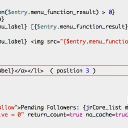
            SHOW THIS THING ( position 1 )
        { OTHERWISE}
            SHOW THIS THING ( position 2 )
        {/if}
    { OTHERWISE}
        SHOW THIS THING ( position 3 )
    {/if}
{/foreach}

Once you understand which position its in you can take the other markers away.

In that location where you know the "Private Messages" comes out you can add pauls code
{if $entry.menu_label == "Private Messages"}
        THE CUSTOM CODE HERE
{/if}

Need to know where to put it first though.
michael
@michael
01/13/18 11:21:17PM
7,823 posts

daily limits


Using Jamroom

There is no way to set a limit for visitors. Use the "Require Login To Stream" if you want to limit visitors. Then they will have to login and they will be limited by their quota setting.
expectations.jpg expectations.jpg - 41KB
michael
@michael
01/13/18 11:01:20PM
7,823 posts

Error 403 - Forbidden only on signup


Using Jamroom

Check that your server does NOT have a directory or file at /user/signup.
michael
@michael
01/13/18 10:54:33PM
7,823 posts

Helping my members see their 'pending' Followers


Using Jamroom

Yes it is possible to have it in the menu editor, but its a bit more involved. It requires you to build a module, a pretty simple module, but still a module. :)

So if you wanted to call it xxPendingFollowers. (?? or other name.... whatever you like.). The modules include.php file would look like this:

<?php
/**
 * @copyright 2018 you.
 */

// make sure we are not being called directly
defined('APP_DIR') or exit();

/**
 * meta
 */
function xxPendingFollowers_meta(){
    $_tmp = array(
        'name'        => 'Pending Followers',
        'url'         => 'pendingfollowers',
        'version'     => '1.0.0',
        'developer'   => 'You ©' . strftime('%Y'),
        'description' => 'Adds a menu item',
        'category'    => 'custom',
        'license'     => 'jcl'
    );
    return $_tmp;
}


function xxPendingFollowers_init(){
    $_tmp = array(
        'group'    => 'user',
        'label'    =>  'Pending Followers'
        'url'      => 'followers',
        'function' => 'xxPendingFollowers_pending_count'
    );
    jrCore_register_module_feature('jrCore', 'skin_menu_item', 'xxPendingFollowers', 'pending_followers_link', $_tmp);
 return true;
}

function xxPendingFollowers_pending_count($_conf, $_user)
{ $_sc = array( 'search' => array( "_user_id = {$_user['_profile_id']}", "follow_active = 0", ), 'skip_triggers' => true, 'privacy_check' => false, 'ignore_pending' => true, 'return_count' => true, 'nocache' => true, 'limit' => 100 ); $cnt = jrCore_db_search_items('jrFollowers', $_sc); if ($cnt && $cnt > 0) { return (int) $cnt; } return true; }

Something like that. The structure is just copied from the way the Private Notes module does it, so its not been tested. It is the right way though and should be correct.
updated by @michael: 01/13/18 10:56:55PM
michael
@michael
01/12/18 11:46:32PM
7,823 posts

Helping my members see their 'pending' Followers


Using Jamroom

Try this:

In your skins menu.tpl add this code:
{if jrUser_is_logged_in()}
<li><a href="{$jamroom_url}/{$_user.profile_url}/follow">Pending Followers: {jrCore_list module="jrFollower" search1="follow_profile_id = `$_user._profile_id`" search2="follow_active = 0" return_count=true no_cache=true}</a></li>
{/if}
to the bottom of that file.

The code reads: "If the user is logged in, get a list of all the followers who are not active. Just return the count of the items, do not cache."
shows_up_as.jpg shows_up_as.jpg - 38KB
michael
@michael
01/12/18 10:45:35AM
7,823 posts

site builder


Using Jamroom

Yes this is true for many skins. You can put the links back if you want to use them.

Some newer skins have default menu items in place.
michael
@michael
01/12/18 10:44:17AM
7,823 posts

SEO Group


Suggestions

A separate forum category group here?
forum_category.jpg forum_category.jpg - 82KB
michael
@michael
01/12/18 10:41:53AM
7,823 posts

Jamroom Radio


Using Jamroom

izhmel:
I created a module and paste the code in "item_index.tpl"
How do I create a check box for the different JR functions , i.e. "search="profile_quota_id = 2"" with the module I created for the admin usage , so I can just check a box genre "dub" ???

http://dubmusic.com/dubmaster/dubmusicradio

Not understanding what you've done here. When you say you created a module, could you list the steps and locations you've edited so I can understand what you've done please.
  157