Forum Activity for @michael

michael
@michael
04/21/17 05:42:11PM
7,832 posts

Firefox Warning when Logging In


Using Jamroom

Ah, yeah! ^^ douglas is right. After I have visited one of my sites that is https enabled then I visit a subdomain of that site that is on a different server and not https enabled, firefox does always try to force me to https.

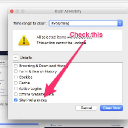
To stop that behaviour I have to do FIREFOX -> TOOLS -> HISTORY -> CLEAR RECENT HISTORY -> Site Preferences -> CLEAR NOW

(screenshot)

to get the non-https version to show again. Good catch Douglas!
clear_https.jpg clear_https.jpg - 43KB
michael
@michael
04/21/17 05:37:05PM
7,832 posts

my Premium Cometchat disappeared- related to SSL/https changes?


Using Jamroom

send me the details to login to your cometchat control panel and I'll take a look. See if anything obvious jumps out. support at jamroom dot net.
michael
@michael
04/21/17 05:34:22PM
7,832 posts

Blocking Pinterest.


Using Jamroom

You're in now. An agent will make contact. ;)
michael
@michael
04/21/17 06:17:42AM
7,832 posts

Firefox Warning when Logging In


Using Jamroom

May take some time, but not a lot. I can see your shale site is online now.
michael
@michael
04/20/17 08:08:46PM
7,832 posts

my Premium Cometchat disappeared- related to SSL/https changes?


Using Jamroom

I couldn't see it because logged out users cant see it normally. I logged in and can see the cometchat code.

That all looks right. Does cometchat have a control panel on cometchat.com? does that have an "enable SSL" option perhaps?
michael
@michael
04/20/17 07:43:45PM
7,832 posts

creating a subdomain


Using Jamroom

Same thing,

https://www.google.com/search?q=godaddy+how+do+i+setup+a+URL+redirect

Plenty of resources with step-by-step guides.
michael
@michael
04/20/17 07:39:55PM
7,832 posts

my Premium Cometchat disappeared- related to SSL/https changes?


Using Jamroom

sure it could be related. First thing to do is to use ctrl+u to view the source code of one of your pages where cometchat should be seen and see if the code to get it there is coming out or not.

I cant see anything "cometchat" in your home page.

There will be some javascript somewhere calls it into existence. Need to figure out where that should be and get it back there.
michael
@michael
04/20/17 07:35:55PM
7,832 posts

Audio Download on or off


Installation and Configuration

Adding a checkbox will make nothing different on your site. Its just a checkbox. What it will do is when you look at the details for that audio item, you will have a new variable and it will either be 'on' or 'off'.

You can use {debug} in the template you're interested in to see if that checkbox is there or not.

Docs: "{debug}"
https://www.jamroom.net/the-jamroom-network/documentation/module-developer-guide/1477/debug

In the template where the download button is shown it will be shown because of this line:
{jrCore_item_detail_buttons module="jrAudio" field="audio_file" item=$item}

You want to check the state of your checkbox, then hide/show the button from there.

Example, if you wanted to turn off the audio download button you could use this code

{jrCore_item_detail_buttons module="jrAudio" field="audio_file" item=$item exclude="jrAudio_item_download_button"}

and the button wont show, so to check the state of your checkbox first, then

{$ex_dl = ''}
{if isset($item.audio_download_checkbox) && $item.audio_download_checkbox == "off"}
   {$ex_dl = 'jrAudio_item_download_button'}
{/if}
{jrCore_item_detail_buttons module="jrAudio" field="audio_file" item=$item exclude=$ex_dl}


^^ in that code above im guessing at what you called your checkbox. I dont know if you called it 'audio_download_checkbox' or not in the Form Designer. Use the name you called it.
updated by @michael: 04/20/17 07:36:23PM
michael
@michael
04/20/17 07:18:13PM
7,832 posts

Blocking Pinterest.


Using Jamroom

thats it? this is easy.

ACP -> SKINS -> (your skin) -> TEMPLATES -> meta.tpl -> MODIFY

at the bottom of that you will see:
</head>
add your line in there so it reads like this
<meta name="pinterest" content="nopin" />
</head>
then SAVE CHANGES

After you save the changes, you're going to need to activate the changed template, so click on CANCEL or on TEMPLATES to go back to the file list page.

Then check the checkbox next to meta.tpl and scroll to the bottom and SAVE CHANGES.

You can test to see if that code is coming out in your pages by going to the top page of your site an use ctrl+u to "view the page source". look at the code to see if your new line is coming out, if it is, we're done. If it isn't refresh the caches.
michael
@michael
04/20/17 07:12:05PM
7,832 posts

not seeing lock


Using Jamroom

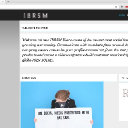
looks like you figured it out:
ibrsm.jpg ibrsm.jpg - 126KB
  233