Forum Activity for @michael

michael
@michael
09/13/17 09:21:39PM
7,839 posts

Latest Videos Module


Installation and Configuration

What you're seeing is not videos, but images belonging to the videos. They are laid out in a row with the image in a column that is 2 wide and the text in a column that is 10 wide. ( total must equal 12 for a full row ).

I believe you're wanting to make the images about 6 wide, so change the col2 to col6 and the col10 to col6 for that row.

See screenshot
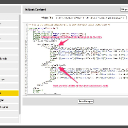
half-half.jpg half-half.jpg - 182KB
michael
@michael
09/13/17 09:05:52PM
7,839 posts

Couple of gallery delete issues


Using Jamroom

This might be what you're saying:
http://www.ourtownstory.co.uk/gallery/template_compare/id=85

Previously:
{jrCore_item_list_buttons module="jrGallery" item=$item}
was changed to
{jrCore_item_update_button module="jrGallery" profile_id=$item._profile_id item_id=$item._item_id}
{jrCore_item_delete_button module="jrGallery" profile_id=$item._profile_id action="`$murl`/delete_save/`$item.profile_url`/`$item.gallery_title_url`"}

Its not on the item detail page, but the link does look like its ends up on the gallery list page which is setup without a header.
http://www.ourtownstory.co.uk/gallery
updated by @michael: 09/13/17 09:06:14PM
michael
@michael
09/13/17 08:46:54PM
7,839 posts

Couple of gallery delete issues


Using Jamroom

A video of me walking through the problem. Not understanding it sorry. :(
delete_issue.mp4.zip - 31.4MB
michael
@michael
09/13/17 01:21:01AM
7,839 posts

User Registration


Design and Skin Customization

Use this code:
{jrCore_include template="header.tpl"}


{jrCore_form_create_session module="jrUser" option="signup" assign="token"}
<div id="jrUser_signup_msg"></div>
<form id="jrUser_signup" name="jrUser_signup" action="{$jamroom_url}/user/signup_save" method="post" accept-charset="utf-8" enctype="multipart/form-data">
    <input type="hidden" id="jr_html_form_token" name="jr_html_form_token" value="{$token}">
    user name <input type="text" id="user_name" class="form_text" name="user_name" value=""><br>
    email <input type="text" id="user_email" class="form_text" name="user_email" value=""><br>
    password <input type="password" id="user_passwd1" class="form_text" name="user_passwd1" value=""><br>
    repeat password <input type="password" id="user_passwd2" class="form_text" name="user_passwd2" value=""><br>
    <input type="hidden" id="quota_id" name="quota_id" value="1">
    <img id="form_submit_indicator" src="{$jamroom_url}/skins/jrNova/img/submit.gif" width="24" height="24" alt="working...">
    <input type="button" id="jrUser_signup_submit" class="form_button" value="signup" tabindex="3" onclick="jrFormSubmit('#jrUser_signup','{$token}','post');">
</form>


{jrCore_include template="footer.tpl"}

Change the quota_id from "1" to the number of the quota you want to allow signups for.
michael
@michael
09/13/17 12:49:48AM
7,839 posts

User Registration


Design and Skin Customization

Good point about the signup quota, that needs to be added in.
michael
@michael
09/13/17 12:45:43AM
7,839 posts

User Registration


Design and Skin Customization

That code is for LOGIN, not SIGNUP.

What do you mean by direct the "signup to the correct quota"?

Where the user is redirected after signup/login is set on the QUOTA CONFIG page of the USER module:
ACP -> MODULES -> USER -> USER ->QUOTA CONFIG -> Login Redirect Page
ACP -> MODULES -> USER -> USER ->QUOTA CONFIG -> Signup Redirect Page
michael
@michael
09/12/17 11:52:50PM
7,839 posts

Couple of gallery delete issues


Using Jamroom

Slate's not available anymore, been retired. Could be something connected to the skin. Ok if I login and add something, then delete it to see whats going on?
michael
@michael
09/12/17 11:42:25PM
7,839 posts

Couple of gallery delete issues


Using Jamroom

delete moves the item into the Recycle Bin, you can undelete it from there.
DASHBOARD -> RECYCLE BIN

Deleting it from the detail page is working for me. Which skin? Are you up to date with the latest stuff from the marketplace?
michael
@michael
09/12/17 10:40:11PM
7,839 posts

Profile Tab Home Link for Ninja Skin


Installation and Configuration

add the link into the profile_menu.tpl file.
ACP -> SKINS -> NINJA -> TEMPLATES -> profile_menu.tpl -> MODIFY

Just add it at the top before the foreach loop.
<a href="{$jamroom_url}/{$profile_url}/"><div class="profile_menu_entry">Home</div></a>
michael
@michael
09/12/17 06:05:56AM
7,839 posts

User Registration


Design and Skin Customization

If you use a Site Builder page, there is a widget you can drop in.
  187