Timeline refers to gallery name, not item
Using Jamroom
How to figure this problem out.
* The template that controls how items are displayed in the timeline is the item_action.tpl file found in any module that writes to the timeline.
We want to change the Comment module's structure, so the template is:
jrComment/templates/item_action.tpl
Docs: "Altering a modules template"
https://www.jamroom.net/the-jamroom-network/documentation/jamroom-developers-guide/1051/altering-a-modules-template
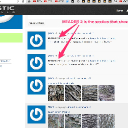
in that template we have a series of headers. I added some markers HEADER1 HEADER2 HEADER3 to understand which section is actually showing when looking at the timeline. (add_markers.png and results.png)
--
So you need to alter the second section of item_action.tpl to get the header out.
Currently that section looks like this:
......
{elseif isset($item.action_data.comment_item_title) && strlen($item.action_data.comment_item_title) > 0}

    <span class="action_item_desc">{jrCore_lang module="jrComment" id="12" default="Posted a new Comment on"}</span>
    {jrCore_module_url module=$item.action_data.comment_module assign="curl"}
    <span class="action_item_title"><a href="{$item.action_original_item_url}#cm{$item.action_item_id}" title="{$item.action_data.comment_item_title|strip_tags|jrCore_entity_encode}">{$item.action_data.comment_item_title|strip_tags}</a>:</span>

{else}
......
Its checking if the item -> action_data -> comment_item_title is set and if it is then show this section.
I added a {debug} to the template and refreshed.
Docs: "{debug}"
https://www.jamroom.net/the-jamroom-network/documentation/module-developer-guide/1477/debug
And can see that the title we are after IS there, but on a different variable. Its there on item -> action_original_data -> gallery_title_url
so if you use that and add a section before the current comment_item_title section then it will fire first.
......
{elseif isset($item.action_original_data.gallery_title_url) && strlen($item.action_original_data.gallery_title_url) > 0}

    <span class="action_item_desc">{jrCore_lang module="jrComment" id="12" default="Posted a new Comment on"}</span>
    {jrCore_module_url module=$item.action_data.comment_module assign="curl"}
    <span class="action_item_title"><a href="{$item.action_original_item_url}#cm{$item.action_item_id}" title="{$item.action_original_data.gallery_title|strip_tags|jrCore_entity_encode}">{$item.action_original_data.gallery_title|strip_tags}</a>:</span>

{elseif isset($item.action_data.comment_item_title) && strlen($item.action_data.comment_item_title) > 0}

    <span class="action_item_desc">{jrCore_lang module="jrComment" id="12" default="Posted a new Comment on"}</span>
    {jrCore_module_url module=$item.action_data.comment_module assign="curl"}
    <span class="action_item_title"><a href="{$item.action_original_item_url}#cm{$item.action_item_id}" title="{$item.action_data.comment_item_title|strip_tags|jrCore_entity_encode}">{$item.action_data.comment_item_title|strip_tags}</a>:</span>

{else}
......