Forum Activity for @michael

michael
@michael
09/12/16 07:14:41PM
7,826 posts

How do I remove items so they don't show in a profile "latest activity"


Using Jamroom

guess: depends on how the groups were deleted. If they were deleted by clicking the delete button on the group from the profile, then the Listeners should have caught that process and fired the code to delete the timeline entry.

But if the groups were deleted another way, directly from the database, via the batch item editor, other..... then its possible the timeline module didn't catch the event so didn't delete the timeline entry.
michael
@michael
09/12/16 06:54:30PM
7,826 posts

How do I remove items so they don't show in a profile "latest activity"


Using Jamroom

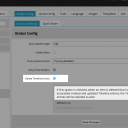
Check that you have "Delete Timeline Entries" setting set at:
ACP -> MODULES -> PROFILES -> TIMELINE -> GLOBAL CONFIG -> Delete Timeline Entries

Checked. When that is on and the main item is deleted, the associated timeline entry should be deleted too. (screenshot)

If its not being deleted, steps to set it up please.
screenshot_timeline_entries.png screenshot_timeline_entries.png - 76KB
michael
@michael
09/12/16 06:25:48PM
7,826 posts

Editing Activity Timeline


Design and Skin Customization

Throw a {debug} OUTSIDE the foreach loop in the remove_activity.tpl file and see if any blog posts are contained in the $_items array.

Need to figure out if the blog posts are:
* not getting included in the requested results OR
* included but not getting displayed on the page OR
* not getting saved to the activity timeline datastore.

My guess is #2.
michael
@michael
09/12/16 06:16:05PM
7,826 posts

PayPal Buy It Now


Installation and Configuration

The thread title reads "PayPal Buy It Now" but the first sentence reads "I would like like to set up FoxyCart". Its unclear what you are asking. Without clear questions you are unlikely to get clear answers.

Foxycart is one module, its docs are here:

Docs: "Setting up Foxycart"
https://www.jamroom.net/the-jamroom-network/documentation/modules/2/foxycart-ecommerce-setting-up-foxycart

Paypal is another module, its docs are here:

Docs: "Paypal Buy it now"
https://www.jamroom.net/the-jamroom-network/documentation/modules/1987/paypal-buy-it-now

The "Paypal Buy it now" module was created because some sites were not selling enough to cover the monthly cost of the Foxycart module. Foxycart is the better module, it can sell subscriptions and allows accepting many more payment gateways (including Paypal).
updated by @michael: 09/12/16 06:16:59PM
michael
@michael
09/12/16 05:52:34PM
7,826 posts

How do I remove Follow from my Community profile?


Using Jamroom

Its found in the profile_header.tpl file in the jrNingja skin, so to alter it:
ACP -> SKINS -> NINGJA -> TEMPLATES -> profile_header.tpl -> MODIFY

The button code is on line 13 ish and looks like this:
{jrCore_module_function function="jrFollower_button" profile_id=$_profile_id title="Follow This Profile"}

So if you wrap that in a template block you can show it to just who you want to show it to.

Docs: "Template Blocks"
https://www.jamroom.net/the-jamroom-network/documentation/jamroom-developers-guide/3126/template-blocks

I believe you have your community in its own separate quota, so maybe a quota block that checks which quota it is before showing the button.

In .tpl files you can add {debug} to figure out what variables are available on the page.

Docs: "{debug}"
https://www.jamroom.net/the-jamroom-network/documentation/jamroom-developers-guide/1477/debug

For you, you need to figure out which quota_id the 'community' profile is in and exclude all profiles with that quota_id from having the button. (or you could use the specific profile_id if you JUST wanted that profile only)

Suggested code:
{if $profile_quota_id != 3}
{jrCore_module_function function="jrFollower_button" profile_id=$_profile_id title="Follow This Profile"}{/if}
which reads "If the profile quota id is not 3 then show the FOLLOW button.". But you will need to make sure that it is quota id 3 that is the one you want to exclude of course. If 'community' is in quota 2, then change the 3 to a 2.
updated by @michael: 09/12/16 05:52:57PM
michael
@michael
09/12/16 04:54:46PM
7,826 posts

Ning Endangered?


Off Topic

jimmyk:.....My last post was more focused on venture capitalists and startups. Not many of those aforementioned are interested in funding / starting social networks.
startups - because there is no funding.
venture capitalists - aren't funding because they see FB as a beast that can't currently be beat... which is pretty much true and there isn't enough profit in niche sites.
That rings true to me. Where I see a systematic problem is the expectations it generates. Venture capitalists put in millions of dollars, then give away the product for unrealistic prices with the expectation that that will increase user adoption. Which it does, everyone loves something for nothing. Then they expect to be able to monetize it later on to recover their losses taken in the initial period.

In Ning's case that seams to be what is happening, they've been using Venture capital to subsidize community creation, monetizing it hasn't worked, now their trying to back out of that idea to a non-money-loosing one and that's generated the current mess.
michael
@michael
09/12/16 04:33:17AM
7,826 posts

Ning Endangered?


Off Topic

Nice insight Jimmy.

There seams like space for alternative networks to exist though. Facebook has a 'connection via people you know' setup, but for a lot of the time, I don't care that my friends aren't into what I'm into, but just want updates on what it is I'm interested in even if it doesn't come from someone I know.
michael
@michael
09/12/16 01:42:43AM
7,826 posts

How do I get Site Builder to display Forum topics, not forum posts?


Using Jamroom

Try this one then

* LIST MODULE: Forum
* SEARCH CONDITION 1: forum_post_count | is greater than | 0
* ORDER BY: forum_updated | descending
michael
@michael
09/12/16 01:22:17AM
7,826 posts

Two-word tags are displaying incorrectly in Tag Cloud


Using Jamroom

There is a new version 1.4.0 in the marketplace now, update from your ACP to get the most recent version.
ACP -> MODULES -> CORE -> MARKETPLACE -> SYSTEM UPDATE
michael
@michael
09/12/16 01:18:36AM
7,826 posts

Two-word tags are displaying incorrectly in Tag Cloud


Using Jamroom

You're doing nothing wrong. Its a bug in the current version of the tag module that crept in when it was adjusted to make it work with foreign language characters.

Then next version of the TAGS module will fix it. We'll get that out shortly.
  355