Forum Activity for @michael

michael
@michael
09/11/16 07:46:26PM
7,832 posts

Modifying the Login form


Installation and Configuration

FYI: comments in the template editor show up in yellow so they're easy to spot.
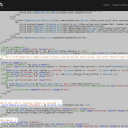
screenshot_comments.png screenshot_comments.png - 243KB

updated by @michael: 09/11/16 07:46:45PM
michael
@michael
09/11/16 07:43:36PM
7,832 posts

Modifying the Login form


Installation and Configuration

Yep, thats it. comment out the login line, 122 and if you're going to build you're own signup page too, then comment out that too.

The communication issues in this thread probably arose because there are many ways to set things up and i wasn't sure how yours was set up so my instructions weren't specific enough. I've got it now.

In ACP -> SKINS -> NINGJA -> TEMPLATES -> header_menu_desktop.tpl, down near line 117 you will see this section:
            {if !jrUser_is_logged_in()}
                {jrCore_module_url module="jrUser" assign="uurl"}
                {if $_conf.jrCore_maintenance_mode != 'on' && $_conf.jrUser_signup_on == 'on'}
                    <li><a id="user-create-account" href="{$jamroom_url}/{$uurl}/signup">{jrCore_lang skin=$_conf.jrCore_active_skin id="4" default="create account"}</a></li>
                {/if}
                <li><a href="{$jamroom_url}/{$uurl}/login">{jrCore_lang skin=$_conf.jrCore_active_skin id="5" default="login"}</a></li>
            {/if}

That is the menu block that is showing to users who are not logged in. We can either delete that section or comment it out. (Term: "comment it out" means to leave it showing in the code, but not have that section actually run. Programmers often leave comments in code to let others know what they are thinking. I know you know this elise, but others might not.)

The comment format in smarty templates is to wrap the section in {* this is a comment *}

So if we want to comment out the login link, it becomes:
            {if !jrUser_is_logged_in()}
                {jrCore_module_url module="jrUser" assign="uurl"}
                {if $_conf.jrCore_maintenance_mode != 'on' && $_conf.jrUser_signup_on == 'on'}
                    <li><a id="user-create-account" href="{$jamroom_url}/{$uurl}/signup">{jrCore_lang skin=$_conf.jrCore_active_skin id="4" default="create account"}</a></li>
                {/if}
                {* <li><a href="{$jamroom_url}/{$uurl}/login">{jrCore_lang skin=$_conf.jrCore_active_skin id="5" default="login"}</a></li> *}
            {/if}
michael
@michael
09/11/16 07:21:37PM
7,832 posts

Modifying the Login form


Installation and Configuration

The extra item in the menu issue. Goal: remove the "Login" link that points to /user/login from the menu OR change it to point to our new page.

How we do that depends on what system is generating our menu. If its the Site Builder menu system, then open the MENU EDITOR and change the destination URL from there.

If its the default system for the skin, then change it in the header_menu_desktop.tpl file
ACP -> SKINS -> NINGJA -> TEMPLATES -> header_menu_desktop.tpl -> MODIFY

The line you're after is line 122 which reads:
<li><a href="{$jamroom_url}/{$uurl}/login">{jrCore_lang skin=$_conf.jrCore_active_skin id="5" default="login"}</a></li>

Adjust that to point to just the login url, the text can stay the same:
<li><a href="{$jamroom_url}/login">{jrCore_lang skin=$_conf.jrCore_active_skin id="5" default="login"}</a></li>
michael
@michael
09/11/16 07:16:49PM
7,832 posts

Modifying the Login form


Installation and Configuration

Another way to do it would be to alter the header.tpl file and add a URL specific div to the page
ACP -> SKINS -> NINGJA -> TEMPLATES -> header.tpl -> MODIFY

At the bottom of that file:
        {if $_post._uri == '/user/login'}
        <div>
        THIS IS AN EXTRA BIT added to just the login page
        </div>
        {/if}
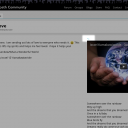
Would add a block of code that just showed on the /user/login page.

Docs: "Using the Template Editor"
https://www.jamroom.net/the-jamroom-network/documentation/jamroom-admin-handbook/3183/using-the-template-editor
michael
@michael
09/11/16 06:41:31PM
7,832 posts

Modifying the Login form


Installation and Configuration

The suggestion was not to put the login form on your home page, but rather make a login page setup however you want to set it up.

Currently the login page is here:
http://empathcommunityeliselebeaucom.jamroomhosting.com/user/login

on the /user/login url. With Site Builder you can add a new url anywhere and either add it to the menu, or don't.

By visiting a url that doesnt exist, say:
http://empathcommunityeliselebeaucom.jamroomhosting.com/login

You can create a NEW page there with site builder. You can add the login widget to the page and that will replicate the setup that exists on '/user/login' now, then add extra bits to the page via the site builder system.

Is what I was thinking. Programatically you could alter the /user/form page with events and listeners, but Im pretty sure thats not the question.

#2 Yes if you wanted to turn Site Builder on on your index page, the current content of the index page would be hidden, so you'd have to recreate it. We've heard the good suggestion about making that stuff already exist as Site Builder content and have it on our TODO list.
michael
@michael
09/11/16 06:22:52PM
7,832 posts

Modifying the Login form


Installation and Configuration

What you could do is create a page with Site Builder and use the 'Login and Signup' widget. Add a login form to the page in the right column and as much text/instructions as you like in the left.

There are some instructions on howto in this doc:

Docs: "Make the site visible to members only : Create the Login box "
https://www.jamroom.net/the-jamroom-network/documentation/jamroom-admin-handbook/4357/howto-make-the-site-visible-to-members-only#create-the-login-signup-box

And if you wanted to add extra Form Fields for the members to enter when they sign up, you're probably thinking of the Form Designer.

Docs: "Using the Form Designer"
https://www.jamroom.net/the-jamroom-network/documentation/jamroom-admin-handbook/1275/using-the-form-designer
michael
@michael
09/11/16 06:16:00PM
7,832 posts

Is my NingToJamroom site working right?


Ning To Jamroom

Elise:
I saw that but I assume it was doe to weird formatting in the content. Can it be a problem in the URL scan module?
could be a problem with the url scan module, but the first place I would look is directly in the code that created that post. My guess is you will find incorrect HTML pasted into that post.

If it is a problem with the url scan module, let us know and we'll get it sorted.
updated by @michael: 09/11/16 06:16:45PM
michael
@michael
09/11/16 06:14:22PM
7,832 posts

Is my NingToJamroom site working right?


Ning To Jamroom

Seams pretty good. Not sure if this one is by design to only allow ad requests from logged in users or not, so:

"Contact me to place an Empath relevant ad" on the top page of the site, the 'Contact Me' points to the tickets which is only usable by logged in users, where as the header "contact" points to a contact form that is usable also by non-logged-in users.
  357