Forum Activity for @michael

michael
@michael
07/25/16 04:38:18PM
7,826 posts

Question concerning recent updates


Design and Skin Customization

Spellcheck should be coming in now from your browser because the context bar (that right click menu) is no longer on by default. This lets the browsers native spellchecker work.

Turn the spellchecker plugin off and the browsers native spellchecker should work.

Run the COMPARE tool on the form_editor.tpl template you're interested in. There is one for Site Builder and one for the Core. That will tell you what is different between the default version and your version.

Also HOW you did the change is important. If you're doing it via a skin override in the templates then you may need to copy the contents from the module again to your skins file to make sure it matches what was there before adding your changes back in.

The point though, is whichever version is active, make sure it matches all the things you want to turn on from the modules version of the file.

You cant have the context editor and the browser spellcheck active together though, this is a TinyMCE issue that we've yet to understand a solution for.
michael
@michael
07/25/16 04:31:55PM
7,826 posts

JrCore_list in email template


Jamroom Developers

You Rock! :)

Good on you for persisting and finding and fixing the problem, and most of all reporting back so others can use the info too.
michael
@michael
07/25/16 04:27:15PM
7,826 posts

Errors (beta version 5.4.0b2)


Using Jamroom

There's probably a ? mark to the right of that error message that contains more info. Could you paste that info here please.

jrCore_load_url is a function that goes and gets a web-address, so the issue is "Some module somewhere is trying to load a URL but failing". Why its failing will likely be in the extra info in that error log.
michael
@michael
07/24/16 08:00:25PM
7,826 posts

MP3 Player Broken


Using Jamroom

douglas:.....There is an issue with your Site Builder "Audio Player" widget, for some reason it will not load the audio, I just get a spinning loading image. It is the same of the other player widgets and I'm not sure what is going on there.
I've tried everything I can think of so I'll see if I can get on of the other guys to check it out....

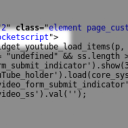
After checking this out, I found what I think is the source of the issue. Something on your server is changing the text 'javascript' to 'rocketscript'.

This is unrelated to anything jamroom. The templates in your ACP still read javascript (which is a web scripting language, not sure what a 'rocketscript' is, first time i've seen it.)

--edit--
Looks related to "Cloud Flare"
http://stackoverflow.com/questions/9681032/why-is-wordpress-placing-text-rocketscript-instead-of-text-javascript-when-u

--edit edit--
Yeah, thats the problem. Need to add
 data-cfasync="false" 
to all the widget_(module name)_config_header.tpl to all the modules where this is an issue.

I've added it to your widget_youtube_config_header.tpl via the TEMPLATES editor in the ACP but you'll need to add it to the others not working, Audio, Video, Vimeo as its a server issue, not a jamroom issue and you might prefer to do it in template over-rides rather than the ACP. Your site, you can choose. :)
screenshot_rocketscript.png screenshot_rocketscript.png - 23KB

updated by @michael: 07/24/16 08:07:41PM
michael
@michael
07/24/16 06:22:43PM
7,826 posts

HTML notifications


Jamroom Developers

All jrCore_send_email() functions create a queue entry via the jrCore_queue_create() function.

There is an event that fires when that queue entry is created 'create_queue_entry'.

If you use your module to listen for that event, you can add in the send_as_html option at that point.

Docs: "Events and Listeners"
https://www.jamroom.net/the-jamroom-network/documentation/jamroom-developers-guide/1011/events-and-listeners

That will allow you to avoid altering the jrUser module.
michael
@michael
07/22/16 06:00:41PM
7,826 posts

JrCore_list in email template


Jamroom Developers

There is also an hourly_maintenance function that fires every hour.
michael
@michael
07/22/16 05:59:00PM
7,826 posts

JrCore_list in email template


Jamroom Developers

?? daily_maintenance doesnt run as a user, it runs as a system process, so it shouldn't make any difference if its triggered by a bot visiting the site or by a logged in user.

How did you reach the conclusion it was different?
michael
@michael
07/22/16 05:43:34PM
7,826 posts

JrCore_list in email template


Jamroom Developers

ok, done. I have made a module and sent you an email invite to the channel. Add that channel to your jamroom system and you will be able to install the module "Test Email".

In the ACP there is a tool to test the email sending:
ACP -> MODULES -> CUSTOM -> TEST EMAIL -> TOOLS -> SEND EMAIL

When you click on the tool it will send one email to the registered address in the GLOBAL CONFIG tab of the module.

It will also display whatever is in the TEMPLATES files to the screen at the same time.

So adjust the contents of the files via the TEMPLATES tab, save, then activate them and you will be able to test out things quicker than having to wait for daily maintenance to run.

In case you haven't used the TEMPLATES tab before:

Docs: "Using the Template Editor"
https://www.jamroom.net/the-jamroom-network/documentation/jamroom-admin-handbook/3183/using-the-template-editor
michael
@michael
07/22/16 05:15:03PM
7,826 posts

JrCore_list in email template


Jamroom Developers

give me a few minutes, I'll build a tool to send out test emails.
michael
@michael
07/22/16 05:02:39PM
7,826 posts

JrCore_list in email template


Jamroom Developers

Nice idea, If that 19410726 does work it tells us the email system is likely doing something to either '%' or '%$'

What came out for the
SOME DEBUGGING CODE
search="event_date like %$yedi"
??
  375