Forum Activity for @michael

michael
@michael
11/25/15 01:32:26AM
7,832 posts

Still Unable to upgrade


Using Jamroom

The issue I figured out today is that in a recent update there's been code added to check which page the user is coming from.

So if i'm on my profile and I click + to add an audio song, I still see the profile skin even though I'm not on the profile. This makes sense.

The problem is, that if I go from my profile to a page on the site, say /user/login it STILL thinks I want to see the profile skin because the situation is the same as the above one. This is the problem now.

If your on the 'site' level and your clicking around you should see all the correct skins _until_ you visit a profile once, then things can start to go wrong. Its that that needs figuring out.

Simplest solution is to revert to "Is it a profile url? yes, show profile skin, no, don't." but that brings back the previous issue of "On profile, click + to add something, skin changes."
michael
@michael
11/25/15 01:26:53AM
7,832 posts

my many issues with upgrading and possible fixes?


Using Jamroom

Send me the info to the dev site.
michael
@michael
11/25/15 01:25:29AM
7,832 posts

Lost comments


Using Jamroom

Can't explain it without being about to recreate it. Any idea on how to get setup so I can see this on my Dev machine?

Without more info as to what is happening, the standard steps are:
* run the integrity check
* clear the caches.

And possibly check the state of his account; is it pending, or in a special quota; or marked as private;

Hard to know.
michael
@michael
11/25/15 01:20:27AM
7,832 posts

Create a module using Aparna


Jamroom Developers

if its a free module (MPL license) you are free to alter it and redistribute your altered module.
If it is a paid module (JCL license) you can alter it for your own purposes but not release or distribute that module.
michael
@michael
11/25/15 01:16:27AM
7,832 posts

please do something about profile comments! they are outta control!


Suggestions

If your base is the Ningja skin then it has the same setup, try:
ACP -> ITEM FEATURES -> COMMENTS -> GLOBAL CONFIG -> LIST OPTIONS -> comments per page

Set to 10 and you'll get a pager to "Load more comments".
michael
@michael
11/25/15 01:11:23AM
7,832 posts

please do something about profile comments! they are outta control!


Suggestions

This is a custom page you've built right? What code did you set for the comments?

Check
/skins/(Your Skin)/profile_index.tpl

To see what's generating that page.
michael
@michael
11/25/15 01:05:41AM
7,832 posts

Can't update module


Using Jamroom

now do what I said. ;)

I can see you have a license for it. I have licenses for mine too, but sometimes they get stuck.

* Go to the INFO tab of that module.
* check the DELETE checkbox and save.
* go to the marketplace locate the module.
* (it will show you have a license to install it) click install.
michael
@michael
11/25/15 12:59:09AM
7,832 posts

Unable to open CSS file


Design and Skin Customization

The screenshot shows the name of the skin is 'WowMusic' which looks like its based off of Flashback by the rest of the screen.

make sure your CSS files are registered in your include.php file for your skin and that they are in the /css directory.

so for flashback that looks like this:
/skins/jrFlashback/include.php

/**
 * jrFlashback_init
 * NOTE: unlike with a module, init() is NOT called on each page load, but is
 * called when the core needs to rebuild CSS or Javascript for the skin
 */
function jrFlashback_skin_init(){
    // Bring in all our CSS files
    jrCore_register_module_feature('jrCore', 'css', 'jrFlashback', 'html.css');
    jrCore_register_module_feature('jrCore', 'css', 'jrFlashback', 'grid.css');
    jrCore_register_module_feature('jrCore', 'css', 'jrFlashback', 'site.css');
    jrCore_register_module_feature('jrCore', 'css', 'jrFlashback', 'page.css');
    jrCore_register_module_feature('jrCore', 'css', 'jrFlashback', 'banner.css');
    jrCore_register_module_feature('jrCore', 'css', 'jrFlashback', 'header.css');
    jrCore_register_module_feature('jrCore', 'css', 'jrFlashback', 'footer.css');
    jrCore_register_module_feature('jrCore', 'css', 'jrFlashback', 'form_element.css');
    jrCore_register_module_feature('jrCore', 'css', 'jrFlashback', 'form_input.css');
    jrCore_register_module_feature('jrCore', 'css', 'jrFlashback', 'form_select.css');
    jrCore_register_module_feature('jrCore', 'css', 'jrFlashback', 'form_layout.css');
    jrCore_register_module_feature('jrCore', 'css', 'jrFlashback', 'form_button.css');
    jrCore_register_module_feature('jrCore', 'css', 'jrFlashback', 'form_notice.css');
    jrCore_register_module_feature('jrCore', 'css', 'jrFlashback', 'forum.css');
    jrCore_register_module_feature('jrCore', 'css', 'jrFlashback', 'list.css');
    jrCore_register_module_feature('jrCore', 'css', 'jrFlashback', 'menu.css');
    jrCore_register_module_feature('jrCore', 'css', 'jrFlashback', 'table.css');
    jrCore_register_module_feature('jrCore', 'css', 'jrFlashback', 'tabs.css');
    jrCore_register_module_feature('jrCore', 'css', 'jrFlashback', 'image.css');
    jrCore_register_module_feature('jrCore', 'css', 'jrFlashback', 'gallery.css');
    jrCore_register_module_feature('jrCore', 'css', 'jrFlashback', 'profile.css');
    jrCore_register_module_feature('jrCore', 'css', 'jrFlashback', 'skin.css');
    jrCore_register_module_feature('jrCore', 'css', 'jrFlashback', 'slider.css');
    jrCore_register_module_feature('jrCore', 'css', 'jrFlashback', 'text.css');
    jrCore_register_module_feature('jrCore', 'css', 'jrFlashback', 'bundle.css');
    jrCore_register_module_feature('jrCore', 'css', 'jrFlashback', 'base.css');
    jrCore_register_module_feature('jrCore', 'css', 'jrFlashback', 'action.css');
    jrCore_register_module_feature('jrCore', 'css', 'jrFlashback', 'doc.css');
    jrCore_register_module_feature('jrCore', 'css', 'jrFlashback', 'poll.css');
    jrCore_register_module_feature('jrCore', 'css', 'jrFlashback', 'slidebar.css');

    jrCore_register_module_feature('jrCore', 'css', 'jrFlashback', 'admin_menu.css');
    jrCore_register_module_feature('jrCore', 'css', 'jrFlashback', 'admin_log.css');
    jrCore_register_module_feature('jrCore', 'css', 'jrFlashback', 'admin_modal.css');

    jrCore_register_module_feature('jrCore', 'css', 'jrFlashback', 'tablet.css');
    jrCore_register_module_feature('jrCore', 'css', 'jrFlashback', 'mobile.css');

    jrCore_register_module_feature('jrCore', 'css', 'jrFlashback', 'playlist.css');

    // Register our Javascript files with the core
    jrCore_register_module_feature('jrCore', 'javascript', 'jrFlashback', 'responsiveslides.min.js');
    jrCore_register_module_feature('jrCore', 'javascript', 'jrFlashback', 'jrFlashback.js');

    // Slidebars
    jrCore_register_module_feature('jrCore', 'javascript', 'jrFlashback', APP_DIR . '/skins/jrFlashback/contrib/slidebars/slidebars.min.js');

    // Tell the core the default icon set to use (black or white)
    jrCore_register_module_feature('jrCore', 'icon_color', 'jrFlashback', 'white');
    // Tell the core the size of our action buttons (width in pixels, up to 64)
    jrCore_register_module_feature('jrCore', 'icon_size', 'jrFlashback', 16);
    // Hide module icons
    jrCore_register_module_feature('jrCore', 'module_icons', 'jrFlashback', 'show', false);

    // Our default media player skins
    jrCore_register_module_feature('jrCore', 'media_player_skin', 'jrFlashback', 'jrAudio', 'jrAudio_player_dark');
    jrCore_register_module_feature('jrCore', 'media_player_skin', 'jrFlashback', 'jrVideo', 'jrVideo_player_dark');
    jrCore_register_module_feature('jrCore', 'media_player_skin', 'jrFlashback', 'jrPlaylist', 'jrPlaylist_player_dark');

    return true;
}

each of the 'css' filenames will be looked for in
/skins/jrFlashback/css/*

There are some javascript files too. those will all be packaged up into a single file to increase page load time.

Take a look inside some of those files too to see the convention for getting a CSS property into the STYLE tab.

You'll see something like this:

/* @title Site Content */
/* @help This is the main Site Content holder */
#content {
    background-color:#0D4C72;
    max-width:1140px;
    height:100%; /* @ignore */
    margin:0 auto;  /* @ignore */
    padding:0;
    box-shadow: 0 0 4px #000 inset;
}

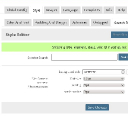
That commented stuff at the top of the CSS is what will show in the STYLE tab (screenshot). The properties with /* @ignore */ will not show up.
screenshot_style_tab.jpg screenshot_style_tab.jpg - 52KB
michael
@michael
11/25/15 12:49:36AM
7,832 posts

Is it still possible to hide a song file


Using Jamroom

If you turn the profile to "Not Active" then the media on that profile will not show up, or change the profile to "Private", same thing.

(the profile) -> settings -> profile active OR

(the profile) -> settings -> profile privacy
michael
@michael
11/25/15 12:44:00AM
7,832 posts

jrCore_media_player not working on my skin


Design and Skin Customization

Try adding this to your meta.tpl file:
<script type="text/javascript" src="{jrCore_javascript_src}"></script>

Then take a look at the meta.tpl file from one of the stock skins.

In your wowmusic skin I can see a lot of individual links to individual .js and .css files. One of the thing jamroom provides is a compression system where you can define all the .css and .js files that will be used in your skins:
/skins/(YOUR SKIN)/include.php

file and they will be compressed into a single file to speed up page load.

This allows modules to put .js and .css into the skin without alteration to the skin.

It seams like that's what's missing on yours.
  460