Forum Activity for @michael

michael
@michael
05/16/15 01:37:32AM
7,832 posts

Upgrading YouTube to newest version 1.2.0


Announcements

I don't think that info is related.

That info is supposed to help provide some extra data to diagnose problems when there are problems. The log is not showing any of those things as a problem.

The reason I dont think its related is because when your daily maintenence starts, there is this log entry: (screenshot)

which has a url /angela when that is unrelated to the daily mantenence starting and it has some data, which is also un-connected.

It feels like info that has been collected when something that could fail was happening was not cleared and just happens to be there when something else that is not an error happens so it gets attached.

Ignore it. We'll try to track down the source and stop it from happening. If the error log is YELLOW and demanding attention like the "Errors Only" section shows and they have attached data, that is probably important.
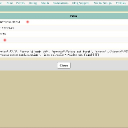
screenshot_daily_maintenence.jpg screenshot_daily_maintenence.jpg - 56KB

updated by @michael: 05/16/15 01:37:45AM
michael
@michael
05/16/15 01:15:22AM
7,832 posts

Privacy for Under 18s


Suggestions

or you could set that as a param in the core list functions. Get them to set the DOB in their profile, then when doing a list call:
{$cutoff = $smarty.now - 568021248}
{jrCore_list module="?????" search1="profile_dob > $cutoff"}

That 568021248 is 18 years in seconds.

--edit--
need to have the DOB attached to the profile because thats were all the data is associated with. the $_user account is the actual person, but you could have a 25 year old person and a 17 year old person both associated with the same profile. Need to decide on how to set that up.
updated by @michael: 05/16/15 01:16:39AM
michael
@michael
05/16/15 01:11:26AM
7,832 posts

profile image


Using Jamroom

My first guess is because the image file is not an image file. Try a different file and see if a different file uploads. If different files work but that one doesn't then its a problem with the image.
michael
@michael
05/16/15 01:09:02AM
7,832 posts

Problems after updating Core Module


Genosis

Try downloading the jrCore package and uploading it to your server.

You can download it from here:
http://www.jamroom.net/

Then un-zip it and upload it via FTP to your server. should just need to upload the:
/modules/jrCore/*

--

Another way to do it would be to look at your servers file system and see if there are multiple versions of the core module
/modules/jrCore-version-5.2.33
/modules/jrCore-version-5.2.32
/modules/jrCore-version-5.2.31

If there are, then its probably just the newest one that is only half transferred, so delete that and the system should revert to the next newest one.

--
What that error messsage is saying is on your server there is expected to be a file:
/modules/jrCore/templates/page_begin.tpl

but that page is not there, so it cant continue.
michael
@michael
05/16/15 12:49:11AM
7,832 posts

jrProfile_disable_sidebar


Using Jamroom

It doesnt need to be in any of those files, add it to your skin and see if that sorts it out.

What it does is sets a flag that is checked for at the point where the sidebar is included. I'll get it added to Slate.

Right now it looks like it only works for:
* Elastic
* Lucid
* Ningja

--edit--
Slate 1.0.8 should now work with {jrProfile_disable_sidebar}

updated by @michael: 05/16/15 01:03:24AM
michael
@michael
05/15/15 02:53:35AM
7,832 posts

Privacy for Under 18s


Suggestions

Like this as a splash page?

http://borderlandsthegame.com/index.php/agegate?ref=%2F

enter your date of birth to continue?
michael
@michael
05/15/15 12:52:41AM
7,832 posts

jrProfile_disable_sidebar


Using Jamroom

mmm, then the issue appears to be somewhere else. are all modules up to date?

Do you see this code:
    {if $profile_disable_sidebar != 1}
        {jrCore_include template="profile_sidebar.tpl"}
    {/if}
In /skins/YOUR SKIN/profile_header.tpl

??
michael
@michael
05/15/15 12:24:29AM
7,832 posts

jrProfile_disable_sidebar


Using Jamroom

Give it a go one time by changing to the most up-to-date jrElastic. If it does disappear there then the issue is with the skin, if it also has the same behaviour on the most up to date jrElastic, the the issue is elsewhere.
michael
@michael
05/14/15 11:49:58PM
7,832 posts

jrProfile_disable_sidebar


Using Jamroom

Yep, works fine for me.

I add it to the top of:
ACP -> PROFILES -> PROFILE FORUM -> TEMPLATES -> item_index.tpl

make sure that template is 'Active'

Then when I visit a profile's top forum page:
http://my-site.com/admin/forum

The admin's side bar does not show.

--edit--
screenshot
screenshot_no_sidbar.jpg screenshot_no_sidbar.jpg - 129KB

updated by @michael: 05/14/15 11:51:48PM
michael
@michael
05/14/15 11:19:43PM
7,832 posts

Configuring the Homepage with SiteBuilder


Using Jamroom

The widget stuff does have a bunch of CSS classes to identify them:
class="item widget-item widget-item-widget_html"

To identify them as an .item then a .widget-item then the type of widget it is: .widget-item-widget_html

If you want to target a specific widget, they each have a unique id too:
id="widget_id-1"

That should be enough to apply any CSS you need. If you need more, then you can add extra div's around the type. eg to change an HTML WIDGET you can over-ride the tempalte for it:

/modules/jrSiteBuilder/templates/widget_html_display.tpl

copy that to
/skins/( YOUR SKIN )/jrSiteBuilder_widget_html_display.tpl

and your skins version will work instead. add any wrapper div's there.

(or via the ACP TEMPLATES tab if you prefer that method.)
  544