Forum Activity for @michael

michael
@michael
05/06/15 12:12:08AM
7,839 posts

Odd FORUM view behavior


Using Jamroom

For some reason, after a refresh, your col12 shrinks to a col9.

I'll go see what mine's doing.
michael
@michael
05/05/15 05:50:09PM
7,839 posts

Image quality is fuzzy in a blog post


Using Jamroom

The chosen resolution is a bit low, open up the editor where the image is and edit the source code, (that double greaterthan/lessthan button), and look for this:

http://fotmd.com/upimg/image/upimg_file/34/320

Change it to this
http://fotmd.com/upimg/image/upimg_file/33/xxlarge

To use a biggger image.

Valid image sizes are:
Quote:image size - must be one of: 24,xxsmall,40,xsmall,56,72,small,96,icon96,128,icon,196,medium,256,large,320,larger,384,xlarge,512,xxlarge,800,xxxlarge,1280

--edit--
That image size is set when you upload the image in the dropdown box, you could always re-upload it again but select a larger image size when you upload. That would do the same thing.

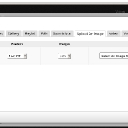
here is a screenshot of where it was set when the image was uploaded:
screenshot_set_image_size.jpg screenshot_set_image_size.jpg - 77KB

updated by @michael: 05/05/15 05:53:38PM
michael
@michael
05/05/15 05:43:52PM
7,839 posts

JrElastic disappear after upgrading jrslate


Using Jamroom

A skin that is not active should not effect a skin that is active.

Try
ACP -> CORE -> MARKETPLACE -> TOOLS -> RELOAD MODULES OR SKINS

and try reloading the jrElastic to re-dowload the latest version from the marketplace.

not really understanding what:
Quote:....no longer sliding menu from the side???? The menu is on top???...
means, a screenshot perhaps.
michael
@michael
05/01/15 11:12:34PM
7,839 posts

Cacheing media file in player.


Jamroom Developers

Don't understand what you are trying to convey, try adding more info.
michael
@michael
05/01/15 11:09:44PM
7,839 posts

Profile Tweaks


Using Jamroom

Not confident I'm understanding.

I think im hearing:
* create a new skin as an option for Profile Tweak users to choose from,
* in the new skin, just put profile_*.tpl files
* select it in a profile as the desired skin

DESIRED:
The skin will show with the main skins header and footer

ACTUAL:
Something breaks because the profile only skin doesn't have its own header/footer.

Is that the issue?
michael
@michael
05/01/15 11:05:08PM
7,839 posts

Change Base Color On Solo Artist Skin


Design and Skin Customization

An easy way is to clone the skin first, then work on the clone. That way you have something to revert to if anything goes wrong.

ACP -> TOOLS -> DEVELOPER TOOLS -> CLONE SKIN.

Call it something like:
xxSomeName

you need to put the xxSomeName before the name you choose so there is a developer prefix. since its not for sale, xx is a good choice for prefix.

Then switch to your new skin and make any alterations. You can go back to jrSolo if there are issues. :)

Which color do you want to change it to?

--
What I think the steps your after are:
* in the "selector search" on the STYLE tab, type #header

You will arrive at this page:
YOUR-SITE.COM/core/skin_admin/style/skin=jrSoloArtist/file=core_admin_log.css/section=search/search_string=%23header

Change the 2 red colors on that page to the colors your after. the top one is the background color of the header, the second one is the link color of the menu links when they are hovered over by the mouse.
michael
@michael
05/01/15 10:45:37PM
7,839 posts

Tracking events


Jamroom Developers

You can look in the function code at:
/modules/jrCore/index.php

around line 2290 ish is this function view_jrCore_set_dashboard_panel().

The line that gets all the features is this one:
$_tmp = jrCore_get_registered_module_features('jrCore', 'dashboard_panel');

It returns an array of registered for the dashboard_panel.
michael
@michael
05/01/15 10:40:21PM
7,839 posts

After Latest Jamroom upgrade - Lucid Template displays black screen


Design and Skin Customization

Thank you @luis789 for finding that issue. I have it fixed in the latest update. The issue was that the jrSlate skin language string was used in the jrNewLucid skin.

That was my fault for copying+pasting the updated code.

If you update from the marketplace now you can change without breaking anything.
michael
@michael
05/01/15 05:55:27PM
7,839 posts

OneAll login error


Using Jamroom

That message is coming from oneall.com, not your jamroom site. The things to check for are:

* is the "Public API Key", "API request domain" and "Private API Key" entered at:
ACP -> USERS -> ONEALL -> GLOBAL CONFIG

* Is "Facebook" also checked on that same page.

Thats the jamroom side of things.

On the oneall side of things, at https://app.oneall.com/
* do you have a site entered in the SITES section, if not "Create a new site"
* on that site, click on the "Social Networks" -> facebook

Make sure
* "Publish Actions - Request the permission to post content, comments and likes to a user's stream"
is checked.

and see if there are any other instructions on that page that its wanting you to do.

Give that a go.
michael
@michael
05/01/15 05:46:50PM
7,839 posts

After Latest Jamroom upgrade - Lucid Template displays black screen


Design and Skin Customization

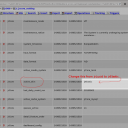
To change your skins without access to the ACP, go into the database find the 'jr_jrcore_settings' table. Locate the 'active_skin' setting and change it to jrElastic. (screenshot)
screenshot_phpmyadmin_settings.png screenshot_phpmyadmin_settings.png - 120KB

updated by @michael: 05/01/15 05:47:03PM
  546