Forum Activity for @michael

michael
@michael
04/25/15 12:41:16AM
7,832 posts

creating a table in a blog post


Using Jamroom

Don't think the table tool is turned on by default Paul.

To turn it on, you can edit:
ACP -> SYSTEM CORE -> TEMPLATES -> form_editor.tpl -> MODIFY

find this part down the bottom:
   image_advtab: true,
    plugins: "contextmenu,pagebreak,{if $jrsmiley}jrsmiley,{/if}{if $jrembed}jrembed,media{/if},image,autoresize,{if $table}table,{/if}link,code,fullscreen,textcolor,colorpicker,preview",
    toolbar1: "formatselect | fontselect forecolor {if $strong} bold{/if}{if $em} italic{/if}{if $span} underline{/if} | {if $span || $div} alignleft{/if}{if $span || $div} aligncenter{/if}{if $span || $div} alignright{/if}{if $span || $div} alignjustify |{/if}{if $ul && $li} bullist numlist |{/if}{if $div} outdent indent |{/if} undo redo | link unlink anchor pagebreak{if $table} table{/if} | {if $hr} hr{/if}{if $sub && $sup} | sub sup {/if} | code preview fullscreen{if $jrembed || $jrsmiley} |{/if}{if $jrembed} jrembed{/if}{if $jrsmiley} jrsmiley{/if}",
    contextmenu: "link image | cut copy paste"
});

add the table plugin if its not already there:
 plugins: "contextmenu,pagebreak,
to
 plugins: "table,contextmenu,pagebreak,

and the same for the toolbar line, so it should look like this when your finished:
    plugins: "table,contextmenu,pagebreak,{if $jrsmiley}jrsmiley,{/if}{if $jrembed}jrembed,media{/if},image,autoresize,{if $table}table,{/if}link,code,fullscreen,textcolor,colorpicker,preview",
    toolbar1: "table formatselect | fontselect forecolor {if $strong} bold{/if}{if $em} italic{/if}{if $span} underline{/if} | {if $span || $div} alignleft{/if}{if $span || $div} aligncenter{/if}{if $span || $div} alignright{/if}{if $span || $div} alignjustify |{/if}{if $ul && $li} bullist numlist |{/if}{if $div} outdent indent |{/if} undo redo | link unlink anchor pagebreak{if $table} table{/if} | {if $hr} hr{/if}{if $sub && $sup} | sub sup {/if} | code preview fullscreen{if $jrembed || $jrsmiley} |{/if}{if $jrembed} jrembed{/if}{if $jrsmiley} jrsmiley{/if}",
    contextmenu: "link image | cut copy paste"
});

save that and activate the over-ride and reset the caches and you will have the button.

Your users will only be able to use the button if you have allowed table,tr,td in their quota.

--edit--
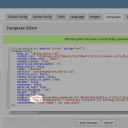
Bit hard to see in the code, here's a screenshot of the template editor.
screenshot_form_editor.png screenshot_form_editor.png - 110KB

updated by @michael: 04/25/15 12:43:31AM

michael
@michael
04/24/15 10:42:49PM
7,832 posts

_init() doesn't need 'editor_button'


IpsumJam

Hi steve,

in
/modules/ujIpsumjam/include.php

In the _init() function there is this line:
    jrCore_register_module_feature('jrCore', 'editor_button', 'ujIpsumJam', 'on');

It can be commented out or removed.

That line is asking TinyMCE to add an extra button to its system. Its the code you use if you want to add a button like the jrEmbed has added its button to TinyMCE.

IpsumJam is adding itself to the jrEmbed popup a couple of lines before.

The result is TinyMCE is expecting to find the button config file at:
http://jr500.iixxii.cc/modules/ujIpsumJam/tinymce/plugin.min.js?v=1.0.4

Its not finding it and its throwing a small error in the console.
michael
@michael
04/24/15 03:50:49PM
7,832 posts

New Site Builder Warning Message


Using Jamroom

l o l :) Yeah, lets go with that.
michael
@michael
04/24/15 01:43:52AM
7,832 posts

Another (old) SiteBuilder page only visible to admin


Using Jamroom

Theres a bunch of ways you could approach any problem from. Just got to find ways you enjoy using. And when you get stuck as in the forums for other options. :)
michael
@michael
04/24/15 01:40:38AM
7,832 posts

Forum post says no HTML allowed, but quota seems ok


Installation and Configuration

I'm not able to reproduce what your seeing here. Can you check to make sure your all up-to-date from the marketplace.

If you are up-to-date, would you click that < > button on the editor and paste the code in to a [ code ] [ /code ] block here so I can try to see what your seeing please.
michael
@michael
04/24/15 01:28:41AM
7,832 posts

Who determines when a profile is active or not active? (and related questions)


Using Jamroom

I keep 10 email addresses for testing
1@mydomain.com
2@mydomain.com
3@mydomain.com
4@mydomain.com
....

But maybe you don't want to do that. Could try something like this:
https://www.guerrillamail.com

Which seams to be a service for disposable email addresses. Or search for "disposable email address" or similar to find others.
michael
@michael
04/24/15 01:24:42AM
7,832 posts

New Site Builder Warning Message


Using Jamroom

currently it reads like this:
Quote: This URL is currently mapped to the Slate - Site Builder skin "index.tpl" template.

If you create this new Site Builder page, it will show instead of the template.

If you delete the Site Builder page, the template will show again.

Create this Site Builder page?

Would this wording be less scary?
Quote: This URL is currently mapped to the Slate - Site Builder skin "index.tpl" template.

Click OK to use a fresh Site Builder page instead.

If you want to restore the page to how it is now, just delete the Site Builder page you created and the current page will return.

Click OK to continue, or cancel to keep it how it is now.

Or could you think of an even better version? :)
michael
@michael
04/24/15 01:17:10AM
7,832 posts

Where are Member's Individual Profile Pages?


Design and Skin Customization

What is 'out there' isn't a mystery if you know where to look. It starts by "What modules do I have installed?"

If you know that your users have something on thier profiles, thats a great place to start.

So let analyze this profile on the demo site:
http://demo.jamroom.net/jrNingja/demoadmin/audio/80/song-dance

We can see that they have:
* TIMELINE
* AUDIO
* BLOG
* EVENTS
* FORUM
* GALLERY
* GROUPS
* PLAYLIST
* POLLS
as tabs on their profile. This means that at least those modules are active on the site.

Most modules contain an index.tpl file, that means that they provide a common list for all the items from the site regardless of profile. Its probably that that you want to link to from the main menu.

We can see in the URL in the address bar that the structure is:
sitename.com/(profile name)/(module url)/.......

So we can go check if the module url also provides us with a site wide list. In this case the URL we are on is the audio one, so remove the profile name and check out:
http://demo.jamroom.net/jrNingja/audio

Yup! Thats got a list of them all. So now make a menu url pointed to that location.

And repeat.

For the url's that are active on the demo site, we see that these all have lists:
http://demo.jamroom.net/jrNingja/audio
http://demo.jamroom.net/jrNingja/blog
http://demo.jamroom.net/jrNingja/event
http://demo.jamroom.net/jrNingja/gallery
http://demo.jamroom.net/jrNingja/group
http://demo.jamroom.net/jrNingja/playlist
http://demo.jamroom.net/jrNingja/poll

So you can do the same for your site. Just because a module has that page available, doesn't mean you HAVE to put a link to it in your menu. Its your site, you can choose.
michael
@michael
04/24/15 12:51:03AM
7,832 posts

Another (old) SiteBuilder page only visible to admin


Using Jamroom

somewhere special? sort of. I'm looking in the database. You can get there by going to:
ACP -> TOOLS -> DEVELOPER TOOLS -> TOOLS -> DATABASE ADMIN

Thats all the data for your site.

To see the panels info above, in the box on the left type 'panel' to filter ALL the tables down to just the ones we're interested in.

Then click on the little icon next to jr_jrpanel_item_key to see the data.

We want to see the newest pages, so above _item_id column, click the little down arrow to get the newest up first.

That should show you what i pasted above.

Yeah, looks like /nearme is back to profile_id 1 seams like that is the issue then.
michael
@michael
04/24/15 12:41:57AM
7,832 posts

Feedback new site builder - Menues gone in slate site builder skin


Using Jamroom

Slate wasn't ready for the sitebuilder menu, it is now, you can update from the marketplace to get the changes and your menus should appear again.
  552