Forum Activity for @michael

michael
@michael
12/29/13 08:46:49PM
7,832 posts

Media Download and Foxycart


Design and Skin Customization

need more info than that. The items for sale should not be downloadable, how do you have it setup?
michael
@michael
12/27/13 11:24:31PM
7,832 posts

jrAudio and some files?


Installation and Configuration

That link to the mixposure audio file:
http://www.mixposure.com/1052539/audio/16612/himado

that doesnt play, it doesnt play when you download it and play it in VLC either.

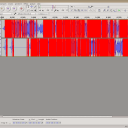
I opened it up in audacity and its got a bunch of red parts. Think red is bad...

Not sure why when or how, or even if thats useful. If i had to guess, I would guess dataloss at some point. encoding time or upload time perhaps.

(screenshot of audacity)
screenshot_broken_audio.png screenshot_broken_audio.png - 55KB

updated by @michael: 12/27/13 11:24:51PM
michael
@michael
12/27/13 11:03:30PM
7,832 posts

Problem with Timeline Footer


Using Jamroom

My guess would be a stray /div

If there is one or more extra closing or opening divs than there should be, the footer could get sucked up into a higher div.
michael
@michael
12/27/13 06:37:53PM
7,832 posts

Jamroom has no reviews on Quora.com.... :( reviews please


Off Topic

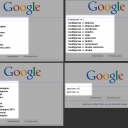
It doesn't have to be quora. (there is only a Jamroom page on this since a few weeks ago when I added it) It could be anywhere.

The main thing is: Jamroom isn't one of the options when people go looking for social or community sites.

It isn't a known option for anything. Check out this vs. image i made, it illustrates the point.
screenshot_jamroom_competion_vs.png screenshot_jamroom_competion_vs.png - 161KB

updated by @michael: 12/27/13 06:38:08PM
michael
@michael
12/26/13 09:39:47PM
7,832 posts

issue deleting a module


Installation and Configuration

go to:
yoursite.com/marketplace/system_update

to make sure the system is up to date. Run the integrity check to make sure the site is in order:

yoursite.com/core/integrity_check

Install 'jrEmbed' module,
* activate module.

Install 'jrUpimg' module,
* activate module.

-- trying to recreate issue ---
* deactivate tinyMCE embed button.
* delete module - save changes.

Go to upimg module's info tab, it reads "This module has required dependencies that are not met, and cannot be enabled"

(this seams to be the problem)

back to marketplace, install jrEmbed.
* make active.

on upimg INFO tab, "module active" now appears.
* deactvate
* delete - save changes.

on embed module INFO tab,
* deactvate
* delete - save changes.

-------------------
That way works. I can see its a bit of a hassle though, so have added a tracker here:
https://www.jamroom.net/the-jamroom-network/tracker/269/add-module-deactivate-and-delete-to-modules-that-have-dependencies

Thanks.
michael
@michael
12/26/13 04:28:03PM
7,832 posts

Jamroom has no reviews on Quora.com.... :( reviews please


Off Topic

Seams like the only social networks known on Quora.com go round and round in the questions "Which is best" but Jamroom rarely gets a mention.

Like Jamroom? How about a review here:
http://www.quora.com/Reviews-of-Jamroom-CMS

Cheers.
updated by @michael: 01/28/14 11:33:01AM
michael
@michael
12/26/13 01:43:20AM
7,832 posts

issue deleting a module


Installation and Configuration

Whats the module combo that I can use to see it happen?
michael
@michael
12/26/13 01:42:43AM
7,832 posts

How do you use the Item Action Buttons:


Design and Skin Customization

Working on something to address this issue though.
michael
@michael
12/25/13 09:47:54PM
7,832 posts

Allow Artists to just stream music.


Installation and Configuration

you could use the 'Form Designer' tool to add another checkbox option:

"the Form Designer tool"
Using the Form Designer tool

then wrap the download button in that. Something like audio_streamingonly so if the artist checks the checkbox the download button does not show.

{if $item.audio_streamingonly !== 'on'}
// show the download button
{/if}
  749