Forum Activity for @michael

michael
@michael
07/26/17 04:20:01PM
7,826 posts

Image Display Query


Using Jamroom

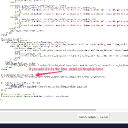
If you use the Template Editor (or other means) to add it to the the jrImage galleries item_detail.tpl file, then you can have it wherever you want.

Docs: "Using the Template Editor"
https://www.jamroom.net/the-jamroom-network/documentation/jamroom-admin-handbook/3183/using-the-template-editor

and alter:
ACP -> MODULES -> PROFILE -> IMAGE GALLERIES -> TEMPLATES -> items_detail.tpl
template.jpg template.jpg - 141KB
michael
@michael
07/26/17 06:28:21AM
7,826 posts

Image Display Query


Using Jamroom

I did, but then you said ".....It's just slightly different than Ning beacuse Ning's button is to 'view' the original full size image on its own url...."

So I'm just pointing out a way to have it that way if you prefer. :)
michael
@michael
07/26/17 06:15:59AM
7,826 posts

Image Display Query


Using Jamroom

if you want to add a link to the original image, just adjust the .tpl file to point to the URL and have text that reads "download"
<a href="https://fotmd.com/gallery/image/gallery_image/8256/1280/_v=1436754228">Download</a>

Something like:
<a href="{$jamroom_url}/gallery/image/gallery_image/{$item._item_id}/original">Download</a>
michael
@michael
07/25/17 08:45:42PM
7,826 posts

Image Display Query


Using Jamroom

"......So when we 'allow' download image, it does not download the original full size image...." this is incorrect, download downloads the full size original image.

The image gallery tool to reduce uploaded jpgs changes the size of the original image.
michael
@michael
07/25/17 07:35:34PM
7,826 posts

Image Display Query


Using Jamroom

Strumelia:
michael:
ACP -> PROFILES -> IMAGE GALLERY -> GLOBAL CONFIG -> Allow Original Download (check)
That?

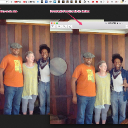
That downloads a smaller-than-original image version.
Try it here:
https://fotmd.com/strumelia/gallery/8256/bones-lesson-at-my-house-with-dom-flemons

Both images are JPEG Image, 960 × 720 pixels, same.

Maybe you've run the image cropping system to reduce space on your server perhaps.
image_sizes.jpg image_sizes.jpg - 245KB
michael
@michael
07/24/17 08:59:29PM
7,826 posts

Image Display Query


Using Jamroom

Strumelia:
...or am I missing something obvious for members to get to the largest res image they see in another member's gallery? Is there a setting I may have set and subsequently forgotten, that is preventing the option from showing on my own site?....
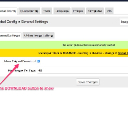
ACP -> PROFILES -> IMAGE GALLERY -> GLOBAL CONFIG -> Allow Original Download (check)

That?
allow.jpg allow.jpg - 73KB
michael
@michael
07/24/17 04:53:49PM
7,826 posts

Embed The Playlist Player In An External Site


Design and Skin Customization

andrusito:
I'm trying this:

on AudioPro/test.tpl:

{jrCore_list module="jrAudio" order_by='audio_display_order numerical_asc' limit="10" profile_id="24044"  template="standalone_player.tpl"}

and on jrAudio/standalone_player.tpl:

{jrCore_media_player module="jrAudio" type="jrAudio_player_dark"}

The result is a white square with a loading gif in the middle. (attached img)

What's wrong in that code? How can I show a player with all songs from this artist id: 24044?

You need to look at what your asking, then if its not returning what you're expecting, re-phrase it.
{jrCore_list module="jrAudio" order_by='audio_display_order numerical_asc' limit="10" profile_id="24044"  template="standalone_player.tpl"}
That reads: "Get me a list of 10 audio items from the profile 24044 and pass the list in to the template standalone_player.tpl"

Which would be fine if standalone_player.tpl was setup to receive a list, but its not, so don't pass it a list. You need to build your own template file which is expecting to receive a list.

The next piece of code you have
{jrCore_media_player module="jrAudio" type="jrAudio_player_dark"}
reads: "Show an audio player with a dark skin"

But there is no mention of anything to play, so it will play nothing.
michael
@michael
07/24/17 04:06:57AM
7,826 posts

Image Display Query


Using Jamroom

Sure, you can link to it if you want. There is a setting to block it in the ACP if you dont want it. Might be good for the download version for your users.

If you link to an invalid image size it shows you the available options:
https://pmp-art.com/gallery/image/gallery_image/215280/something
Quote: CRI: invalid image size - must be one of: xxsmall,xsmall,56,small,icon96,icon,medium,large,larger,xlarge,xxlarge,xxxlarge,1280,original
michael
@michael
07/23/17 07:18:36PM
7,826 posts

Image Display Query


Using Jamroom

Not a fair comparison. In your screenshot both images look the same size, but they're not. The one on your site is 1280px. Its been reduced to that size so that it loads faster over the web.

The full size image is on this url:
https://pmp-art.com/gallery/image/gallery_image/215280/original

The full size image is 4288px wide.

So the answer to your question is the bigger image looks better because it has more detail to it. When an image is reduced in size it looses detail.

--edit--
If the user was to compress the file to 1280px before uploading to your site, then compare what they had with what was uploaded they would look the same.

--edit edit--
Also the "Convert to JPG" could also have something to do with it, its a setting at:
ACP -> CORE -> IMAGE SUPPORT -> GLOBAL CONFIG -> GENERAL SETTINGS -> CONVERT TO JPG

When using this, to save size, the image is reduced to 85% of its full quality.
updated by @michael: 07/23/17 07:26:48PM
  203