Forum Activity for @brian

brian
@brian
11/30/16 08:51:19AM
10,149 posts

emergency core update disabled site nothings redirecting right


Installation and Configuration

This is WRONG and likely your issue:

ln -s jrCore-release-5.4.0b4 jrcore

you probably have "jrCore" and "jrcore". It is CASE SENSITIVE so delete "jrcore".

Is there a reason you don't use the Marketplace to upgrade? It would save you all this headache and hassle.
brian
@brian
11/30/16 08:43:02AM
10,149 posts

emergency core update disabled site nothings redirecting right


Installation and Configuration

You somehow have 2 cores in there, or your web server has cached things. Restart your web server.
brian
@brian
11/30/16 08:37:35AM
10,149 posts

emergency core update disabled site nothings redirecting right


Installation and Configuration

You keep saying "redirecting" - Jamroom is not going to redirect you. Do you have something custom in place to redirect?

Rename the "repair.php.html" to "repair.php" in your Jamroom root directory and then run that script in your browser.
brian
@brian
11/30/16 08:12:59AM
10,149 posts

Jamroom 6 Upgrade Guide


Announcements

iamtimbo:
does that create a clone of your altered skin, or just the original one.

It creates a clone of the skin int the state it is in when you make the clone, so it will include any template changes you have made.
brian
@brian
11/30/16 08:04:51AM
10,149 posts

Pedigree


Genosis

Melih:
Hello Brian,
I hope you are well!

I saw a problem but i don't know how long it has been like this.
When i click the search box on pedigree page a small windows appears below which shows mainpage. There is also a translation problem. It shows the translated word for a split second then changes in to "search". When i click it doesn't disappair.

OK - let me check that out and see what's up.

Thanks!
brian
@brian
11/29/16 02:35:49PM
10,149 posts

Create An Event


Using Jamroom

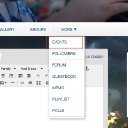
The "events" link is located in the "More" (see screenshot). I believe once you add an event, it will show on the right.

Let me know if that helps.
Voila_Capture 2016-11-29_02-34-56_PM.jpg Voila_Capture 2016-11-29_02-34-56_PM.jpg - 74KB
brian
@brian
11/29/16 02:22:38PM
10,149 posts

Create An Event


Using Jamroom

jffgldr:
OK, I'm in the Member quota and have selected that quota for this module....reset caches...still no go. When you checked this with iSkin did you use the one that was updated yesterday?
Thanks

Yep - I'm using what I believe you are using. Open a ticket with your admin login and pass and we can check it out.

Thanks!
brian
@brian
11/29/16 02:07:25PM
10,149 posts

Jamroom updates - to overwrite own things


Using Jamroom

No problem - I think that will work out best for you.

Thanks!
brian
@brian
11/29/16 02:06:51PM
10,149 posts

Create An Event


Using Jamroom

Double check that you enabled the Event Calendar module on the right quota:

1) Go to your Account Settings (click on the gear) -> Profile tab and check what QUOTA your profile is in

2) in the ACP -> Profiles -> Event Calendar -> Quota Config that make sure you have selected THAT quota and have checked the "allowed on profile" option and saved

3) then reset caches

Let me know if that works.
  200