Forum Activity for @strumelia

Strumelia
@strumelia
01/04/17 06:17:22AM
3,605 posts

Latest Activity showing "Holly posted a new comment on Holly"


Using Jamroom

Micheal, it appears to be working perfectly now- thank you! :D

I guess if you 'get it out for everyone' that means:
1) it'll then automatically be fixed on my other site
2) i'll need to remove your customization/fix on my fotmd site at that point and just go with the update when you release it?
Strumelia
@strumelia
01/03/17 05:56:24PM
3,605 posts

Why Jamroom is the best CMS


Off Topic

Agree 100% !
Strumelia
@strumelia
01/03/17 05:37:57PM
3,605 posts

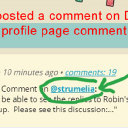
Latest Activity showing "Holly posted a new comment on Holly"


Using Jamroom

I just updated to jr6 yesterday, and I'm now suddenly seeing this as well. See attached screenshot from my home page Timeline. I am using my custom skin which was built from Ningja.
And though the link says "@ strumelia", clicking on it does take me correctly to my comment on David's profile page, here:
http://fotmd.com/david-pedersen#cm132389
-but the hotlink shouldn't say "@ strumelia" I believe? It does look confusing and nobody can see on whose page somebody actually left their comment. It is showing the same on my own profile page timeline as well. It seems to only happen when a member posts a comment on the comment wall of another member's profile page. Other links in the timeline for comments show up correctly (like a comment on someone's video etc).
atstrumelia.jpg atstrumelia.jpg - 146KB

updated by @strumelia: 01/03/17 05:38:49PM
Strumelia
@strumelia
01/03/17 02:24:03PM
3,605 posts

new in jr6- but where/how Admin joins/shows as a member of a group now?


Using Jamroom

Ah, thank you very much Paul! I made the fix in my other whistle site as well, and both are working great now. Love this little update in Groups... woo-hoooo! :D
Strumelia
@strumelia
01/03/17 02:08:08PM
3,605 posts

jr6 - bug in the profile page timeline links?


Installation and Configuration

After updating to jr6, we're now getting a 'not found' error page for a certain type of link situation:

Seems to work fine?: the link to a group discussion from the Main Page/Index page activity Timeline.

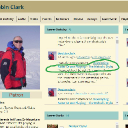
Does not work: clicking the same link to a group discussion from a member's Profile Page Activity timeline. See the link in my screenshot from a profile page. Clicking that link takes me to http://fotmd.com/robin-clark/group_discuss/2012/developing-noter-drone-playing-the-melodic-style#cm132364 'not found'.
-Clicking same link from main page timeline takes me to the discussion correctly- and the CORRECT url would be: http://fotmd.com/strumelia/group_discuss/2012/developing-noter-drone-playing-the-melodic-style#cm132364
Here's the actual member page where you can see this happen: http://fotmd.com/robin-clark
The link is setting Robin as the group owner I believe, when actually it's my group, but his discussion thread.

Here's another example, when clicking on a different group discussion link from a different member's Profile page timeline:
http://fotmd.com/sleepingangel/group_discuss/2007/ebony-or-micarta-for-fingerboard-overlay#cm131658
That link 'should' be taking us to :
http://fotmd.com/guy-babusek/group_discuss/2007/ebony-or-micarta-for-fingerboard-overlay#cm131658
- you can see above that the link url is getting the item owner name wrong. The group belongs to Guy B., but the discussion was started by Sleepingangel.

Thanks!
profile-timeline-link-to-group.jpg profile-timeline-link-to-group.jpg - 379KB

updated by @strumelia: 04/13/17 04:10:34AM
Strumelia
@strumelia
01/03/17 01:19:41PM
3,605 posts

new in jr6- but where/how Admin joins/shows as a member of a group now?


Using Jamroom

I know that one of the new features we've gotten for jr6 is that ability for an Admin member to actually 'join' a Group and show up as one of the members of the group in it's member roster. This is different from before when we Admins always just automatically had access to posting/editing groups but weren't shown as being a member of the group.
I just updated to 6, and maybe I'm missing something obvious, but I'm still not seeing any 'join group' option for me. Maybe I'm not really understanding how this works? I tried looking for the thread here that talked about this, but I can't find it. Am I thinking Paul perhaps worked on developing this added feature?
Thanks for any help in understanding it.
updated by @strumelia: 04/14/17 11:44:35AM
Strumelia
@strumelia
01/03/17 01:01:45PM
3,605 posts

Header prevents access to top tabs and login fields on ipad


Installation and Configuration

Ok, so on my jr6 sites, last night I made a few trials of adding the "margin top 70px" code snippet in my active (customized from ningja) skin: I experimented in doing this in both my mobile_core.css and my tablet_core.css files in my active skin (I'm assuming that's where this needs to be changed).
I got mostly no results, but when I did get results it simply added more space above the header...but still the top tabs and login window etc remained stuck BEHIND the banner and were still not accessible. I undid the tests I made.
This issue is happening on both my jr6 sites, on iPads but not on Android phones...and i see it in Safari and Chrome but have not looked at other browsers- I assume they all show it. As I show in my video in my prior post, it prevents members from logging in on ipads, and also keeps folks from accessing upper TABS, such as on their profile pages.

I'm stuck. Maybe you can tell me more specifically what code to add and in which .css file, please?
Here is what I have in my two files (note that there's a scrollbar to see both codes in their entirety)...first my mobile_core.css, and secondly my tablet_core.css :

mobile_core.css:
/* Mobile */
@media handheld, only screen and (max-width: 767px) {

    body {
        width: 100%;
        min-width: 0;
        margin: 0;
        padding: 0;
        font-size: 10px;
        -webkit-text-size-adjust: none;
    }

    h1 {
        font-size: 14px;
        font-weight: bold;
    }

    h2 {
        font-size: 13px;
    }

    h3 {
        font-size: 12px;
    }

    h4 {
        font-size: 11px;
    }

    input[type=submit], input[type=reset], input[type=button] {
        -webkit-appearance: none;
    }

    .ioutline, .iloutline {
        border-width: 0;
        margin: 0;
        padding: 1px;
    }

    #wrapper {
        margin: 0;
        padding: 0;
        padding-top: 48px;
    }

    #content {
        margin-top: 0 !important;
        margin: 0;
        padding: 0;
    }

    #header {
        position: inherit;
        background-image: none;
        margin-bottom: 0;
        height: 45px !important;
        padding: 3px 0;
        z-index: auto;
    }

    #main_logo {
        background-color: #333333;
        text-align: center;
        width: 100%;
        padding: 0;
        margin: 0;
    }

    .banner {
        display: none;
    }

    #mmt {
        background-color:transparent;
        position: relative;
        float: left;
        width: 28px;
        height: 28px;
        top: 6px;
        left: 6px;
        z-index: 50;
    }

    #main_menu {
        padding: 6px;
        text-align: center;
        font-size: 14px;
    }

    .rslides {
        height: 300px;
    }

    .rslides_tabs {
        width: auto !important;
        padding: 6px;
        margin: 0;
    }

    .rslides li {
        height: 300px;
    }

    #footer {
        margin: 0;
        padding: 0;
    }

    #footer_logo img {
        display: none;
        padding: 0;
        margin: 0;
    }

    #footer_text {
        text-align: center;
        padding: 0 12px;
        margin-bottom: 24px;
        font-size: 11px;
    }

    .row, .container {
        width: 100%;
        min-width: 0;
        margin: 0;
        padding: 0;
    }

    .row .col1, .row .col2, .row .col3, .row .col4, .row .col5, .row .col6, .row .col7, .row .col8, .row .col9, .row .col10, .row .col11, .row .col12 {
        width: auto;
        float: none;
        margin-left: 0;
        margin-right: 0;
        padding-left: 0;
        padding-right: 0;
    }

    .block {
        font-size: 12px;
    }

    #item-list {
        background: #CCCCCC;
        height: 86px;
        overflow: scroll;
        overflow-y: scroll;
        border: 3px solid #222222;
    }

    #item-holder {
        margin-right: 0;
    }

    .page_content {
        width: 100%;
        margin: 0 auto;
    }

    .page_banner_box {
        background-color: #FFFFFF;
    }

    .page_banner {
        margin-bottom: 6px;
    }

    /* @title Page Banner Icon */
    /* @help The Page Banner Icon section is the small section at the top of pages where the module icon appears */
    .page_banner_icon {
        padding: 0;
        margin: 0;
    }

    .page_banner_icon img {
        display: none;
    }

    .page_banner_left {
        text-align: left;
        background-color: #EDEDED;
        padding: 3px 9px;
        font-size: 12px;
        font-weight: bold;
        text-transform: capitalize;
        white-space: nowrap;
    }

    .page_banner_right {
        background-color: #EDEDED;
        padding: 6px 12px;
        text-align: right;
    }

    .page_table_header {
        font-size: 8px;
    }

    .page_table_cell {
        padding: 2px;
        font-size: 8px;
    }

    .nowrap {
        white-space: normal;
    }

    .element_left {
        padding: 3px;
        font-size: 11px;
    }

    .element_right {
        font-size: 10px;
        padding: 3px;
    }

    .profile_image_element_right img {
        width: 190px;
        text-align: center;
    }

    .profile_menu_entry {
        padding: 8px;
        margin-bottom: 3px;
    }

    .profile_name_box {
        height: 40px;
        padding: 6px;
        margin: 0;
    }

    .profile_name {
        display:inline-block;
        margin: 3px;
        font-size: 22px;
    }

    .profile_menu {
        padding: 0 0 0 5px;
        margin: 0;
    }

    #profile_select_menu {
        margin: 12px 12px 6px 12px;
        width: 90%;
        padding: 3px;
        font-size: 18px;
        color: #000000;
        text-transform: capitalize;
    }

    .block {
        padding: 6px;
        margin: 0;
    }

    .title {
        padding: 6px;
        min-height: 40px;
    }

    .title h1 {
        display: inline-block;
        font-size: 18px;
        margin-top: 9px;
        padding: 0;
    }

    .breadcrumbs {
        display: none;
    }

    .form_button {
        font: bold 10px Verdana, sans-serif;
        padding: 0 6px;
        margin: 0;
    }

    .form_select_item_jumper {
        width: 50%;
    }

    .upload_button {
        font: bold 10px Verdana, sans-serif;
        height: 20px;
        padding: 6px 6px 0 6px;
        margin: 0;
    }

    .create_img {
        height: 20px;
        width: 20px;
    }

    .update_img {
        height: 20px;
        width: 20px;
    }

    .delete_img {
        height: 20px;
        width: 20px;
    }

    .download_img {
        height: 20px;
        width: 20px;
    }

    .img-profile {
        max-width:250px;
        max-height:250px;
        margin: 4px auto;
    }

    /* Tab Bar */
    .page_tab_bar_holder {
        width: 100%;
        background: #FFFFFF;
        border-bottom: 0;
        padding: 0 12px 9px 0;
    }

    .page_tab_bar_spacer {
        height: 0;
        background-color: #FFFFFF;
    }

    .page_tab {
        background: #DDDDDD;
        float: left;
        list-style: none;
        margin: 3px 6px 3px 0;
        color: #000000;
        text-transform: capitalize;
        font-size: 12px;
        padding: 3px;
        text-align: center;
        border-radius: 0;
    }

    .page_tab a {
        color: #000000;
        text-decoration: none;
    }

    .page_tab_first {
        margin-left: 0;
    }

    .page_tab_last {
        background: #DDDDDD;
        color: #000000;
    }

    .page_tab_active {
        background: #444444;
        color: #FFFFFF;
        border: 0;
    }

    .page_tab_active a {
        color: #FFFFFF;
    }

    .info_img {
        display: none;
    }

    .gallery_img {
        width: 100%;
    }

    .item {
        padding: 6px;
        font-size: 12px;
    }

    #action_text {
        width: 95%;
    }

    .action_item_holder {
        text-align: left;
        display: inline-block;
    }

    .action_item_desc {
        font-size: 10px;
    }

    .action_item_user_img {
        display: none;
    }

    #action_networks {
        display: none;
    }

    .action_item {
        width: 100%;
        font-size: 11px;
        overflow: auto;
        clear: both;
    }

    .action_item_date {
        clear: both;
        float: none;
        text-align: left;
        font-size: 8px;
        font-style: italic;
        margin: 6px 0 0 0;
    }

    .action_item_user_img {
        margin: 0 9px 0 0;
        width: 32px;
        height: 32px;
    }

    .action_media_thumb {
        display: inline-block;
    }

    .action_media_thumb img {
        display: inline-block;
        width: 32px;
        height: 32px;
    }

    .left {
        font-size: 10px;
    }

    .right {
        font-size: 10px;
    }

    .form_text_search {
        width: 33%;
    }

    .ds_browser_key {
        width: auto;
    }

    #ds_browser_new_key {
        width: 80px;
    }

    .CodeMirror {
        width: 30% !important;
    }

    /* Scroll Up Icon */
    .scrollup{
        bottom:10px;
        right:10px;
    }
} 

tablet_core.css:
/* Tablets */
@media only screen and (max-width: 1025px) {

    input[type=submit], input[type=reset], input[type=button] {
        -webkit-appearance: none;
    }

    .page_tab {
        font-size: 14px;
    }

    .page_section_header {
        border-bottom: 0;
        margin-bottom: 9px;
    }


    #header {
        height: 115px !important;
    }

    #content {
        margin-top: 20px !important;
    }

    #menu_content {
        padding: 12px 0 !important;
    }

    #menu a {
        padding: 3px 6px !important;
    }

}

@media only screen and (max-width: 900px) {

    #main_logo a img {
        width: 189px !important;
        height: 51px !important;
    } 
}

Thank you for your help!
updated by @strumelia: 01/03/17 01:03:08PM
Strumelia
@strumelia
01/02/17 07:10:40PM
3,605 posts

Reversing the order of replies to forum discussion (newest first)


Using Jamroom

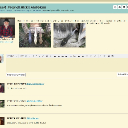
Here's a screenshot of how my Group Discuss discussions are laid out, which I just love. I'd LOVE to make my profile Forums match the same-
Note that the Original post stays at very top. Then the reply box right under it, then all the replies to the topic are under that, with oldest replies at bottom:
groupdiscuss layout.jpg groupdiscuss layout.jpg - 191KB
Strumelia
@strumelia
01/02/17 07:05:00PM
3,605 posts

Reversing the order of replies to forum discussion (newest first)


Using Jamroom

brian:
If you set the forum post order to NEWEST first (like you want) the "post response" box will show at the top, so you should not have to make any modifications.

Hmm...that's seemingly not happening for me- have updated to jr6 and reversed the (profile forum) posts order to Newest first...but the post response box (and the original thread post) is remaining at the bottom of the page. So gotta figure out how to pull it up to on top of the most recent response post.

Ideally, I'd like the topic's FIRST post to be treated differently and remain at very top of the discussion page, then the response text box right under it, and then all the topic response posts underneath those...with the newest on top. That would match how our Group Discussions are laid out, and I really like that layout, as do many of my members. It uses much less scrolling down, and keeps the original post in view too, which helps keep folks on topic.

The thing about keeping original post at top like in Group discussions would be really great, but minimally I do need to pull the response textbox up from the bottom of each page.
Thanks for any help with this- I tried to see where to move the response texbox myself, but I honestly couldn't figure it out due to all the new updates I'm still looking through..
Is this a bug though maybe, where it was supposed to move it up if I reversed order to newest on top?
Strumelia
@strumelia
01/02/17 06:25:33PM
3,605 posts

Header prevents access to top tabs and login fields on ipad


Installation and Configuration

In my active skin, I see the
tablet_core.css
which has:
#wrapper {
    background-color:#C9D0CE !important;
    font-size:13px !important;
}
...which I could alter via ftp.

OR
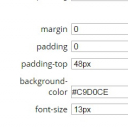
in my skin's STYLE tab, there is mobile_core.css
which has the following settings currently as seen in the following screenshot, which I can change right there:
wrapper.jpg wrapper.jpg - 17KB
  107