Forum Activity for @strumelia

Strumelia
@strumelia
12/30/16 12:39:16PM
3,605 posts

Lost the trashcan/delete icon on Index page Timeline in jr6?


Using Jamroom

On my jr5 live site, I have the nifty 'delete' trashcan for items on both profile page Timelines and on the Home/index page Timeline of my site. This hover trashcan enables admins to delete an item's mention from the activity feed (without deleting the actual item from the site).
On my jr6 (non-live site), I seen that a 'link' icon has now been added for both the Index page and Profile page Timeline entries. The link icon takes you to the Timeline page for that item, such as: yoursite.com/profilename/timeline/9 That's a cool new feature (though I'm not sure why it doesn't take one to the actual item instead of to its mention in a timeline- seems it would be more useful to take one to the actual item where it exists, like a comment on a photo for example).

HOWEVER on to my subject- On my jr6, the Trashcan icon is now missing from the Main/index page Timeline entries. It's still there on profile page Timeline entries. It's SO convenient for admins and moderators to be able to quickly remove a particular mention from the home page activity feed (without removing the item itself). This covers occasions like if a member keeps editing their video description over and over- we can remove lots of those so they don't take up the whole main page timeline. Or if some member says something I don't want to actually delete, but I dont necessarily want it broadcast on the main page of the site.

How can we get back the trashcan delete feature for the Homepage Timeline entries in jr6? Thanks!
updated by @strumelia: 04/02/17 11:21:41AM

Strumelia
@strumelia
12/29/16 04:51:49PM
3,605 posts

bug in template Compare Tool, in jr6


Using Jamroom

Yes I noticed the advanced ability to compare versions- good job.
Thanks for fixing up this little quirk so that folks will be less confused. :)
Strumelia
@strumelia
12/29/16 03:27:34PM
3,605 posts

bug in template Compare Tool, in jr6


Using Jamroom

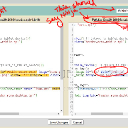
The template title in the Compare tool does not change correctly to the version you are trying to compare, even though you are changing the versions in the dropdown menu and even though you can tell from the code that it's the correct version in the right panel...the top title remains stuck and incorrect, so it's confusing and makes you nervous about transferring changes. See screenshot. (the tool works correctly in jr5)
compare-tool.jpg compare-tool.jpg - 375KB

updated by @strumelia: 04/04/17 06:38:27AM
Strumelia
@strumelia
12/29/16 03:17:47PM
3,605 posts

chat bug?


Using Jamroom

I'm on a custom Ninja skin in jr6 and am not getting that problem when I go through your steps and go to my profile page- I see the close/widen buttons just fine...(in case that info helps anyone to track down the issue).
Strumelia
@strumelia
12/28/16 07:19:59AM
3,605 posts

Default font settings and default font size options in drop down list


Using Jamroom

In your ACP, go to your active SKIN- and to the STYLE tab.

There in the "style editor", look through the drop-down menu and the main ones you'll want to look at are:
site.css and html.css.

Check the sizes of fonts and background colors in all the style TABS of both site.css and html.css (the tabs like 'color and font', advanced, 'untagged', etc)
I have lots of older members and I find 13 point text in general rather than 12pt is nice.

You mention the 'text editor'- are you referring to the tinymce text input window? I'm not sure where you would go to control the default font size for the tinymce 'text editor'. My members have never complained on that so I never looked into changing it, or whether it's even possible.

The place to see your font selection is in html.css
I have "open sans, Tahoma, sans serif" selected, which I find very readable. It's currently set to 14pt for the 'body' section.

Work with your site.css and htmal.css settings and see if it governs the various parts of your site that you need it to. Only if you find an area that's NOT changing to what you want should you then delve into exploring the font styles in each various module/area... could be the overall settings control all sufficiently- they did for me, I didn't need to go in module by module. The things like your header/footer links font styling however..like whether you want them all caps and what color font...would (naturally) be set in your header.css and footer.css.
Don't forget to clear cache to see the results, or temporarily put your site in developer mode to see results immediately.

I stumbled through all of this back when building my site almost 2 years ago, so I don't really know if this is the best or most direct way to set font styles, but it worked for me. Maybe the JrTeam will have more accurate or elegant suggestions. :)
updated by @strumelia: 12/28/16 07:46:37AM
Strumelia
@strumelia
12/28/16 06:49:29AM
3,605 posts

Auto Join main chat room


Using Jamroom

You guys never cease to amaze me. I look forward to seeing your smiley button and menu feature in jrChat when it's ready!
Strumelia
@strumelia
12/27/16 02:09:11PM
3,605 posts

The New Jamroom.com Site Update


Design and Skin Customization

Michael, the description there of the jamroom.net site needs to be updated to read "built on JR6", I think?
Strumelia
@strumelia
12/27/16 12:39:06PM
3,605 posts

Auto Join main chat room


Using Jamroom

"You COULD have 2 sets of key codes that worked for the same smiley: ...
but the problem is if the " version gets used in chat it wont do anything, it will be clicked and nothing will happen."

So... I guess the next question would be: is it possible on my older/live site to make it so the _"( _ version gets used in my forums and comments etc, but the _[( _ version gets used in the chat? I mean, i would assume that'd be the reason to have two versions in this situation.
Strumelia
@strumelia
12/27/16 09:07:25AM
3,605 posts

How to Include "Add to Timeline" for Forum/Create when posting as Admin?


Using Jamroom

This is still not working for me on either jr5 or jr6. Admin user posts to EXISTING forum threads appear just fine on main page Timeline, no matter who created the thread, but no action appears on the site Timeline or in their own profile page Timeline if an Admin CREATES a new forum thread.
Strumelia
@strumelia
12/27/16 08:43:09AM
3,605 posts

Auto Join main chat room


Using Jamroom

Michael, I assume you are recommending:
 [(dulcimer)] 
and not
 [(dulcimer]) 
as you typed above for your examples.
I did test that format on my test site (pennywhistle site) and yes it works in the chat as well as in the regular posts on the site.
So I could go through all my smileys on the new (non-live) site and change them all fairly quickly, and the smileys would then work everywhere - in forums and in jrchat as well.
However, that resolves just half of the dilemma of the chat for me-
my members are not able to memorize all the chat codes, so I'd still need a chat button that pulls up a visual menu of the smiley gifs to select from, without their codes...like most chat programs that offer smileys have. If the jrChat had that, I could then use it on my new site when I go live...instead of Cometchat.

Another question: Are the jrChat smiley images and their codes stored separately from the jrSmiley module images? In other words, could I have a different code format for calling up the chat smileys from the images code format I keep for my jrSmiley module? (I'm thinking to the future here, if I want to switch from CC to jrChat on my OLDER live/main site, without losing all the smiley images embedded in years' worth of forum and comment posts, resulting in broken links for every smiley ever used.)
  109