Forum Activity for @strumelia

Strumelia
@strumelia
02/26/16 11:22:15AM
3,605 posts

Admin items still not seen in activity feed by members


Using Jamroom

Ok, I waited a long time for 5.3 to fix this and I thought I had this fixed with the new 5.3 updates becuase I could suddenly see our admin posts in the main timeline, but...

I realized today that when I'm logged in as either master admin or a profile admin, I DO see my and my moderators' posts and items in my index page main Activity Timeline. I assumed all my members saw our posts, content additions, and comments as well....but I was wrong.

When i log in as a regular member, I still see NONE of the items, posts, updates, forum discussions, new things added...at ALL by me or my 6 profile admins in the Home page Activity feed. This is bad, because we are among the seven most active members, and our site contributions are deliberately geared towards stimulating participation...but members cant' see any of them in the timeline on the main page! :(

How can I get ADMIN and profile-Admin posts/items/comments/updates to SHOW to regular members in the Activity Timeline on my main page??

Additional related issue: when logged in as master admin, I see in the timeline when I post a RESPONSE to my own forum discussion...but it won't show up when I CREATE a forum discussion. Yet I can see when a regular member creates a new forum discussion. Thus, when i create a new forum discussion, I need to then immediately reply to it to get it to show up on the activity Timeline at all. (but since regular members won't see EITHER action, I guess I need to fix the first issue first!)

Thanks for any help
updated by @strumelia: 06/22/16 12:16:09AM
Strumelia
@strumelia
02/23/16 05:20:16PM
3,605 posts

default profile image - how to change on the "Profiles" page


Ning To Jamroom

Great to hear it Deb!

Genius...yeah that's me...lol...

Step 1- I check to make sure my computer is plugged into the wall... ;D
Strumelia
@strumelia
02/23/16 03:15:45PM
3,605 posts

how to change default font


Using Jamroom

I don't have SiteBuilder, but...if you can get into the form_editor.tpl via your ACP, then look for the lines near the bottom that start with "plugins:" and "toolbar1".

Here are some snippets that I have added to add more options to the font styling, and some other features buttons I (rather inelegantly) added to my text editor:
 
plugins: "contextmenu,pagebreak,{if $jrsmiley}jrsmiley,{/if}{if $jrembed}jrembed,media{/if},image,autoresize,{if $table}table,{/if}link,code,fullscreen,textcolor,colorpicker,preview{if $hr},hr{/if}",
toolbar1: "formatselect | fontselect fontsizeselect forecolor {if $strong} bold{/if}{if $em} italic{/if}{if $span} underline{/if} | {if $span || $div} alignleft{/if}{if $span || $div} aligncenter{/if}{if $span || $div} alignright{/if}{if $span || $div} alignjustify |{/if}{if $ul && $li} bullist numlist |{/if}{if $div} outdent indent |{/if} undo redo | link unlink anchor pagebreak{if $table} table{/if}{if $hr} hr{/if} | code preview fullscreen{if $jrembed || $jrsmiley} |{/if}{if $jrembed} jrembed{/if}{if $jrsmiley} jrsmiley{/if}",

-pay particular attention to the toolbar1 line where I have added:
"fontselect fontsizeselect forecolor"

add the above missing wording in where I have it in the toolbar1 line, and save changes. Be sure to check the checkbox to activate the change. See if it works ok for you, if not just click to reset the template the way it was before.

Note- I'm not sure that's going to set the "default font/size for the site" as you seem to be angling for in this thread though. But it may add the font options in the text editor that you are wanting.
updated by @strumelia: 02/23/16 03:19:33PM
Strumelia
@strumelia
02/23/16 02:51:10PM
3,605 posts

default profile image - how to change on the "Profiles" page


Ning To Jamroom

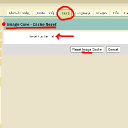
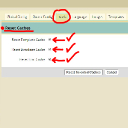
Maybe a dumb question, but did you do both of these in both locations in my following two screenshots? (also be sure to clear your browser cache just to be sure)
image_cache_reset.jpg image_cache_reset.jpg - 166KB
Strumelia
@strumelia
02/23/16 11:38:20AM
3,605 posts

default profile image - how to change on the "Profiles" page


Ning To Jamroom

Try looking in the Images Tab of your Image Core module.

Or try accessing it here: http://yoursite.com/image/admin/images
You just have to upload a new custom image. Dont' forget to check the 'active' checkbox, and then "save changes".
If you make it a square custom image, it 'plays nice' in grids and lists.
Strumelia
@strumelia
02/22/16 12:27:11PM
3,605 posts

add "Empty Playlist" help text to the profile tab.


Design and Skin Customization

I think that's a terrific idea! I do notice that members (especially new members) are sometimes confused as to why they are lacking various content tabs on their profile page...while seeing those tabs present on other members' profile pages.
Strumelia
@strumelia
02/21/16 08:39:06AM
3,605 posts

Cannot find my server settings button at jamroom.net


Installation and Configuration

Note also that when you fill in the mailgun API there, you don't just put the number.... you put:
" key-12345...etc " Be sure to start with: key-
...and no spaces.

I run my site's notifications through Mailgun built into JR, and I was told to leave my actual "Mailgun SMTP" Module DE-activated, which I do.
Instead, if you have your server mailgun api code in properly, and your other Email settings set up, it works fine with simply the JR Email/EmailCore Module.

If your 'test emails' are working, you can also go directly to your Mailgun.com account (not on JR site) and see your email/notification logs and bounces etc from there. From there you can occasionally check for problems, like if a member's address get put in the 'suppressed' list because it bounced a couple times or their mailbox rejected a notification...you can remove it from the suppressed list in mailgun once you know it should be working fine again. You can also see excactly how many notifications are going out from any of your domains every day, how many bounces, etc.
Strumelia
@strumelia
02/21/16 08:29:16AM
3,605 posts

Cannot find my server settings button at jamroom.net


Installation and Configuration

researchcooperative:

I have my Mailgun API numbers ready, and following the mailgun setup instructions, am looking for the place to enter these API codes.

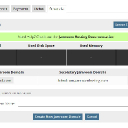
Back up one screen from where you were in your screenshot, and click here instead- that's where you'll find the place to put in your mailgun API code:
hosting_server_settings_11.jpg hosting_server_settings_11.jpg - 168KB
Strumelia
@strumelia
02/20/16 08:20:56AM
3,605 posts

issue with photo gallery


Using Jamroom

Yes, if a profile is not 'private' then any photos uploaded via the profile's Images Tab will be seen in the site's general "/gallery" page images.
  160