Forum Activity for @strumelia

Strumelia
@strumelia
01/08/16 05:07:53PM
3,605 posts

After skin or module updates by the original developer, what happens to customizations?


Design and Skin Customization

If you learn a little every week, one morning you'll wake up and amaze yourself that you can make some changes to your site yourself!

Just follow careful safety procedures, because you 'will' make some mistakes along the way. Back everything up! - especially before making any changes or testing.
Strumelia
@strumelia
01/08/16 04:50:59PM
3,605 posts

After skin or module updates by the original developer, what happens to customizations?


Design and Skin Customization

researchcooperative:
Things like the colour of the menu background, the layout of profile pages, or the automatic capitalisation of headings.

Just wondering if you saw my response on how you can easily change your capitalization settings, via your ACP-> Style (css files) TAB: https://www.jamroom.net/the-jamroom-network/forum/new_posts/36881/do-private-notes-have-an-outbox#last

Changing colors and font styles and spacing issues can all be changed the same way. It took me a little trial and error (and taking down notes when i hit on the right location in the Stle CSS settings for each item, so I wouldn't forget). After a while I began to get a sense of where to find some of these settings in the Style Css TAB and the .css files.

You'll want your own custom SKIN that you keep backed up. That will normally be your site's ACTIVE skin. You start with a pristine Jamroom skin (like Elastic or Ningja) and make a CLONE of it and name it with your custom skin name. When you style your site, you make your custom changes to your custom skin, not to the parent JR skin. It's the parent JR skin that will get the updates from JR periodically. After each update, you can use the skin COMPARE tool to compare the prior JR skin template in question to the new updated JR skin template, to see exactly what the change was and the code will show as newly added. Then you can decide whether you want that new updated change added to your CUSTOM skin...and you add it or not, yourself. Sometimes the change is only a little snippet in the code. If it's hard to find you can ask the JR Team where the new code update is located- in WHICH template in the updated JR skin. Knowing which template has been updated is very helpful when using the Compare tool.

In short, keep an original non-customized JR 'parent' skin and the skin updates from Jamroom will update THAT one. Also create your own custom skin as a clone of the parent skin- your ACTIVE custom skin will have your own skin name and you'll be backing it up periodically for safekeeping. When JR releases updates to the JR skin, you look to see if it's an update that you want to apply to your custom skin- then you locate the new code changes and apply them to your custom skin. (make a backup of your custom skin always before making any changes, in case things get screwed up!)
By the way, this is a handy backup module to have and USE: https://www.jamroom.net/the-jamroom-network/networkmarket/22/db-and-system-backup
But also learn how to use the ACP-> Developer's Tools-> "Clone Skin" function so you can back up your custom skin to keep it safe, as a habit, before making changes and possibly messing things up.

Learn how to use the "Compare" feature in ACP skin and module templates- at first just look at the differences in the old and new versions of module templates. Being able to do this will be incredibly useful going forward, even if you don't learn how to write code. You don't always need to understand code to see where a word or number has changed, and you can then change a menu link wording or add a row to some picture grid yourself, for example.
Hope some of this helps


updated by @strumelia: 01/08/16 04:55:23PM
Strumelia
@strumelia
01/06/16 09:27:27AM
3,605 posts

Where to view a pending item before approval?


Using Jamroom

"If a user posts a comment (for example) on a third person's profile, will that third person be able to see the comment before admin has approved the comment? Or only the sender of the comment and admin?"

In your User jrComment Module "quota config" tab, you can set "item approval" for each quota. You could set Admin to "no approval needed" for posting comments...and you can set regular members this way too if you like...or certain members in certain quotas.

Do you really want to moderate and approve every single profile page comment your members make on each other's profile pages? Theoretically, you could make a quota of regular members who are new to your site and bear watching, and set them to need approval for comments. Once they are 3 months old you could manually move them to the 'normal' members quota who no longer need intensive comment approval.
I have a quota for members who have failed their Kickbox email validity test- people with failed emails get automatically dumped into my "FailedEmail" quota- and I deal with them later. This unsubscribes them and thus prevents them from going into my mailgun failure statistics.

Members can also have options to set their OWN profile to be private or visible to followers etc, so it can get confusing. And if you're talking Blogs, they have their own member-controlled comment approval setting (I think, right?).
Strumelia
@strumelia
01/06/16 09:11:50AM
3,605 posts

Where to view a pending item before approval?


Using Jamroom

"There are two profiles (sender and admin). I don't know which profile I should look at to see the pending item."

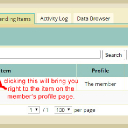
PJ, to see the pending item before approving or rejecting it, click where I have circled in this dashboard screenshot...it will take you to the member's profile area where the pending item sits- in this case, as a pending Event submitted by a test member I have named "The Member":
dashboard_pending.jpg dashboard_pending.jpg - 222KB
Strumelia
@strumelia
01/06/16 06:38:12AM
3,605 posts

Do "Private Notes" have an outbox?


Using Jamroom

Hey i love that!- now i too have changed it to "sent and received". :)

PJ, here is how you can change it to NOT capitalize every word unless you want it to (not exactly wysiwyg, but you CAN control font auto-capitalizing):

Go to your active SKIN, and to the tab for Style, and the "advanced tab of Style.
Using the drop down menu, go through each .css file and look for ones that include an option for "Text Transform"- you can set the options to capitalize, or in this case set to "None". For the Private notes "sent and received" title, you'll find it's controlled in the banner.css file. Set to None, SAVE, clear cache, and you should be able to see or reset the "sent and received" text and it won't get automatically capitalized. I believe all of them are set to capitalize first letter by default. "None" is a handy setting for example if you want something like "Join a new Group"- with the words "a new" not capitalized. "None" simply obeys the way you've typed it in.

Likewise, if you do the same for header.css, your top site menu links can be all lower or all upper case, or first letter capitalized, or simply None if you want it to be cased as you've typed it in...meaning no auto converting case for you.

Go through all your skin Style .css files looking for the "text transform" options and you can experiment to see where they show up. The CSS file name can provide a hint, but sometimes it's not very apparent until you look around for your applied change.
updated by @strumelia: 01/06/16 06:42:35AM
Strumelia
@strumelia
01/05/16 10:12:47AM
3,605 posts

Do "Private Notes" have an outbox?


Using Jamroom

PJ- you've identified the confusing issue. :)
Thanks!

I've changed the language where Paul indicated, to "Messages Box"... partly so I don't introduce a forward slash if using "in/out box". Forward slashes can be weird.
Works great and is less confusing for members. :)
Strumelia
@strumelia
01/05/16 10:03:16AM
3,605 posts

Comment list has wrong urls


Design and Skin Customization

Is that to be fixed in the current version? (not just for beta)
Strumelia
@strumelia
01/05/16 09:59:55AM
3,605 posts

remote storage


Using Jamroom

I have no idea how big your site is Stephen, but my site is about 30GB and at any given time I keep 14 consecutive days' worth of complete site backups on Amazon S3 ...and it only costs me $1.50/month. Have you tried it already?
Strumelia
@strumelia
01/02/16 08:29:44PM
3,605 posts

bug many activity links link to domain only


Installation and Configuration

Ok wow that's great, now they can fix it! :)
  168