Forum Activity for @strumelia

Strumelia
@strumelia
11/07/15 11:54:48AM
3,605 posts

Some users Notification settings being reset to all OFF...?


Using Jamroom

Ok, well then:
Can I possibly EDIT the text to make it a little less likely to click on it inadvertently? I would probably add a second sentence, like "Click below if you are SURE you want to instantly set all your site Notifications settings to OFF" Believe it or not, it might help if this is what has been happening. (I did it to myself once without realizing, so I know it 'can' happen, even to experienced users.)

I have previously already edited the top text (you can see the results in my screenshot above) with "Do not hit "Reply" to this email.Instead..."
I actually had to do that because too many members were simply 'replying' to the email instead of clicking the proper link. I was getting all kinds of misdirected responses to ME instead of to the intended, with messages like "Thanks so much for your comment, Albert, I'd like to get together soon!" etc etc. This was a real annoyance until I edited that text, have not gotten misdirected replies since.

--Hmm, I went to look for the thread where I did that editing, but my The Jamroom Network » Forum » My Posts » Page 3 only goes back to 3 weeks ago and page 3, no further back. :(

Strumelia
@strumelia
11/07/15 11:24:57AM
3,605 posts

Some users Notification settings being reset to all OFF...?


Using Jamroom

I'm thinking it is not Kickbox-related either.
I use an uncommon virus program... Webroot...so i think it's not related to that either.

I do remember ONE time a few months ago, I inadvertantly clicked the 'auto-unsubscribe' link at the bottom of a notification I got. I actually didn't realize I had done this until I stopped receiving all notifications for a day and a half. Now I'm wondering if this is happening more often than one would think.

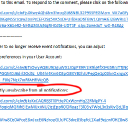
I'd like to REMOVE the whole bottom-most link from ALL emailed notifications that go out (for groups, forums, profile updates, new comments on items, whatever). I'd like to leave the auto-generated link telling people where they can go to change their their notification settings....but I want to REMOVE the instruction and hotlink that INSTANTLY unsubscribes one from all notifications. I see no compelling need for it, it's too easy to click on it when not paying attention, and it may in fact be the root of this problem...maybe. At least by removing it from the email that people get, I could totally eliminate it as the possible culprit for this issue. I think it'd be a good first step to take, and who knows it may solve this.

See screenshot for what I'd like to REMOVE from ALL notification emails.
Can you please tell me exactly where I can remove it? I'm not finding it by looking through the individual module templates.


email-text.jpg email-text.jpg - 387KB

updated by @strumelia: 11/07/15 11:26:16AM
Strumelia
@strumelia
11/07/15 07:41:09AM
3,605 posts

Where do I generate sitemaps?


Using Jamroom

Thanks for the documentation with screenshots, Michael.
I recently had my site set to only have the home page public for a while. Naturally, search engines dislike that. Last week I changed it back to all public again, and I immediately created a new site map with the Jr. Module, to make sure it was up to date for the engine crawls. It's a very handy module.
Strumelia
@strumelia
11/07/15 07:19:35AM
3,605 posts

Can group owners add a document to one of their group's pages? If so, how?


Ning To Jamroom

Does the File Module include a setting that can limit the size of files added by each quota? ...I wouldn't want members to be able to upload gigantic docs.
Strumelia
@strumelia
11/06/15 07:23:31PM
3,605 posts

Where do I generate sitemaps?


Using Jamroom

There is a module in the JR Marketplace called Sitemap Generator.
Strumelia
@strumelia
11/06/15 02:09:59PM
3,605 posts

Groups - Change ownership? change/add administrators?


Ning To Jamroom

Awesome. We'll sit tight then! Thanks so much for all you do, JR Team.

(i'm anticipating some conflicts in my customized skin that will need adjusting...insert 'nervous tic smiley' here)

Feel free to recreate my site (non-live of course) or skin for testing purposes if it helps.


updated by @strumelia: 11/06/15 02:12:03PM
Strumelia
@strumelia
11/06/15 02:07:30PM
3,605 posts

Can group owners add a document to one of their group's pages? If so, how?


Ning To Jamroom

I don't see an 'embed document' plugin option currently in the Tinymce text editor by default. You might be able to add one on your own.
A workaround might be to use the Jamroom "Attach" function to attach the document to a subsequent post in a group page...?
Strumelia
@strumelia
11/06/15 01:07:19PM
3,605 posts

Groups - Change ownership? change/add administrators?


Ning To Jamroom

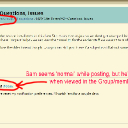
Here you can see that Sam appears normally when posting in the group this morning, yet he's still "@" in the group's member list page.
sams-group-post.jpg sams-group-post.jpg - 348KB
Strumelia
@strumelia
11/06/15 01:02:05PM
3,605 posts

Groups - Change ownership? change/add administrators?


Ning To Jamroom

Sam is one of my moderators, and was posting this morning...his profile is active.

He also 'happens to be' one of the members whose Notifications were reset to all OFF a few days ago, and not by him, as he assured me. I don't know if these two things are related, but BOTH issues happened about 3 or 4 days ago.

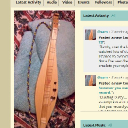
Here is Sam's profile page, which is current and active. Notice he uses his own custom profile photo, not used by anyone else. For some odd reason, all the other "@" members are showing a default profile pic....except Sam, who has retained his custom image despite becoming an "@" in the moderator group member list page.
sam-profile.jpg sam-profile.jpg - 264KB
Strumelia
@strumelia
11/06/15 12:57:33PM
3,605 posts

Groups - Change ownership? change/add administrators?


Ning To Jamroom

Well we can't delete them from groups because when you try to, you just get a message: "invalid user_id - please try again"

I don't understand why these 'ghost users' were not there before and have now suddenly shown up, only on /group/members/ pages. My members don't have the ability to delete their own profiles, and I know I haven't been deleting members left and right lately.
So why are these appearing now?

Here's proof that it's due to something else, not deleted members:
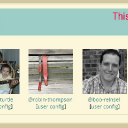
Here's a screenshot of what I'm currently seeing right nOW when I click on my moderator Group "view all members" member page for that group...see how the member on the right is being shown as a "@" member (notice his custom avatar picture, that's my moderator Sam), and when you click on him you're sent to the site main page, a dead end. I saw that with Sam's avatar yesterday and today too. Sam is NOT a ghost member, nor deleted...he's active very much alive and was posting on my site just this morning.
See the problem:
sam-ghost.jpg sam-ghost.jpg - 227KB
  184