My Developer Tools skin cloner is not working right
Ning To Jamroom
Ok, I will now test again:
I go to my site on JR end. My customized Ningja skin is the active one. First I delete all previous attempted clones and save changes. Then I clear all caches, do integrity check.
Then go to Developer Tools (which I reloaded yesterday successfully, as per your instructions), to Clone Skin. I select Ningja skin, then name a new clone mdLisa1. It then says "The mdLisa1 skin has been cloned from the jrNingja skin".
I then go to my SKINS tab, I see "Lisa1" in the list, select it and set as active skin, and save changes.
I just now did all this again, and I do not get a real clone, I'm losing all my customizations I did in my Ningja skin.
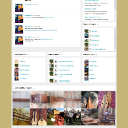
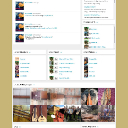
See the two results: the one with my logo and blue header and customized links and module titles is thhe Ningja modified skin. The one with the JR logo and back to original non-modified Ningja settings is the Cloned Lisa1 skin.
The cloning is not 'really' cloning for me!
Thus, I still cannot update to the new version of Ningja skin, becasue I will lose all the mods I have struggled to make over the past couple weeks.
Correction: the correct logo is now appearing, but the top links are wrongly named and the forums link is gone, and the module title changes were lost and the top link strip is black again.
I know this stuff may not seem like a lot to lose, but I think it's important that people be able to really get a clone that is a true clone, or else there will be a whole lot of upset people every time there is a skin update.
Thanks!
P.S. I will not be around all the time today, just off and on.
Here is my customized Ningja skin I am wanting to clone. Notice the top links, the link names, positions, the Forums link. and the module titles, the blue strip at top.
updated by @strumelia: 12/29/14 09:23:54AM