Forum Activity for @strumelia

Strumelia
@strumelia
03/24/17 01:34:44PM
3,605 posts

Trouble in substituting Vimeo image


Using Jamroom

...just stumbling my way around. ;)

A couple more questions before I fiddle with this-
For that added code in the .css file, where you suggested i put the ".video_thumbnail" at height: 85px;....
-Does the term "video" there apply then to all the site videos including youtube, Vimeo, and uploaded?
And if so, SHOULD it apply to all three? So far I'm only seeing a prob with an occasional Vimeo thumbnail. Phone-recorded vids seem to be creating their thumbnails ok too.

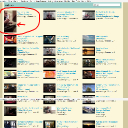
And... why 85 px? I mean, for example on my combined video index page most of the videos thumbnails are approx 88 px high, with a few of 66px height. And on the profile pages combined video page, the thumbnails for videos are about 96 px.

-in general I like how the thumbnails are displaying everywhere and dont' really want to make them all uniform... I just want to limit oversized ones. Can i use instead the .css of something like this?, would this work?:
.video_thumbnail {
    max-height: 90px;
}

...or would something get screwed up?
Strumelia
@strumelia
03/24/17 01:00:13PM
3,605 posts

seeing errors in logs


Using Jamroom

Ok thank Michael, will do. There are several users online now, so I'll watch for a time later today when I'm the only one logged in. :)

----ok, done. Will see if these errors are gone tomorrow morning after S3 backup is done again. Thank you!
updated by @strumelia: 03/24/17 01:36:28PM
Strumelia
@strumelia
03/24/17 08:35:31AM
3,605 posts

Trouble in substituting Vimeo image


Using Jamroom

So to do:
We want to add another class to class="iloutline img_scale", lets make it class="iloutline img_scale video_thumbnail"
...I would then wind up making that code line look like this?:
{$jamroom_url}/{$item.profile_url}/{$murl}/{$item._item_id}/{$item.vimeo_title_url}"><img src="{$item.vimeo_artwork_url}" class="iloutline img_scale video_thumbnail"></a>

AND- when you say: "Then into a css file in your skin add this css"...not sure which .css file in my skin that would be- perhaps in my skin's: image.css file, where I see some similar entries are residing?
Strumelia
@strumelia
03/24/17 08:24:29AM
3,605 posts

seeing errors in logs


Using Jamroom

I'm still getting BOTH kinds of errors as shown in my above two screenshots....the new ones have been both from the 23rd and today the 24th.
Strumelia
@strumelia
03/22/17 08:01:28PM
3,605 posts

Trouble in substituting Vimeo image


Using Jamroom

One of my members added a Vimeo video today and the image used as a thumbnail is way too tall. The image seems to be taken from his Vimeo video images, here:
https://i.vimeocdn.com/video/625084120_1280x2276.jpg?r=pad
The result is my screenshot- where his too-tall Vimeo thumbnail is messing up my video page grid, also on the site's main page video content area. I hate that!

So I downloaded that image and edited it to be a square and smaller jpg. Then I went to EDIT his video and put in my substituted jpg where it says "You can upload an image for this Vimeo video and it will be used in place of the image from Vimeo". I did this 3 times and i keep clearing cache, also my browser cache, did integ check...but his Vimeo continues to use that tall thumbnail instead in the (combined) video index page and on the main page. However, my new edited image DOES now show right under his clip in the thumbnail on his actual vimeo clip page, here: http://fotmd.com/steve-battarbee/vimeo/185/reubenstrain
...But that's not where I really need it to be changed. I need to change it like on this page where it's messing up the whole display grid:
http://fotmd.com/video

Am I doing something wrong?
vimeo-image.jpg vimeo-image.jpg - 474KB

updated by @strumelia: 06/26/17 12:52:05PM
Strumelia
@strumelia
03/22/17 03:34:25PM
3,605 posts

How to change email sent when a new member is activated?


Ning To Jamroom

BTW, you will find other "email/notification" templates in other modules, like jrForum or jrFollow etc...where you can customize what the notification emails say when they go out to your members.
Once you do one, it's too much fun not to do the other emails too.
Strumelia
@strumelia
03/22/17 03:30:07PM
3,605 posts

How to change email sent when a new member is activated?


Ning To Jamroom

Yes, and also the email's SUBJECT LINE can be changed in the: email_account_activated_subject.tpl
Customize both to your liking. :)
updated by @strumelia: 03/22/17 03:34:16PM
Strumelia
@strumelia
03/22/17 09:50:58AM
3,605 posts

seeing errors in logs


Using Jamroom

Yes ok, I will report back here if they have not stopped by tonight or tomorrow. Thanks Paul!

-can you tell me if the errors in my Error log (in my second screenshot) are also related to those temporary server issues, or are they something completely unrelated?
Strumelia
@strumelia
03/22/17 07:55:26AM
3,605 posts

seeing errors in logs


Using Jamroom

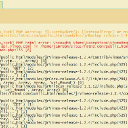
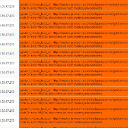
I also see the following in my Error Log, however that's on my FOTMD site only and I'm not sure if it relates to the above entries in the Activity Logs on both sites- see this screenshot in case it helps:
actlog.jpg actlog.jpg - 491KB
Strumelia
@strumelia
03/22/17 07:52:42AM
3,605 posts

seeing errors in logs


Using Jamroom

I've done a bunch of integrity checks and cache clearing, and my System Check has all green lights...but I'm seeing dozens of these over the past couple of days in my Activity Log- on BOTH my sites:
errors.jpg errors.jpg - 655KB

updated by @strumelia: 06/24/17 09:54:30AM
  88