Forum Activity for @strumelia

Strumelia
@strumelia
03/09/17 09:37:48AM
3,605 posts

where to change a forum setting please?


Using Jamroom

Ok Paul I will revert back to the previous code- have a prior-to-change copy saved because I learned my lesson to always do that first... ;D
THANK YOU for broadening the options in the Forum module for it's next update. Something to look forward to! :)
I'll mark this resolved then!
Strumelia
@strumelia
03/08/17 04:57:23PM
3,605 posts

where to change a forum setting please?


Using Jamroom

Is there a way for me to do the above- and be able to increase the choices for how many posts per page I can show on my forum threads? I would love to be able to show 70 or 75 rather than a max of 50- it would help now that I've reversed the forum post order.
Paul, should I UNDO the code that you recommended in your first post in this thread, since it doesn't have the effect intended?

Thanks....
Strumelia
@strumelia
03/08/17 02:32:29PM
3,605 posts

Two problems after Ning Import


Ning To Jamroom

Have you created a PROFILE that will 'own' your site-wide forums? I'm suspecting not.
You can create a new profile that's in a new quota cloned off an admin quota (so it'll have all the powers you need) ...name the new quota say Forum Quota for example. You can name the new PROFILE something like Discussions, or Forums (like I did), or just call it Bob if you want. "Bob" will be the only member of the special Forum Quota (unless you late want to add other profiles that can create/manage additional forums on your site, or yourself....but let's stick with Bob for now).

You are going to ALLOW profile forums for THAT quota, in your quota settings.
If you named it Bob, then the URL to your "Forum Profile URL" will be:
http://whitestone-fellowship.org.uk/social/bob/forum --that's the URL you'll paste in the field.

I'm seeing that ALL your members seem to have 'profile forum' allowed. I'm thinking this is not what you want- you don't want all members to have their own SEPARATE forums on their profile pages, but rather you want a site-wide forum (that you run/control) that everyone else has to post to, right? You can create categories within that forum btw.
If that's correct, then:
go to your jrForum module and under the Quota Config tab, UNCHECK that to NOT allow profile forums on ANY quota EXCEPT the new "forum quota" you created to house your site forums. That quota has only one member in it- your Forum Profile member you created (let's call him Bob). Bob has the checkbox marked to ALLOW a forum on his profile.

So you may have to do several things:
1) create a Quota that will be the only quota that can own forums on your site.
2) create a special profile that will 'own' all your site forums- put that profile into that quota.
3) in your jrForum module settings, switch OFF the box that allows profile forums for all Quotas except your special forums quota.
4) Go to your new Profile ("Bob" or whatever profile name you chose) and click to the Forum TAB on that profile. Copy the URL of that page (should end in: /forum ) and that's the URL for your site forums that you are going to paste into the field in your skin settings. It's also the URL where your members will be taken when they click on the link to site Forums. On my site, that url/page looks like this: http://fotmd.com/forums/forum (note I named my special forum profile "forums" rather than "bob")

If that's not the way you want your site forums to be set up, then there is another way that makes it more separate- the jr Team can help you with that (I can't), and it's the way this JR forum is set up here where we're posting, and it does not use a 'profile forum' structure.
updated by @strumelia: 03/08/17 02:33:14PM
Strumelia
@strumelia
03/08/17 11:08:59AM
3,605 posts

Ninja Skin Upgrades


Design and Skin Customization

SoftDesigns:
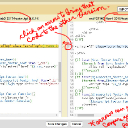
Do we need to "manually" merge changes from the latest Skin updates into our cloned skin?

You can use the arrows in the "Compare" window to apply differences in code back and forth. See my screenshot.
You can first compare the newly updated Ninja skin template to the previous Ninja version to see what changed and whether you want to apply that new code in your cloned custom skin.
Then use the Compare tool to compare the new Ninja tmeplate to the same template in you custom cloned skin, and use the arrow to apply the new change if you like. Be sure to SAVE your change and ALSO make sure the checkbox is checked to activate the new change in your skin and save that.
You may have better 'compare' tools you already use. This is simply the way I do it.
Of course you can also make code changes using your own favorite editors on your computer, by downloading a copy of the template you want to change, then reloading it to your server once you've made a change.
tmpl-compare.jpg tmpl-compare.jpg - 473KB

updated by @strumelia: 03/08/17 11:11:27AM
Strumelia
@strumelia
03/08/17 10:47:42AM
3,605 posts

Two problems after Ning Import


Ning To Jamroom

2. No, that would be your discussions in Groups.

It's asking for your FORUM discussions profile URL.
On my site that skin setting "Forum Profile URL" field is filled in as: http://fotmd.com/forums/forum
(note that I have a profile named "Forums" that 'owns' all my site discussion forums.)
If that field is left blank you won't see your Forum Discussions on the site.
updated by @strumelia: 03/08/17 10:50:04AM
Strumelia
@strumelia
03/07/17 06:56:32AM
3,605 posts

Ban Countries!


Suggestions

Here's a handy thing- I know it works both in Chrome and Firefox:
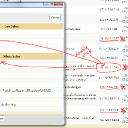
When you're in your "Who's Online" window, double-click on the 'visitor' IPs once in a while (or when you have a specific bad user online). A new window will pop up that tells you the IP location country and the RANGE of ip numbers that specific registrar covers.
See my screenshot.
Note in my screenshot the IP RANGE and then note that there were SEVERAL 'visitors' within that location range (131.161.0.0 - 131.161.255.255) in Brazil that were 'visiting' my site at the same time...all with slightly different IP numbers within the range. I turned my "show Bots" button on and it revealed that none of these Brazil visitors were Bots. They are all 'suspect' visitors in the same IP range.
So I just now banned the entire range. Instead of banning just one specific IP # like 131.161.9.229, I put in my Banned Item module a new entry for IPs of: 131.161 (You can either put a period at the end of that number or not when banning.)
The result is that no IP address from that whole range will be able to join. This is more effective than banning only ONE specific IP address. You just have to be judicious about not banning large geographical IP areas in countries where there might be legit users wanting to join.
If you ever find a 'visitor' online who is from Nigeria for example you can see and then ban the whole IP RANGE they are registered in instead of just banning that one specific address.
brazil-location.jpg brazil-location.jpg - 597KB

updated by @strumelia: 03/07/17 06:58:18AM
Strumelia
@strumelia
03/06/17 06:20:52AM
3,605 posts

Using the private groups feature?


Using Jamroom

Zach be sure to test the privacy of your group before you 'depend' on it with sensitive info. Log in as a regular member to make sure what the user experience is from different quotas. And always keep in mind that as an Admin you can always see and access more content on the site than non-admin members.
Strumelia
@strumelia
03/05/17 04:57:59PM
3,605 posts

What skins are included in jamroom hosting plan


Jamroom Hosting

Kanu the other cool thing is that with JR hosting, you can put as many JR sites as you like on your server at NO extra cost- as long as you make sure your server has enough room to hold them. And you can change your server size up or down whenever you want with the click of a button and the change only takes a few minutes I think...at least it did for me. :)
Strumelia
@strumelia
03/05/17 07:32:44AM
3,605 posts

What skins are included in jamroom hosting plan


Jamroom Hosting

It's the bargain of the century, imho.
Strumelia
@strumelia
03/04/17 11:25:07AM
3,605 posts

where to change a forum setting please?


Using Jamroom

paul:
Maybe something like 1 to 25, then 30, 35, 40 ..... 100. What do you think?
Personally, I'd be cool with increments of 10 up to 100. 10, 20, 30....100.
I hope you understand my explanation of 'why' I want the option of such a seemingly odd large number of posts. Having it will give me the most bang for my buck when i have my forum posts reversed to 'newest first/on top'. My members tend to overlook pagination all too often, and also mobile users hate having to navigate lots of pages to see an original topic post.
  90