Forum Activity for @michael

michael
@michael
07/27/17 10:50:58PM
7,832 posts

About smart phones and the text editor


Using Jamroom

The editor is showing up on an iphone, it shouldn't be, its a mess.

michael
@michael
07/27/17 10:04:57PM
7,832 posts

PayPal & Price Buttons


Design and Skin Customization

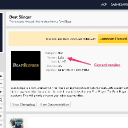
Marketplace: "BeatSlinger"
https://www.jamroom.net/the-jamroom-network/networkmarket/317/beat-slinger

Nope, marketplace version is still 1.2.7 (screenshot)

Probably waiting on something that will be released when the Jamroom 6.1 core comes out.
current.jpg current.jpg - 101KB
michael
@michael
07/27/17 10:02:23PM
7,832 posts

Has anyone seen this: "Privacy in Chrome"


Installation and Configuration

If you were using Jamroom Hosting you could add an SSL cert for free from your hosting control panel.

Jamroom Hosting
https://www.jamroom.net/hosting

Contact your hosting provider to see how much they charge to setup SSL
michael
@michael
07/27/17 09:57:02PM
7,832 posts

Can't press scroll to top button in folllowme (1.1.0b1)


Using Jamroom

Can see this issue is still there in the latest jrFollowMe.

Will get it fixed up.

Thanks :)
michael
@michael
07/26/17 09:30:45PM
7,832 posts

Error with using Like Button


Using Jamroom

somethings wrong somewhere, the jrlike_item_key isnt used in the current version of the module.

Will let you know when I figure out whats going on.
michael
@michael
07/26/17 04:32:41PM
7,832 posts

Error with using Like Button


Using Jamroom

Try running the integrity check again with all the checkboxes checked. That should fix up the database side of things.
michael
@michael
07/26/17 04:20:01PM
7,832 posts

Image Display Query


Using Jamroom

If you use the Template Editor (or other means) to add it to the the jrImage galleries item_detail.tpl file, then you can have it wherever you want.

Docs: "Using the Template Editor"
https://www.jamroom.net/the-jamroom-network/documentation/jamroom-admin-handbook/3183/using-the-template-editor

and alter:
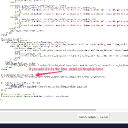
ACP -> MODULES -> PROFILE -> IMAGE GALLERIES -> TEMPLATES -> items_detail.tpl
template.jpg template.jpg - 141KB
michael
@michael
07/26/17 06:28:21AM
7,832 posts

Image Display Query


Using Jamroom

I did, but then you said ".....It's just slightly different than Ning beacuse Ning's button is to 'view' the original full size image on its own url...."

So I'm just pointing out a way to have it that way if you prefer. :)
michael
@michael
07/26/17 06:15:59AM
7,832 posts

Image Display Query


Using Jamroom

if you want to add a link to the original image, just adjust the .tpl file to point to the URL and have text that reads "download"
<a href="https://fotmd.com/gallery/image/gallery_image/8256/1280/_v=1436754228">Download</a>

Something like:
<a href="{$jamroom_url}/gallery/image/gallery_image/{$item._item_id}/original">Download</a>
michael
@michael
07/25/17 08:45:42PM
7,832 posts

Image Display Query


Using Jamroom

"......So when we 'allow' download image, it does not download the original full size image...." this is incorrect, download downloads the full size original image.

The image gallery tool to reduce uploaded jpgs changes the size of the original image.
  203