JAMROOM

Deleting a Jamroom Server
Table of Contents:
Open the Server Dashboard
View the Server Tools section
Delete the Jamroom Server
-
Open the Server Dashboard
If you decide you no longer wish to use Jamroom Hosting, deleting an existing Jamroom Hosting server is quick and easy - just follow these steps:
-
Click on your name that is highlighted in yellow in the top menu bar - this will take you to your profile.
-
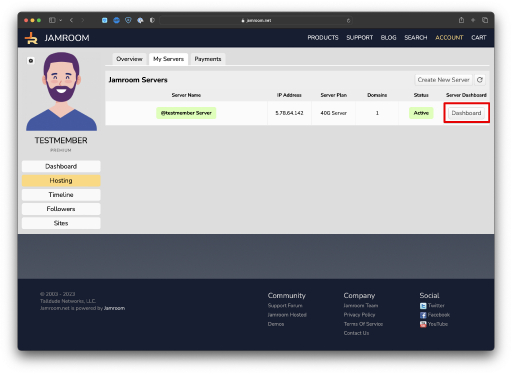
Click on the "Hosting" menu link in your profile.
3). Click on the "Server Dashboard" button for the server you want to remove.
This will take you into the Server Dashboard where you can see the Jamroom Sites that are currently active on the server.
-
-
View the Server Tools section
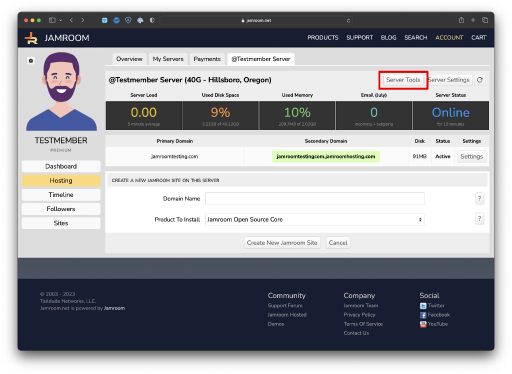
Click on the 'Server Tools' button located in the upper right of the server you want to delete - this wall take you into the Server Control screen.
-
Delete the Jamroom Server
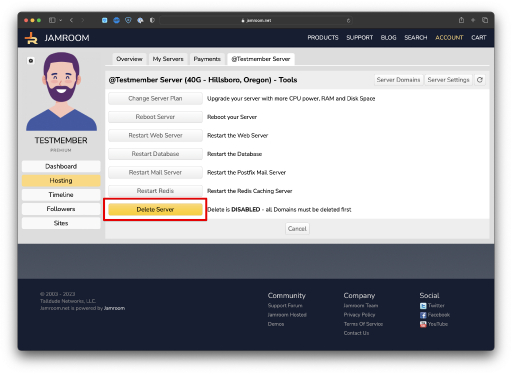
Once in the Server Control for the Jamroom Server, click on the "Delete Server" button.
Confirm the Server Delete and the server will be removed.
If you are currently in the Trial period with a Jamroom Server, you will not be charged for the server.
-
Once a Jamroom Server is deleted, the DATA on the server cannot be recovered!
-
We're always looking to improve Jamroom Hosted - if you have deleted your server, we'd love to get feedback from you on what we could have done better. Please contact us at support [at] jamroom [dot] net and let us know what we can improve! Thanks!