JAMROOM

Upgrading your Server to a new plan
Table of Contents:
Upgrading your server to a new plan
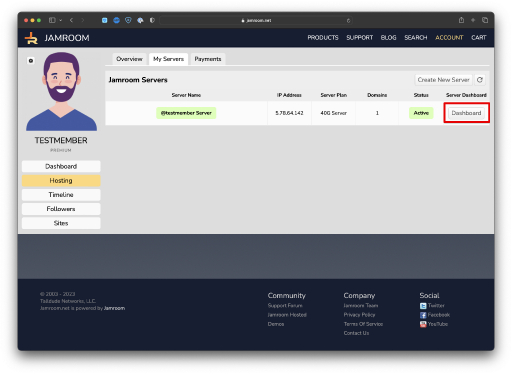
View the Dashboard for the server you want to upgrade
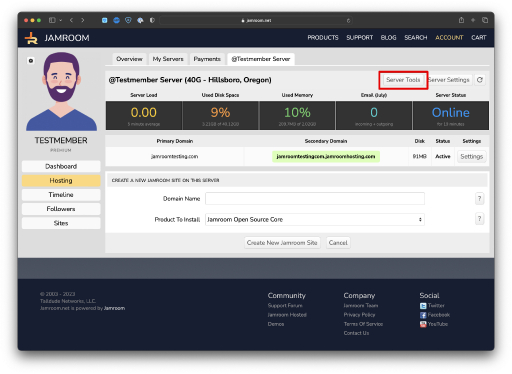
Enter the Server Tools section
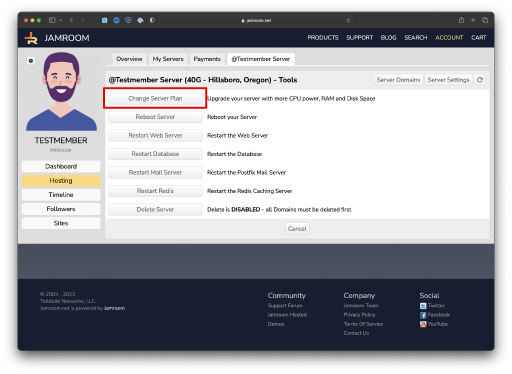
Click the Change Server Plan button
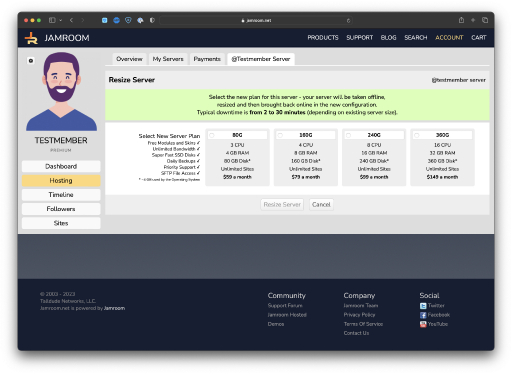
Select your new plan and save
-
Upgrading your server to a new plan
Upgrading your Jamroom Hosted server to a new plan is super easy - it's all automatic and with minimal downtime.
If your site is growing and you need more CPU power and Disk Space to support new users and the increased load on your site, upgrading to a larger hosted plan ensures you keep up with your growing site.
-
View the Dashboard for the server you want to upgrade
To get started, go to your Hosting section and click on the "View Dashboard" button for the server you want to upgrade.
You can access your Hosting section by moving your mouse over your name in the top Jamroom.net menu and selecting "Your Hosting" from the drop down user menu.
-
Enter the Server Tools section
Once you are viewing the Overview and Domain list for the server you want to upgrade, click on the "Server Tools" button at the top.
-
Click the Change Server Plan button
Once in the Server Control section, click the "Change Server Plan" button.
-
Select your new plan and save
Finally, pick the new plan you would like to upgrade to and click the "Resize Server" button. Your server will be taken offline, resized and brought back online. Typically downtime is only a few minutes.
Note that only plans that will accommodate your existing disk space usage are available for upgrade.