solved Daily Limit for Image Uploads

alt=
Tatiana Dokuchic
@tatiana-dokuchic
10 years ago
83 posts
Back on NIng we had a daily limit set for the number of photos a member could upload. This made the administrators' job much easier as it automatically stopped those members who wanted to upload 100's of photos a day.

I couldn't find anything similar on JR and I'm hoping I just missed it.

If not, what would be the best way of implementing this?

Thanks!
updated by @tatiana-dokuchic: 01/19/17 11:32:33PM
paul
@paul
10 years ago
4,335 posts
I thought we had this already with the UserLimit module - https://www.jamroom.net/the-jamroom-network/networkmarket/155/user-daily-limits - but it only works for streams and downloads.
I'll checkout if it can be easily extended to cover item uploads as well.


--
Paul Asher - JR Developer and System Import Specialist
joanna
@joanna
10 years ago
88 posts
Hello
I thought I saw they allow to make daily limits.
Maybe this will help you:
https://www.jamroom.net/the-jamroom-network/documentation/modules/3862/profile-daily-limits
updated by @joanna: 10/19/16 05:36:01AM
alt=
Tatiana Dokuchic
@tatiana-dokuchic
10 years ago
83 posts
Thanks, Paul!

Thank you, Joanna. I've looked in the Marketplace and can't actually find Profile Daily Limits. Maybe because I'm still using JR5? Maybe because I need a coffee before my search? ;) I'll keep looking.

ETA: I found it and it's already installed. The weird thing is that it doesn't show up on the ACP which is why I didn't know that I had it.
updated by @tatiana-dokuchic: 10/19/16 06:01:01AM
joanna
@joanna
10 years ago
88 posts
Hmm, it was released a few months ago so I think your JM5 is not a problem:
https://www.jamroom.net/the-jamroom-network/networkmarket/113/profile-daily-limits

Sometimes I check marketplace a few times before I notice a module which I want to install.
Maybe try to type in a search "profile limit" (sometimes it makes the search a bit faster).

Happy searching with a yummy coffee :)
paul
@paul
10 years ago
4,335 posts
Checkout the Profile Daily Limits module instead -

https://www.jamroom.net/the-jamroom-network/documentation/modules/3862/profile-daily-limits

(I knew this could be done - I was just looking at the wrong module ;-) )


--
Paul Asher - JR Developer and System Import Specialist
alt=
Tatiana Dokuchic
@tatiana-dokuchic
10 years ago
83 posts
Thanks, folks!

I never would have found it without you :)

It was already installed (so it didn't show up when I searched the marketplace) and though it is Active it doesn't show on the ACP under Profiles (or anywhere else for that matter). I found it by following the link from my Installed Modules.

Should I put in a ticket as a display bug?

In the meantime, I'm busy setting up new limits!
updated by @tatiana-dokuchic: 10/19/16 11:33:24AM
paul
@paul
10 years ago
4,335 posts
It should be showing in the ACP Profiles category as 'Daily Limits'. Is that not happening?


--
Paul Asher - JR Developer and System Import Specialist
alt=
Tatiana Dokuchic
@tatiana-dokuchic
10 years ago
83 posts
No, it's not there.

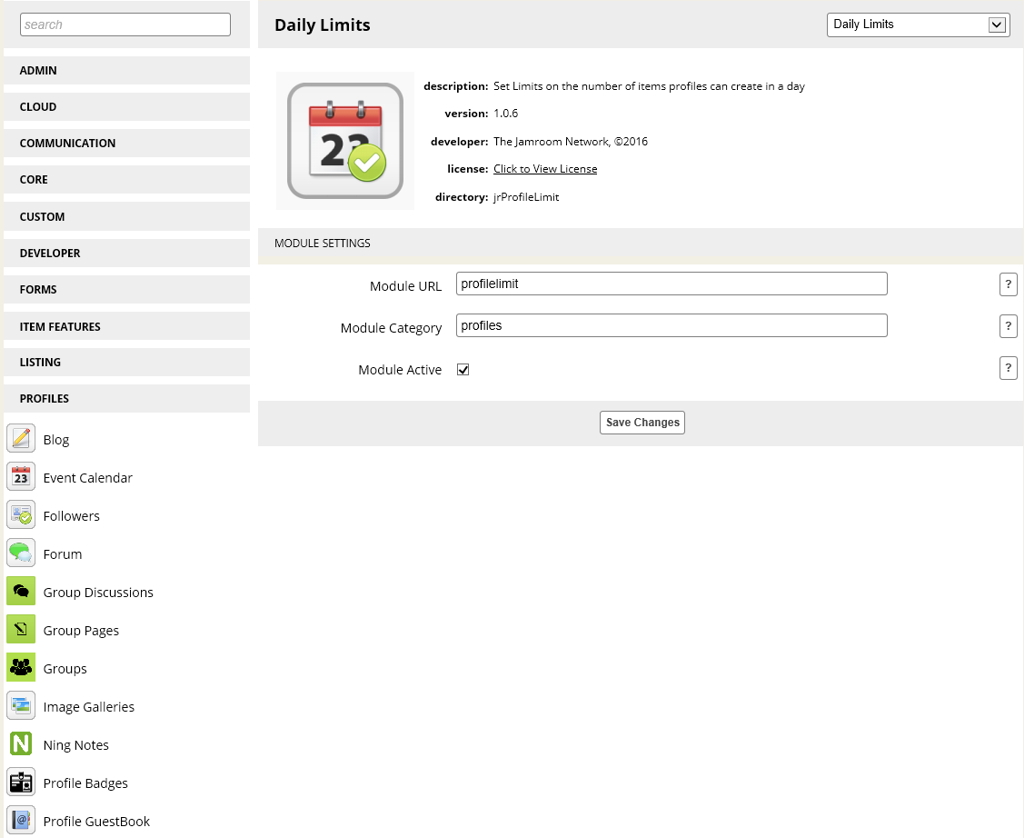
ETA: Screenshot. Daily Limits is not on the sidebar. I managed to get to the page by following my Installed Modules.
Daily Limits.JPG.jpg
Daily Limits.JPG.jpg  •  124KB


updated by @tatiana-dokuchic: 10/19/16 11:58:12AM
paul
@paul
10 years ago
4,335 posts
So where is it (under what category)? I'm assuming it must be somewhere for you to have found and enabled it?


--
Paul Asher - JR Developer and System Import Specialist
alt=
Tatiana Dokuchic
@tatiana-dokuchic
10 years ago
83 posts
It's not under any category (though it says it should be under Profiles).

It's not on the sidebar at all.

I got the url by going to /marketplace/browse/installed, finding the module, and clicking Already Installed

Since then I've accessed it via the url /profilelimit/admin/info for example.

It was already enabled when I finally found it.

ETA: If I disable it - it shows in the sidebar. As soon as it is enabled it disappears again,
updated by @tatiana-dokuchic: 10/19/16 12:40:39PM
paul
@paul
10 years ago
4,335 posts
Odd.
Can you send me your admin login in a ticket so that I can take a look?
Thanks


--
Paul Asher - JR Developer and System Import Specialist
alt=
Tatiana Dokuchic
@tatiana-dokuchic
10 years ago
83 posts
Will do. Thanks, Paul.
alt=
Tatiana Dokuchic
@tatiana-dokuchic
10 years ago
83 posts
Thanks to Brian for fixing this!

Quote: I've fixed this up on your server - root cause is that you have both the "user" Daily Limits module and the "profile" Daily Limits module installed, which both have the same module name. I renamed the profile one to "Profile Daily Limits" and it shows now.

I don't see this issue in JR6, so I think it is already fixed but will double check.