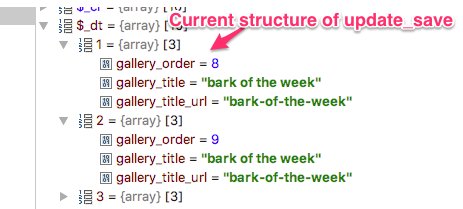
It was when i was trying to save a updated gallery.
Here is what the error read:
Message [admin] Query Error: Duplicate entry 'gallery_order-343-0' for key 'PRIMARY'
Date 08/16/17 11:15:06PM
IP Address 71.166.2.237
URL /gallery/update_save/__ajax=1
Memory 18MB
Data
Array
(
[error] => Query Error: Duplicate entry 'gallery_order-343-0' for key 'PRIMARY'
[_post] => Array
(
[_uri] => /gallery/update_save/__ajax=1
[jr_html_form_token] => 64469debe5fcec05689a6c6df0cd2a43
[jr_html_form_profile_id] => 2
[gallery_existing_title] => website-computer-backgrounds
[upload_token] => 4a49911139915e96400ac5404a847558
[jroneall_share_to_networks] => off
[jraction_add_to_timeline] => on
[gallery_title] => Website / Computer Backgrounds
[gallery_description] =>
[gallery_description_editor_contents] =>
[__sharethis_cookie_test__] =>
[jruser_device] => "62b493f188fa9dffd963fa820a81bcb2"
[sc_is_visitor_unique] => rx9268714.1502326002.7AFCE0EA5BDE4FFADD8A3F535EC7F518.54.52.50.46.43.39.38.34.30
[jrpayment_cart_id] => "XNMIX94aK0jYfaHR"
[jruser_save_location] => "https:\/\/www.centricbeats.com\/core\/integrity_check"
[_ga] => GA1.2.747715922.1458842471
[_gid] => GA1.2.1240042257.1502904310
[style] => null
[sess54e950affc96] => d7d9r9dmn94mag098mbj83oou1
[jr_gallery_xup_width] => 12
[dash_reload] => on
[PHPSESSID] => uepnfa15unfvck260v392fc3v0
[__utma] => 230544270.747715922.1458842471.1502909378.1502937995.973
[__utmb] => 230544270.1.10.1502937997
[__utmc] => 230544270
[__utmz] => 230544270.1502300277.957.50.utmcsr=statcounter.com|utmccn=(referral)|utmcmd=referral|utmcct=/p9268714/dashboard/
[jr_location_url] =>
https://www.centricbeats.com/gallery/update/id=317
[__unam] => c4dace3-153ab7865a9-370a92b7-5706
[module_url] => gallery
[module] => jrGallery
[option] => update_save
[__ajax] => 1
)
[query] => INSERT INTO jr_jrgallery_item_key (`_item_id`, `_profile_id`, `key`, `index`, `value`) VALUES (343, 2, 'gallery_existing_title', '0', 'website-computer-backgrounds'), (343, 2, 'gallery_title', '0', 'Website / Computer Backgrounds'), (343, 2, 'gallery_description', '0', ''), (343, 2, 'gallery_title_url', '0', 'website-computer-backgrounds'), (343, 2, 'gallery_order', '0', '1'), (343, 2, '_created', '0', UNIX_TIMESTAMP()), (343, 2, '_updated', '0', UNIX_TIMESTAMP()), (343, 2, '_profile_id', '0', '2'), (343, 2, '_user_id', '0', '2'), (343, 2, 'gallery_pending', '0', '0')
)
I was trying to add about 15 more images to the gallery when i first got the error message.
After reading the other threads i attempted to add a image again when it showed a error this time i kept pressing save until it uploaded.
So maybe in the 15 images there was a duplicate and it messed the sync up .
updated by @devcentricbeats: 08/16/17 11:40:08PM


 JAMROOM