where's the jrUser 'bot button' code update located?
Using Jamroom
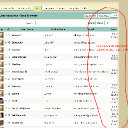
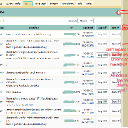
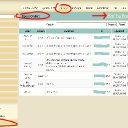
I just realized why I'm not seeing the button- it's that databrowser browser 'cut-off' issue I believe you and I were discussing a few days ago. You can see the issue again in my screenshot above, but here are two more screenshots to follow.
On a Mac desktop and on a Macbook, I get the whole screen with the last column(Modify) and the Bot button in Safari, in Chrome, and in Firefox...no issue on the Macs.
On my windows desktop however (with a large screen, and won't change if pulling or refreshing) it works fine on Firefox but right column(s) are cut off in both Safari and in Chrome. See these new screenshots...am missing the right sides and thus cannot see or access the Modify column or the new bot button. Can someone else check this out on their windows in safari and chrome?
This is happening in my Who's Online, my User Accounts browser, and my Profile Browser.
IMPORTANT: I just found that this ONLY happens if I'm getting there from the ACP-->Users menu. All displays JUST FINE if I go there from the Dashboard! This must be a clue!

And of course I am not yet getting the BotButton via the dashboard, but at least I get the whole screen.
 updated by @strumelia: 10/31/15 04:18:05PM