Forum Activity for @strumelia

Strumelia
@strumelia
02/18/17 04:06:00PM
3,605 posts

Event lists all show a calendar marker of 31?


Using Jamroom

Zach just go on Google Images and type in "calendar icon"...you'll get a gazillion to choose from. Find where the current icon image is stored on your server and replace it with your new one- keep the same file name to avoid having to change code anywhere.

Strumelia
@strumelia
02/17/17 07:57:14AM
3,605 posts

youtube video search


Suggestions

After adding your video successfully, what exactly are you doing or clicking on when you "try to close"?
Strumelia
@strumelia
02/13/17 12:09:00PM
3,605 posts

Adjusting Forum email notification


Using Jamroom

Thank you Brian! OMG that was FASSSST. Working just great now.

By the way, the fix for the email notifications you did earlier in this thread is working properly now as well- woo-hoooo! :)
Strumelia
@strumelia
02/13/17 11:37:34AM
3,605 posts

Adjusting Forum email notification


Using Jamroom

Sorry to bring up another instance of this issue, but my reversing the order of Forum posts has created pretty much the same issue in another location as well...
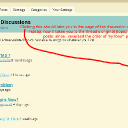
The best way to describe it is if you go to my forum Categories page here: http://fotmd.com/forums/forum/off-topic-discussions and look at a discussion such as "Show Us Your Pets" with multiple pages' worth of replies... see screenshot. Clicking on the right hand link that shows the latest post is incorrectly taking you to: http://fotmd.com/forums/forum/off-topic-discussions/11944/show-us-your-pets/p=18#last which has the thread's OLDEST replies. Instead, it 'should be taking you to: http://fotmd.com/forums/forum/off-topic-discussions/11944/show-us-your-pets/p=1 now, where the newest post is on page 1 at the top.
newest-post.jpg newest-post.jpg - 435KB
Strumelia
@strumelia
02/12/17 04:50:41PM
3,605 posts

bad link when simply pasting an url into a post


Using Jamroom

I saw it in some of my site member's posts lately, so it's not just me posting them on my sites. Perhaps another JR customer will see this and chime in if they're getting it too. Meanwhile i can wait until the next core update and check it again then.
Thanks for your efforts Brian!
Strumelia
@strumelia
02/12/17 04:41:53PM
3,605 posts

bad link when simply pasting an url into a post


Using Jamroom

Yes, it's happening on my iPad too, in both Safari and Chrome. Used the url for google.com :( Weird.

We did a little fixing up of how hotlinks got pasted and displayed in posts while using the editor's Link button and Embed media button a week or so ago, but I am not connecting that in my mind to this, since not using the editor buttons for this.
updated by @strumelia: 02/12/17 04:42:17PM
Strumelia
@strumelia
02/12/17 04:34:05PM
3,605 posts

bad link when simply pasting an url into a post


Using Jamroom

Let me try it on my iPad. Back in a minute.
Strumelia
@strumelia
02/12/17 04:31:39PM
3,605 posts

bad link when simply pasting an url into a post


Using Jamroom

I could ask my moderators if they are seeing the diamonds in my posts.
Yes, posting it right into the editor right into a sentance without using any buttons (the button functions seem to work fine BTW)
updated by @strumelia: 02/12/17 04:32:43PM
Strumelia
@strumelia
02/12/17 04:30:16PM
3,605 posts

bad link when simply pasting an url into a post


Using Jamroom

Same thing on Safari, FF and Chrome.
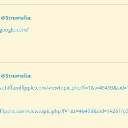
When I paste the url to https://www.google.com/ after a space, link is no good and get the diamonds. If I paste the very same url in a new line (after hitting 'enter' to line break) then all works fine.
image3.jpg image3.jpg - 23KB
Strumelia
@strumelia
02/12/17 04:25:43PM
3,605 posts

bad link when simply pasting an url into a post


Using Jamroom

Ok, I just tried it by copy/pasting the url to Google.com
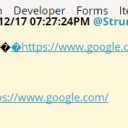
I got the same results- when pasting it after a space, I get the diamonds and the link goes nowhere. When pastin gthe same url after a line break, it works correctly. Screenshot:
Will try on Safari now....
image2.jpg image2.jpg - 52KB
  93