Forum Activity for @strumelia

Strumelia
@strumelia
02/07/17 09:21:20AM
3,605 posts

LOVE the new Profile Browser DISK SPACE tool!!


Using Jamroom

Oh wow, this new Jamroom feature is so GREAT!!!!
Now we can see and sort which of our site members are using the most disk space with their content!

Just discovered this in the recent updates.
Go to your Profile Browser (ACP>users>profile browser) or yoursite.com/profile/browser
There you'll see a new column called Disk Space which shows you how much space each profile is using up.
If you click right on the column title "disk Space", it'll SORT all your profiles based on their disk space usage- high to low or low to high- just click again to change that order.
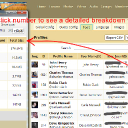
ALSO, if you then click on a particular Profile's disk space usage number, it'll pop out a window that breaks the usage down into categories of their content- for example you can see how much space they are using in just their photo galleries...or in just their videos. See the below SCREENSHOT...

This is terrific!!
See exactly who's been hogging more of your server space than they should ...you can go in and check it out or delete stuff if it's not needed or outdated. You can perhaps delete a long-inactive member who uploaded waaaay too much stuff 5 years ago and has never been back. (you can check their last login date in your User Account Browser first). Get rid of those 20 videos of their goldfish's birthday party from years ago, that you never noticed were there...that YOU have been hosting all this time.

Not sure if this feature only works for people on Jamroom Hosting plans or not. But if so, then it's another reason to opt to be on Jamroom servers!

OMG I just luuuuuv this! Thank you JR Team for giving us this new KOOL TOOL.
disk-usage.jpg disk-usage.jpg - 640KB

updated by @strumelia: 05/14/17 09:15:56AM

Strumelia
@strumelia
02/05/17 03:36:39PM
3,605 posts

Smiley/chat replacement string question


Using Jamroom

Thanks so much!

(every one need spaghetti smiley)
Strumelia
@strumelia
02/05/17 02:26:36PM
3,605 posts

Can i change the icon for chat?


Using Jamroom

Go to ACP>Developer>Developer Tools>Global Config>general settings>run in developer mode

The module is called jrDeveloper
updated by @strumelia: 02/05/17 02:27:57PM
Strumelia
@strumelia
02/05/17 12:58:34PM
3,605 posts

Smiley/chat replacement string question


Using Jamroom

It's only in my jrChat that there's a problem. The same smileys that are working fine on the rest of my site (via tinymce editor and 'smiley button'...in forum posts, comments, etc)...are not showing up properly in my jrChat.
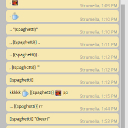
Here's a screenshot showing various probs with the smileys - I have about 200 msileys loaded in my Smileys module- almost all of which have strings using quotes, i.e. like: "(sadcat)".

See screenshot- at first the "(coffee)" smiley in chat didn't show- I changed the string to: [(coffee)] and it statred showing up ok in chat. I did the same for the "(bug)" smiley and it then shows up ok as [(bug)]. But I then did the same for the "(spaghetti)" smiley and it still won't show up right in chat no matter how much i clear the cache, restart browser, etc. I'm sort of stumped now. Your jr defualt smileys like for :D show up fine in chat btw.

Michael please note that I only have the jrChat active on my whistle site, not on FOTMD.com ... but it's the same Admin login.
chat-smileys.jpg chat-smileys.jpg - 294KB

updated by @strumelia: 02/05/17 12:59:49PM
Strumelia
@strumelia
02/05/17 10:47:47AM
3,605 posts

Smiley/chat replacement string question


Using Jamroom

I have about 200 custom smileys loaded in my Smiley module...which also get used in my jrChat program.

Almost all of them are .gifs with a replacement string surround of: "(____)"

All of these smileys have always worked fine this way in my site posts, comments, etc...in the tinymce editor by using the smiley button. However they are showing working properly when sued in my jrChat, using the smiley button there.
I CAN change all of these in a couple of hours or so manually to anything I need to, for example to the: [(___)] string which seems to work 'sometimes' in chat.. but that's not working consistently either, though better than "(_____)"

However, before I undertake changing the strings for all of them (on both my sites...400 gifs in all, yikes)....please correct me if I'm wrong, but I seem to recall(?) that you JrTeam had made an adjustment to the Chat feature that accommodated the "(___)" style for the gifs. I thought you had made it so it worked for the strings with quotation marks as well...?
But the "(____)" gifs are not working now in chat for some reason- i thought I had them all working fine in chat a few weeks ago. Maybe I'm not remembering correctly.

updated by @strumelia: 05/09/17 05:15:13AM
Strumelia
@strumelia
02/03/17 12:55:30PM
3,605 posts

Can i change the icon for chat?


Using Jamroom

Zach, just a tip- when you make a small change to your site (assuming you have NOT put it into Developer Mode first, which would show your changes immediately, but would also slow down your site if it's live)... then you only need to do the Reset Cache with all options checked in order to see your changes take effect. You don't have to do the whole Integrity Check for every little change. (though it's good to do that if you've made a bunch of changes) Reset Cache will make your last change show, and it's real quick. Occasionally you may have to also refresh your browser page to see the change as well.
Strumelia
@strumelia
02/03/17 11:12:25AM
3,605 posts

Can i change the icon for chat?


Using Jamroom

Zach, note that the default chat-open.png is 64 x 64 pixels in size. Did you make your custom .png too big?
Strumelia
@strumelia
02/03/17 11:07:12AM
3,605 posts

Sending Private Messages To Multiple Users


Using Jamroom

You're welcome!
You might want to create a couple of 'permanent' discussions on your private Mod Group, and ask your moderators/admins to 'follow' those discussions so they'll be notified of a new post in them. Note that we don't get notifications about new posts in the group Comment Wall- only about new posts in discussions we are following. If one 'follows' the whole group, I believe it only lets you know if a NEW discussion has been created.

I have one such 'permanent' discussion titled "Should We do Something about...?" -where mods can point out a possible problem with a member and ask if something should be done about it.
Another permanent discussion I have there is "I'm Be Away During..." -for mods to let us know if they will be away for some extended period of time.
Another one I titled "Site Issues and Questions" ...where the mods can ask how stuff works or reporting site glitches.

Every once in a while I clear out old outdated posts from those discussions. Or I just delete the old long ones and start new threads- and ask folks to now 'follow' the new one.

I have the private group set to not allow new members to apply. When I have a new moderator I temporarily open the group up to applicants and send them an invite. As soon as they join and get approved by me, I again close the group to applicants. It stays 'private' always however.
updated by @strumelia: 02/03/17 11:09:31AM
Strumelia
@strumelia
02/03/17 10:26:50AM
3,605 posts

Question about ad location


Using Jamroom

Perry, if I remember correctly, you use that jrDiscussion module on your site rather than a profile forum with jrForum...is that right? (it might be relevant here to know that.)
  95