JAMROOM

Text Formatters
Applies to: Jamroom 7.0+
Last verified: 2026-10-24
-
What text formatters do
Text formatters change how text written by members is shown. They turn BBCode into formatting, link
@profilenames, show embedded media, and so on. You turn them on or off per quota, so different kinds of members can be allowed different things. -
Where to set them
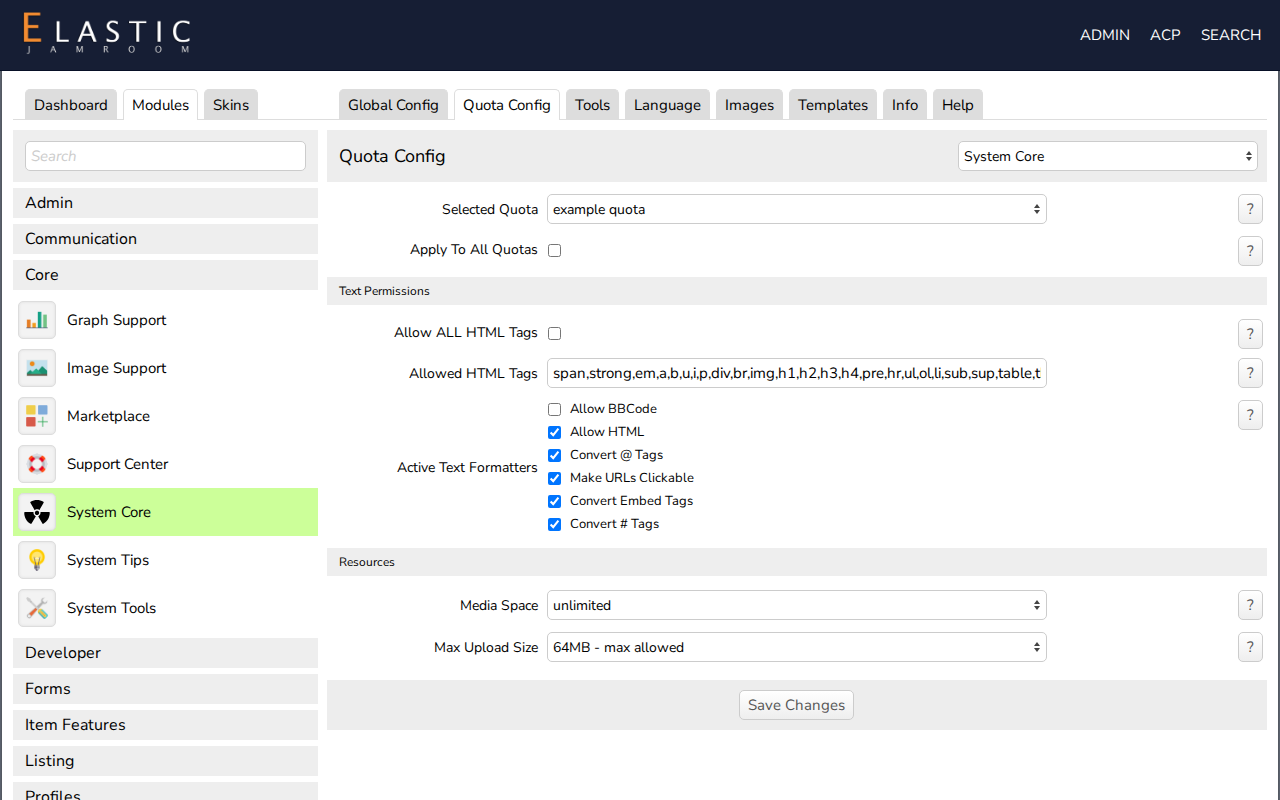
Open ACP > Modules > Core > System Core > Quota Config and choose the quota. In the Text Permissions section:
- Allow ALL HTML Tags: allows any HTML (only for quotas you trust).
- Allowed HTML Tags: the HTML tags allowed when Allow HTML is on.
- Active Text Formatters: the formatters for this quota.
-
-
The formatters
Jamroom Open Source has these:
Formatter If active Allow BBCode BBCode tags are turned into HTML. Allow HTML HTML tags listed in Allowed HTML Tags are allowed. Convert @ Tags @profile_namelinks to that profile.Make URLs Clickable Web addresses in the text become links. Convert Embed Tags Embed tags, such as [jrEmbed module="jrVideo" id="5"], show the embedded item (Editor Embedded Media module).Convert # Tags #taglinks to a search for that tag (Timeline module).Modules add more. For example:
Formatter Module If active Media URL Scanner Media URL Scanner Media addresses, such as a YouTube link, are replaced with a player. Allow Smileys Smiley Support Smiley text patterns are replaced with smiley images. Validate iframes iFrame Control iframeaddresses are checked against the allowed domains.