JAMROOM

Translate Jamroom into Another Language
Applies to: Jamroom 7.0+
Last verified: 2026-10-24
Table of Contents:
How languages work
1. Create the language
2. Translate the strings
3. Set the default language
Language links in your skin
Flag images
-
How languages work
Every module and skin keeps its own text, its language strings. A language is a full set of those strings. Jamroom comes with English (en-US). To add a language, you copy English and translate the copy.
-
1. Create the language
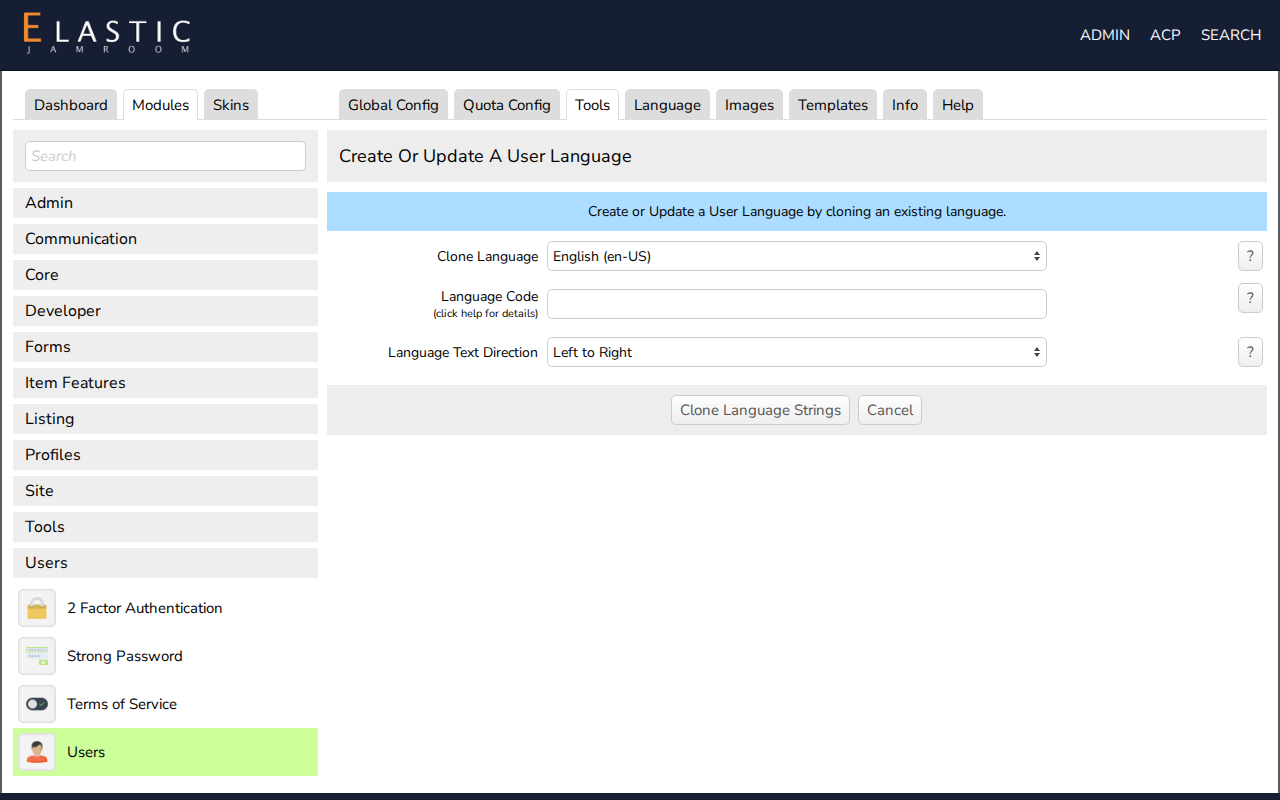
Open ACP > Modules > Users > Users > Tools > Create a Language:
- Clone Language: the language to copy, usually English (en-US).
- Language Code: the new language's code, such as
es-ESorfr-FR. - Language Text Direction: Left to Right or Right to Left.
Click clone language strings.
-
-
2. Translate the strings
Open the Language tab of a module, choose your new language in the Language list, translate the strings and save. Do the same for each module your site uses, and for your skin (ACP > Skins > (your skin) > Language).
There's no single file with every string: each module and skin has its own Language tab.
-
Export Language Strings and Import Language Strings (in the same Tools tab) move a language between sites, or let a translator work offline. Reset Language Strings restores a module's or skin's original strings.
-
3. Set the default language
Choose Default Language in ACP > Modules > Users > Users > Global Config, in the Account section. New members get this language. Each member can change their own in their Account Settings.
-
Language links in your skin
To let visitors switch language with a link, add
?set_user_language=and the language code to any page address. For example, in a skin template:
<a href="?set_user_language=es-ES">Español</a> <a href="?set_user_language=en-US">English</a> -
Flag images
A set of flag images you can use for language links. Put them in your skin's
imgdirectory.