JAMROOM

Following, Timeline and Notifications
Applies to: Jamroom 7.0+
Last verified: 2026-10-24
-
Following
To follow a profile, visit it and click Follow. The button changes to Following. If that profile approves its followers, your request shows as pending until they do, and you're notified then.
New posts from the profiles you follow appear in your timeline. Profiles You Follow, in your user menu, lists them.
To stop following, click Following on the profile, and confirm.
-
Your timeline
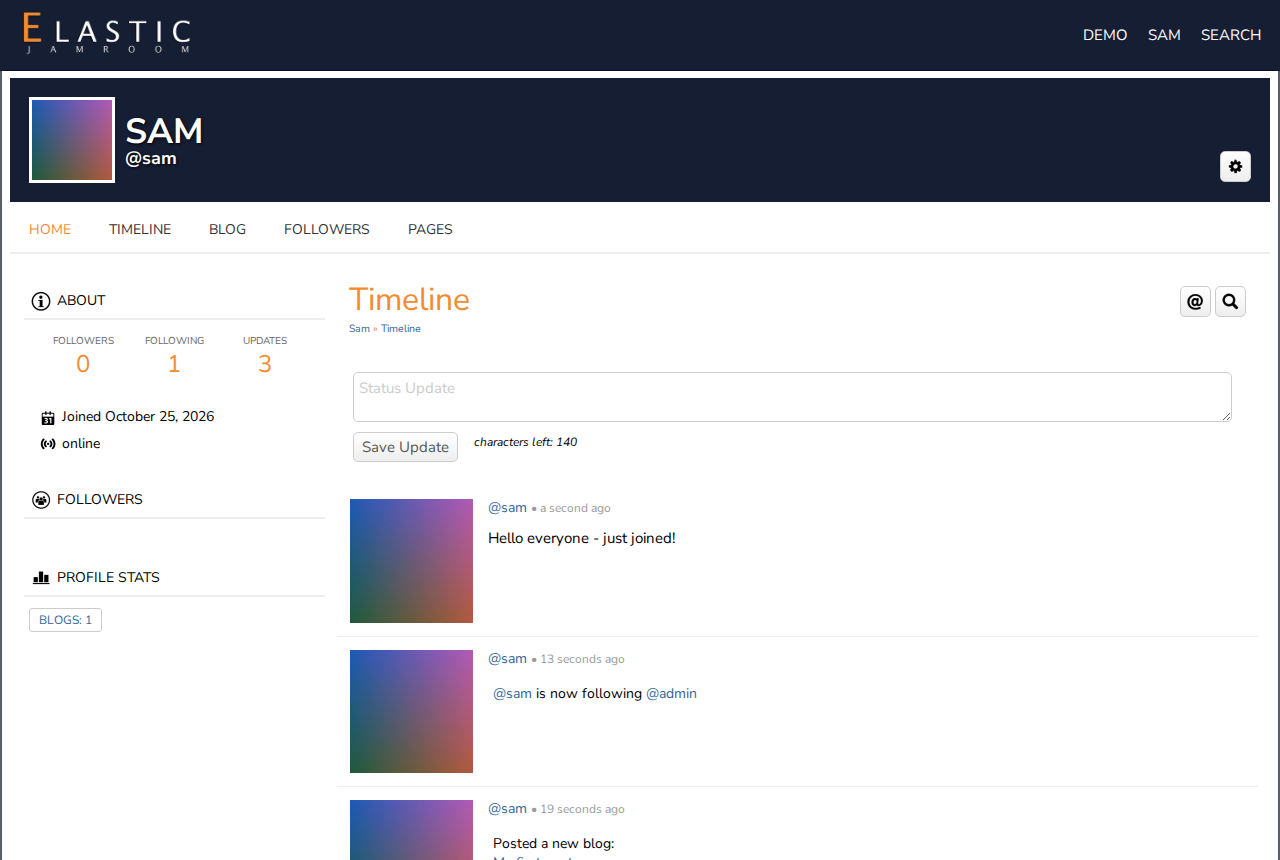
The Timeline on your profile shows what you do on the site: new items, profiles you follow, and status updates.
To write a status update, type in the Status Update box on your timeline, and click Save Update. Updates are short: 140 characters on most sites. Mention someone with
@and their profile name, such as@admin, and they're notified.Your followers see your updates and new items in their timeline. You see theirs in yours.
-
-
Notifications
Some things on the site send you a notification: a new follower, a mention, an approved item, and so on. Choose which ones on the Notifications tab of Account Settings:
- For each event, choose Send Email or Do Not Notify. Some sites also offer Send Private Note.
- Disable All Notifications turns them all off.
Which events are listed depends on the site's features.
-
Who sees who you follow
Share Who You Follow, on the Account tab of Account Settings, lets others see the profiles you follow. Uncheck it to keep that private.