JAMROOM

Self Hosted or Jamroom Hosted
Applies to: Jamroom 7.0+
Last verified: 2026-10-24
Table of Contents:
Two ways to run Jamroom
Jamroom Hosted: the easiest way to get started
Self hosted: you need a web server
Recommended: a domain name
-
Two ways to run Jamroom
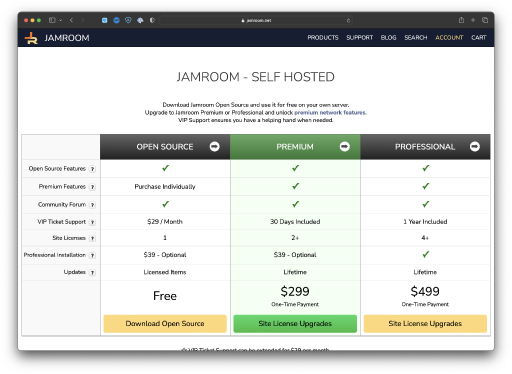
Jamroom runs on a web server. You can use a Jamroom Hosted server, which is set up and maintained for you, or install Jamroom on a server of your own (self hosted). The software is the same either way.
-
Jamroom Hosted: the easiest way to get started
With Jamroom Hosted you don't install anything or look after a server. You create a server from your jamroom.net account, and Jamroom is installed on it for you.
Choose Jamroom Hosted if you haven't run a web server before, or don't want to keep one up to date.
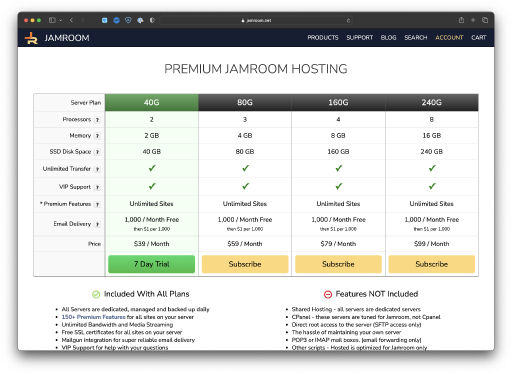
See the Jamroom Hosting plans for what each plan includes. The Jamroom Hosting chapter covers creating your server and domain.
-
Self hosted: you need a web server
To host Jamroom yourself you need a web hosting account or a server that meets the Server Requirements: Linux, Apache or Nginx, PHP 7.2 or newer and a MySQL or MariaDB database.
You install Jamroom by uploading its files and running the installer, as described in Installing Jamroom. Many hosting control panels can also install it for you through Softaculous.
-
Recommended: a domain name
Jamroom doesn't strictly need a domain name, but your members will. Use a domain you already own, or register a new one.
If you are looking for a domain registrar, we recommend Namecheap.
-
TIP: Register your domain with a domain registrar, not with your hosting provider. If you move to another host later, a registrar makes moving the domain easy.