JAMROOM

Maintenance Mode
Applies to: Jamroom 7.0+
Last verified: 2026-10-24
-
What it does
Maintenance Mode closes your site to everyone except admins while you work on it: during an upgrade, a big change, or before the site opens.
While it's on:
- visitors and members see your Maintenance Message instead of the site
- members who are logged in are logged out
- the login page says only site admins can log in while the site is in maintenance mode
Admins and master admins can log in and use the site as normal.
-
Turn it on or off
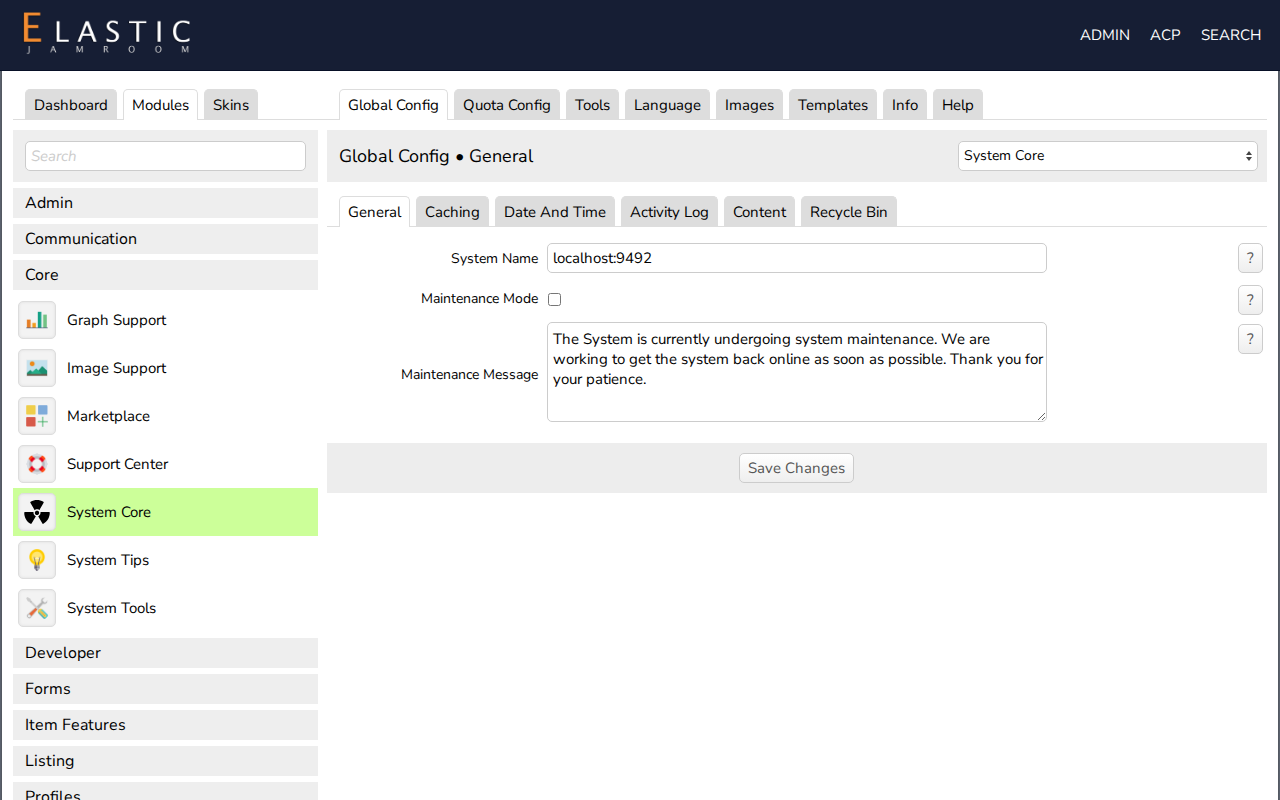
- Open ACP > Modules > Core > System Core > Global Config. The General section opens first.
- Check Maintenance Mode. Uncheck it to open the site again.
- Change the Maintenance Message if you like. The default is The System is currently undergoing system maintenance. We are working to get the system back online as soon as possible. Thank you for your patience.
- Click Save Changes.
-
-
To let your members in while keeping everyone else out, look at the Beta Launch Page module instead.