JAMROOM

Server Requirements
Applies to: Jamroom 7.0+
Last verified: 2026-10-24
Table of Contents:
Summary
PHP
Database
Web server
Media tools
What the System Check shows
Sample Nginx configuration
-
Summary
Required Recommended Operating system Linux Web server Apache 2.4 with mod_rewriteand.htaccessfiles allowed, or Nginx with PHP-FPMApache PHP 7.2 or newer PHP 8 Database MySQL 5.7 or newer MySQL 8 or MariaDB 10.1+ PHP memory cache APCu You don't have to check these by hand. The installer refuses to run when something required is missing and says what it is. After you install, the System Check shows a line for each item (see Create the Admin Account).
-
Jamroom does not run on Windows servers.
-
PHP
Jamroom needs PHP 7.2 or newer. It is tested with PHP 8.3.
These PHP functions must be available, and the installer checks each one:
mysqli: the MySQL improved extensionjson_encodeandjson_decodecurl_init: the cURL extensiongd_info: the GD image extensionmb_internal_encoding: the multibyte string extension (mbstring)session_start,ob_startandob_end_cleansystem: Jamroom runs its media tools (image and audio/video conversion) and some background work through it. Some hosts disable it, so check with yours.
The intl extension is recommended: Jamroom uses it to make page addresses from titles in other languages. The installer of the next Jamroom release (7.1) requires it.
Also check these PHP settings:
- Upload size:
upload_max_filesizeandpost_max_sizelimit the largest file your members can upload. The System Check shows the current limit as Max Upload. - APCu: an in-memory cache that makes Jamroom faster. The System Check lists it as Memory Cache.
-
Database
Jamroom needs MySQL 5.7 or newer. MySQL 8 or MariaDB 10.1 and newer are recommended.
Create an empty database and a database user with full rights on it before you install. You'll need the database name, user name and password in the installer.
-
Web server
Apache (recommended): Jamroom ships with a
.htaccessfile in its main directory, plus more indata/. These turn on clean URLs withmod_rewriteand keep private directories, such asdata/configanddata/logs, out of reach of browsers. So:mod_rewritemust be enabled.- The server must allow
.htaccessfiles (AllowOverride All). - Upload the
.htaccessfiles with the rest. Some FTP clients hide files whose name starts with a dot.
Nginx: Nginx doesn't read
.htaccessfiles, so the same rules go in your Nginx server block (see the sample below). -
Media tools
Jamroom comes with its own command-line tools in
modules/jrSystemTools/tools/, used for images, audio and video:convertffmpegid3v2jpegoptimsoxtifigwget
They must be executable. The Jamroom Open Source ZIP doesn't keep the execute permission, but Jamroom sets it itself the first time it uses a tool. That works when the files belong to the same user PHP runs as, which is usual on shared hosting. If they belong to another user, Jamroom can't change them, and the System Check says binary is not executable. Then set the permission yourself: in your FTP client use permissions or chmod and choose 755. Over SSH, run:
cd /path/to/jamroom/modules/jrSystemTools/tools
chmod 755 convert ffmpeg id3v2 jpegoptim sox tifig wget
-
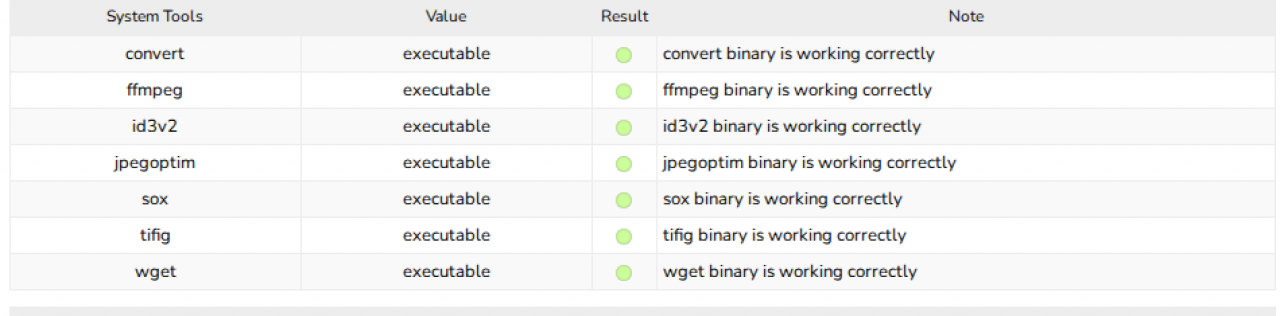
What the System Check shows
The System Tools part of the System Check when the tools are executable: every tool reports binary is working correctly.
-
-
Sample Nginx configuration
The server block below has the same rules as Jamroom's
.htaccessfiles. Changeserver_name,rootand the PHP-FPM socket infastcgi_pass(both places) for your server, then runnginx -tand reload Nginx.client_max_body_sizemust be at least PHP'spost_max_size. Otherwise uploads fail with error 413.
server {
    listen 80;
    server_name example.com www.example.com;

    # Directory Jamroom is installed in
    root /var/www/jamroom;
    index modules/jrCore/router.php;

    client_max_body_size 512m;
    etag off;
    add_header X-Content-Type-Options nosniff always;
    add_header X-XSS-Protection "1; mode=block" always;
    gzip on;
    gzip_types text/plain text/css text/xml text/javascript application/javascript application/json;
    autoindex off;
    absolute_redirect off;

    # Private files
    location ^~ /data/config/  { return 404; }
    location ^~ /data/logs/    { return 404; }
    location ^~ /data/domains/ { return 404; }
    location ^~ /data/media/0/0/ { try_files $uri =404; }
    location ^~ /data/media/     { return 404; }
    location ~* ^/data/.*\.php$ { return 404; }
    location ~* ^/(modules|skins)/.*\.tpl$ { return 404; }
    location ~* ^/modules/[^/]+/tests/    { return 404; }
    location ~ /\.(?!well-known/) { return 404; }

    # PHP: Jamroom only needs the router and the installer
    location = /modules/jrCore/router.php {
        include fastcgi_params;
        fastcgi_param SCRIPT_FILENAME $document_root$fastcgi_script_name;
        fastcgi_pass  unix:/run/php/php8.3-fpm.sock;
        fastcgi_read_timeout 300s;
    }
    location = /install.php {
        include fastcgi_params;
        fastcgi_param SCRIPT_FILENAME $document_root$fastcgi_script_name;
        fastcgi_pass  unix:/run/php/php8.3-fpm.sock;
        fastcgi_read_timeout 300s;
    }
    location ~ \.php$ { return 404; }

    # Everything that is not a real file goes to the Jamroom router
    location / {
        try_files $uri $uri/ @jamroom;
    }
    location @jamroom {
        rewrite ^/(.*)$ /modules/jrCore/router.php?_uri=$1 last;
    }
}